
Counting the digits that actually matter
Significant figures are the digits in a measured number that carry real meaning. Getting them wrong turns a careful lab result into a guess, and getting them right means knowing which zeros count, how to round without losing truth, and when scientific notation saves you from ambiguity. This article walks through every rule, shows where the common mistakes hide, and explains how the calculator on this page handles cases that catch even experienced students.
Why zeros cause all the trouble
The idea behind significant figures is simple enough: only write down digits you actually measured. If a scale reads 4.50 grams, the trailing zero says the scale can see hundredths, not that someone felt like adding decoration. Drop that zero and you have 4.5, which looks the same on a calculator screen but tells anyone reading it that you only measured to tenths.
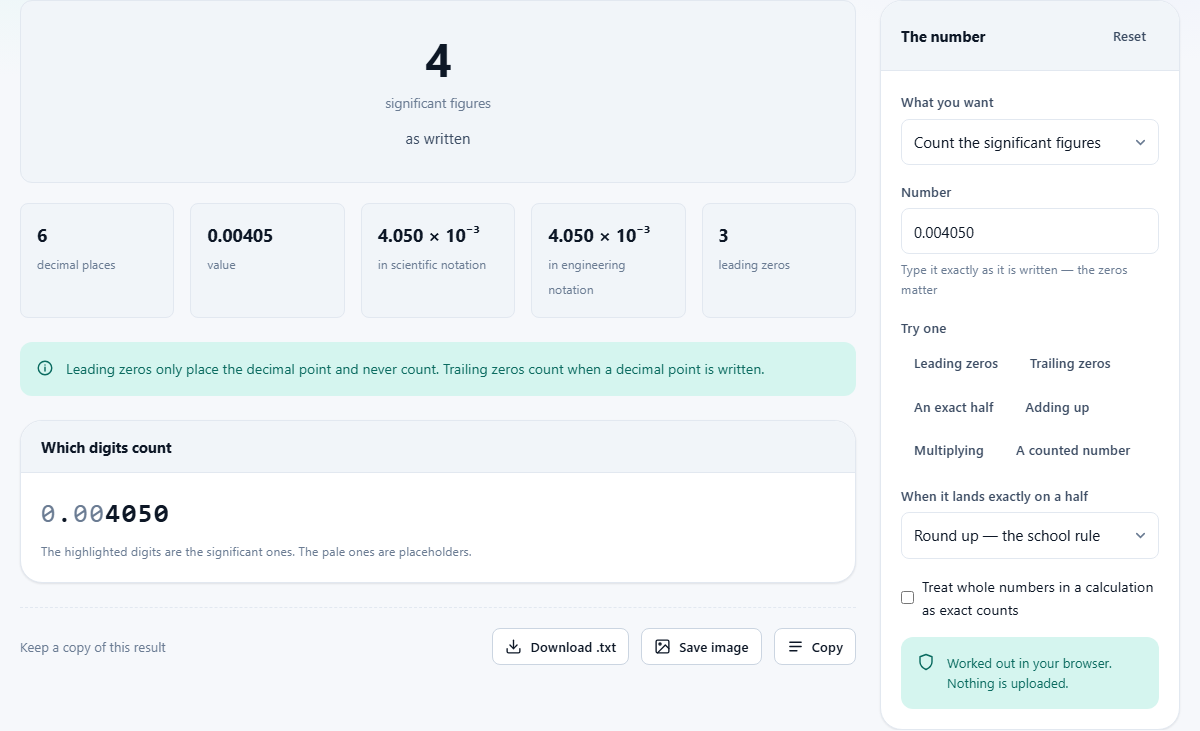
Leading zeros are the other side of the coin. In 0.004050, the three zeros after the decimal point are just place markers. They push the digits into the right column but they say nothing about precision. The figures that count here are the 4, the 0, the 5 and the final 0, giving four significant figures in total. Swap in 0.00405 and you have three, because that last zero is gone and so is the claim it made.
This is exactly why the calculator on this page works on your typed text rather than the number it represents. To a computer, 0.05000 and 0.05 are the same value. To a scientist or a student, they are a four-figure measurement and a one-figure measurement, and a tool that cannot tell them apart is the wrong tool for the job.
The ambiguous middle: whole numbers with trailing zeros
Write 4500 and nobody can tell from the number alone whether you mean two figures, three or four. Did you measure to the nearest thousand, the nearest hundred or the exact unit? There is no decimal point to settle it, and rounding rules cannot help because they do not know which meaning you intended.
The calculator flags this case. It shows all the possible readings and tells you how to write each one without any doubt. Scientific notation is the cleanest fix: 4.5 times ten to the third power is two figures, 4.50 times ten to the third is three, and 4.500 times ten to the third is four. Each version carries its own precision inside the way it is written, and no reader has to guess.
Rounding to a set number of figures
Rounding to significant figures follows a slightly different path from rounding to decimal places, and mixing the two up is the single most common mistake in this subject. When you round 0.004050 to two significant figures, you keep the 4 and the 0, giving 0.0041. The leading zeros stay because they are place markers, not figures. Rounding the same number to two decimal places gives 0.00, which is a completely different answer to a completely different question.
The page lets you choose either operation from the dropdown labelled What you want. Pick round to a number of significant figures and set the count, or pick round to a number of decimal places. The result appears immediately along with the same answer expressed in both scientific and engineering notation, so you can cross-check the form your textbook expects.
Scientific notation and engineering notation side by side
Scientific notation puts exactly one digit in front of the decimal point and adjusts the power of ten to match. It is compact, it removes trailing-zero ambiguity, and it is the standard form in most science writing. Engineering notation does almost the same thing but keeps the power of ten as a multiple of three, so the numbers line up with the prefixes people actually say: kilo, mega, milli, micro.
Both modes are available in the dropdown. Type a number and the page rewrites it in whichever form you pick, showing the exponent, the mantissa and the number of significant figures it carries. If you already have a number in scientific notation and want the plain version, type it in and read it off the result card.
Carrying precision through a whole calculation
A single number is straightforward. The hard part is a chain of operations, because adding and multiplying follow different precision rules and almost every textbook problem mixes them. When you add or subtract, the answer keeps the smallest number of decimal places found in any input. When you multiply or divide, the answer keeps the smallest number of significant figures. These two rules look similar in a textbook but they do very different things in practice.
Select the calculation option from the dropdown and type an expression such as 12.11 + 18.0 + 1.013. The page evaluates every step, tracks which rule applies at each one, and rounds only at the end. That last point is worth stressing: nothing is rounded on the way through. Each step records how precise it is allowed to be, and the rounding happens once when the final answer is produced. Rounding at every intermediate step drifts the answer further from the truth each time, and this is the second most common mistake students make after mixing up the two rounding rules.
Exact numbers and the exclamation mark
Some numbers in a calculation are not measurements at all. Twelve eggs is exactly twelve, not twelve plus or minus half an egg. One inch is exactly 2.54 centimetres by definition, not by measurement. Numbers like these have infinite precision and should never be the thing that limits your answer.
In the calculation box, put an exclamation mark after any number you want treated as exact. Type 3.75 * 12! and the twelve is ignored when deciding how many figures the answer gets. Without the mark, the tool would treat twelve as having two significant figures and cut the answer to match. There is also a checkbox labelled Treat whole numbers in a calculation as exact counts, which applies the same logic to every integer in the expression at once.
The half-round trap and why 1.005 behaves differently here
Ask a spreadsheet or a programming language to round 1.005 to two decimal places and it almost always gives 1.00. The reason is that the nearest value a computer can store to 1.005 is a tiny fraction below it, so rounding down is correct for the stored value even though it is wrong for the written one. This is not a bug in the computer; it is a consequence of how floating-point storage works.
This calculator sidesteps the problem entirely. It carries your digits as text, never converting them into a stored floating-point number, so a value sitting exactly on a half rounds the way the rule says it should. The dropdown labelled When it lands exactly on a half offers two choices: the school rule, which always rounds up, and the statistical rule, which rounds to the nearest even digit. Both are legitimate; the difference is whether you are in a classroom or a lab.
Quick examples to try
A row of sample buttons sits below the input fields, and each one loads a case worth understanding.
- Leading zeros loads 0.004050 and counts its figures, showing that the front zeros are invisible to the count while the trailing zero is not.
- Trailing zeros loads 4500 and explains the ambiguity, listing every possible reading and how to write each one clearly.
- An exact half loads 1.005 and rounds it, demonstrating the floating-point trap described above.
- Adding up loads a sum of three numbers with different decimal places, so you can see the addition rule at work.
- Multiplying loads a product of two numbers with different figure counts, showing the multiplication rule.
- A counted number loads a multiplication that includes an exact count, marked with an exclamation mark, so the exact number does not limit the result.
Where this fits in a wider workflow
Significant figures are not a topic in isolation. They are the bridge between a raw measurement and a reported answer, and getting the bridge wrong undermines everything on the far side. A lab report that quotes a density to six decimal places from a ruler that reads to the nearest millimetre is not being precise; it is making a claim the equipment cannot support.
Use this page to check your own working, to settle arguments about whether a particular zero counts, and to see what happens to precision as a calculation moves through several steps. The step-by-step table the calculation mode produces is especially useful here, because it shows exactly where each figure of precision is gained or lost.
Private by design
Every operation described above runs inside your own browser. Your numbers are never sent to a server, stored in a database or visible to anyone else. You can confirm this by disconnecting from the internet and watching the page carry on working. There is no account, no login and no upload at any point.