
Comparing two lists with set operations
This article walks through the set operations calculator, what each output block means, why showing both differences matters, how the similarity score works, and where to watch out for case, duplicates and the limits of the power set.
What the tool does with two lists
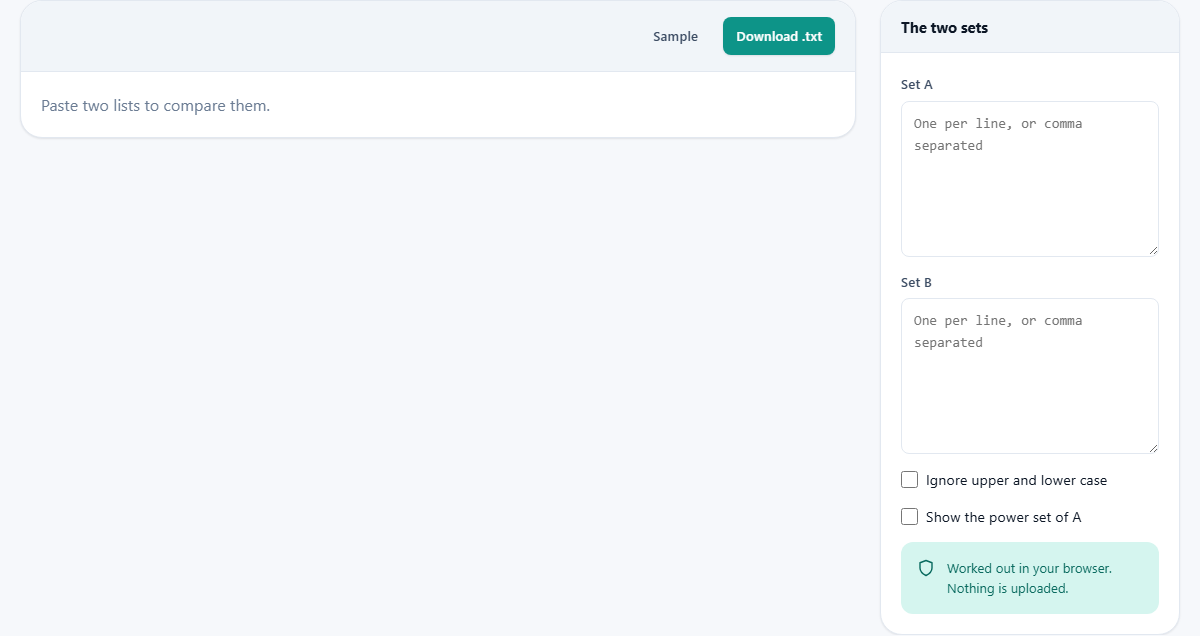
Paste two lists into the Set A and Set B text boxes on the right side of the page and the results appear instantly. Each list can be typed one item per line, or with items separated by commas. The calculator strips duplicates, treats what remains as a mathematical set, and runs every standard operation on the pair.
The output is a series of labeled blocks, each showing the items that belong to that particular result and how many there are. Below the blocks sits a summary that names the relationship in plain words: subset, superset, equal, disjoint, or partially overlapping.
The whole page updates live as you type or paste. There is no button to press. Change one item in either list and every block recalculates on the spot.
Union, intersection and why both are shown first
The union is every item that appears in either list, counted once. If Set A has apples, bananas and cherries, and Set B has bananas, dates and figs, the union is all five: apples, bananas, cherries, dates and figs.
The intersection is only the items that appear in both. In the example above, bananas is the only member of the intersection.
Together these two answers frame the overlap. If the intersection is empty, the lists have nothing in common. If the union is the same size as one of the sets, the other is a subset of it. Most real pairs fall somewhere in between, and the sizes of the union and intersection tell you exactly where.
The two differences and why both directions matter
The difference A minus B contains everything in A that is not in B. The difference B minus A contains everything in B that is not in A. These are not the same set, and that is the trap the calculator guards against.
If someone asks for the difference between two lists and you give them only one direction, the answer looks correct but it is incomplete. Items unique to the second list are invisible. The calculator shows both side by side, with their sizes, so neither direction is lost.
The symmetric difference is everything that appears in exactly one of the two sets. It is the union of the two one-way differences, or equivalently, the union minus the intersection. It answers the question: what is in one list but not in both?
Similarity and the Jaccard index
The similarity percentage is the Jaccard index. It divides the size of the intersection by the size of the union and multiplies by a hundred. If two sets are identical, every item is in both the intersection and the union, so the score is one hundred per cent. If they share nothing, the intersection is empty and the score is zero.
This is a useful single number when you want to know how alike two lists are without examining every item. A score above eighty or ninety per cent means the lists are almost the same with a few exceptions. A score below ten per cent means they are mostly different collections that happen to share a couple of entries.
The Jaccard index does not care about the size of the sets. Two lists of five items sharing three will score higher than two lists of fifty sharing ten, even though the second pair shares more items in total. It measures the proportion of overlap, not the amount.
Other similarity measures exist, but the Jaccard index is the simplest to read and the hardest to misinterpret. A score of fifty per cent means exactly half of the combined collection is shared. There is no weighting, no adjustment, and no way for list order to affect it.
Case, whitespace and duplicates
By default, case matters. The word Apple and the word apple are treated as different items. This is usually what you want, because in most data sets the two really are different records. If you need to ignore case, tick the Ignore upper and lower case checkbox.
Leading and trailing spaces on each line are trimmed automatically. Spaces inside an item are kept, so a city name like New York stays as one item rather than being split into two.
If your list has duplicates, the calculator removes them and tells you how many it found. A list that was supposed to contain unique items but does not is often the real discovery, so the count is shown rather than hidden. Cleaning duplicates before running the comparison is part of the value, and it saves you a separate step.
The power set and its rapid growth
Tick Show the power set of A and the calculator lists every possible subset of Set A, including the empty set and A itself. For a set of three items there are eight subsets. For a set of five there are thirty-two.
The size of the power set doubles with every item added. A set of ten has one thousand and twenty-four subsets. A set of twelve has four thousand and ninety-six. Beyond twelve items the calculator declines, because the list would be too long to be useful and the computation grows large enough to slow the page.
The power set is a concept from pure mathematics and from combinatorics. It is rarely needed in everyday list comparison, but it is valuable when you need to enumerate all possible groupings of a small collection, for example when testing combinations.
Subset and superset relationships
The summary line at the top states the relationship in words. If every item in A is also in B, then A is a subset of B. If every item in B is also in A, then B is a subset of A, which means A is a superset of B. If both are true, the sets are equal. If the intersection is empty, they are disjoint.
Knowing the relationship before you look at the individual items saves time. If A is a subset of B, there is no point searching for items in A that are missing from B, because there are none. The difference A minus B is empty by definition.
In practice, subset checks are useful when validating that a short list is fully covered by a longer one. A list of required fields against a list of fields in a form. A list of invited guests against a list of people who replied. The calculator tells you which items are missing, if any.
When neither set is a subset of the other, the relationship is stated as partially overlapping, and the two one-way differences list exactly which items are exclusive to each side. That is usually the information you came for.
Downloading the results and working with more than two lists
The Download .txt button saves the complete output as a plain text file. Each operation is listed with its name, its item count, and the items themselves. This is useful when you need to paste the result into a report or feed it into another tool.
The calculator compares two sets at a time. If you need to compare three, run two of them first, copy the result you need, and paste it into one of the text boxes as the input for a second comparison. Union and intersection are associative, so the order in which you combine them does not change the final answer.
Press the Sample button to load a pair of example sets. It is a quick way to see the layout before you paste your own data.
Privacy and processing
Everything is computed on your own device. The lists you paste are never sent to a server. There is no account, no upload, and no copy stored anywhere outside your browser. Once you close the tab, the data is gone.
This matters when the lists contain names, email addresses, product codes or anything else that should not leave your machine. The calculation is simple enough that it runs instantly even for lists of several thousand items, and the page works without a network connection once it has loaded.