
Choosing a sample size that does not waste your time or your data
This article explains what the sample size calculator does for surveys and for A/B tests, how each setting shapes the answer, why the number you pick before you start is the one that keeps the result honest, and what the common traps are.
The problem it solves
You want to run a survey and need to know how many responses are enough. Or you want to test a change on your website and need to know how many visitors each version requires before you can trust the result. Both questions are about the same thing: how large a sample makes the conclusion reliable.
Too few responses and the margin of error swallows the finding. Too many and you spend weeks collecting data you did not need. The calculator gives you a number to aim for, based on the precision you ask for, so you can plan the work before it begins.
Survey mode and the controls it uses
Set the Type dropdown to A survey and three fields matter most. Margin of error is the range you are willing to accept on either side of the true answer, entered as a percentage. Three per cent is a common choice. That means if half of all people agree with a statement, your survey result will land between forty-seven and fifty-three per cent.
Expected proportion is your best guess at what the real answer is. Fifty per cent gives the largest and therefore safest sample size, because that is where the spread of possible answers is widest. If you already have a good reason to believe the answer is closer to ten or ninety per cent, you can enter that and the required sample drops.
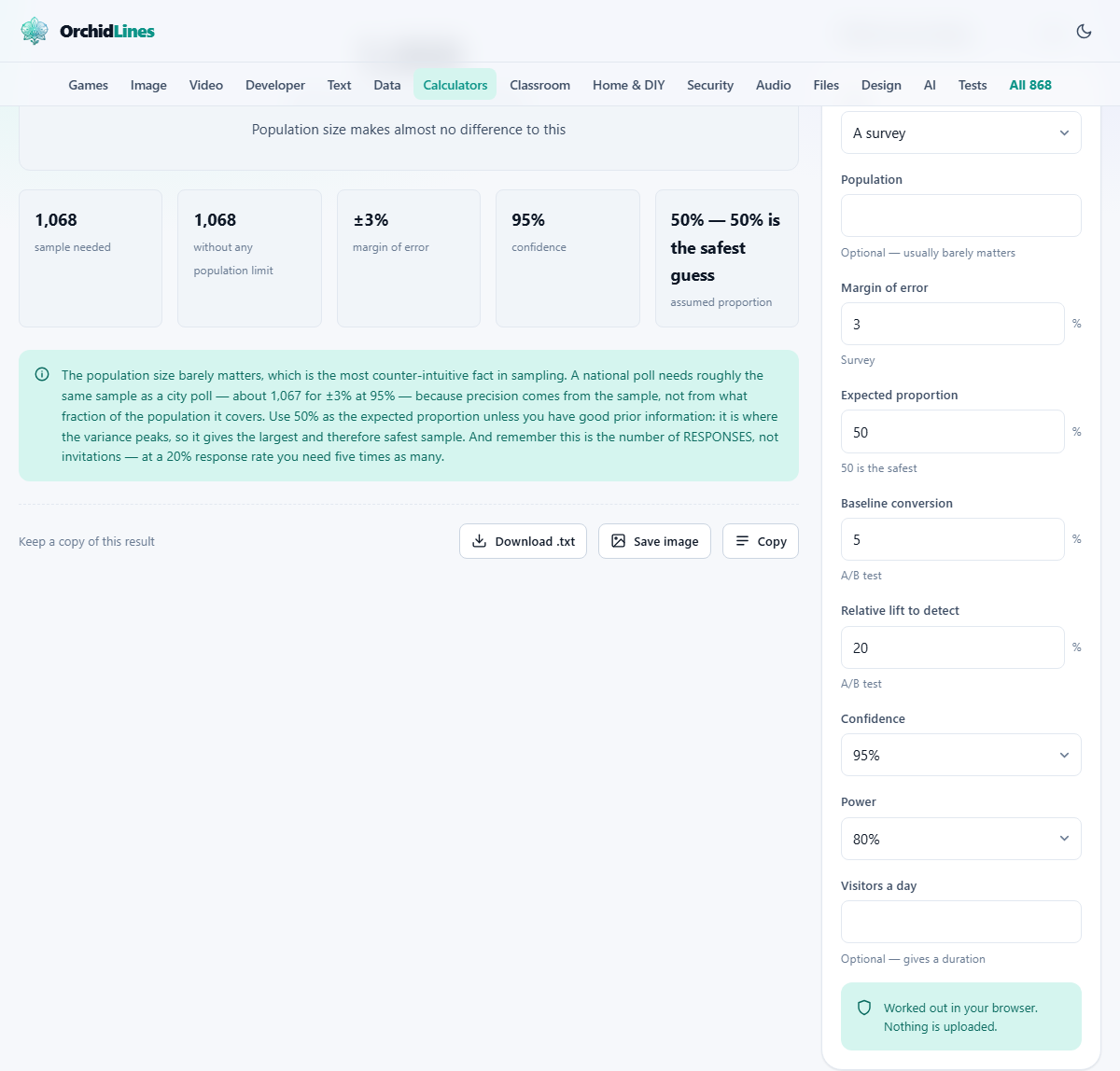
Population is usually optional. A city of three hundred thousand and a country of three hundred million need almost the same number of responses to hit the same margin. The sample does almost all the work. Population only matters when it is small, say a few hundred, because then the correction is noticeable.
Confidence is how sure you want to be that the true answer falls inside your margin. Ninety-five per cent is the standard choice. Ninety is less demanding and needs fewer responses. Ninety-nine is stricter and needs more.
A/B test mode and what changes
Switch the Type dropdown to An A/B test and a different set of fields starts counting. Nothing is hidden when you switch, so the whole panel stays on screen; the survey boxes are simply ignored from that point on. Baseline conversion is the current rate you are starting from, such as five per cent of visitors buying something. Relative lift to detect is how much of an improvement would be worth knowing about, stated as a fraction of the baseline. A twenty per cent lift on a five per cent baseline means you want to catch a move from five to six per cent.
Power joins confidence as the second statistical guard. Confidence protects you from calling something real when it is not. Power protects you from missing something real when it is. Eighty per cent is the usual choice, meaning you accept a one-in-five chance of missing a genuine effect.
Visitors a day is optional but useful. If you know your daily traffic the calculator can tell you how many days the test needs to run, which is often the figure that decides whether a test is worth starting at all.
Why the number must come before the data
There is a reason every textbook says to fix the sample size in advance. If you peek at the results as they come in and stop as soon as they look good, you are more likely to stop on a lucky streak than on the truth. The p value only means what it claims to mean when the sample size was decided before the first response arrived.
This is easy to get wrong in practice because partial results are tempting. A test that looks like a clear winner after three days may look like nothing at all after seven. Stopping early is the single most common way to turn a fair test into a misleading one.
The calculator gives you a fixed target. Collect that many and then look. If you cannot afford the number it shows, that is useful information too. It means the effect you want to detect is too small for the traffic you have, and running the test anyway would not settle the question.
The relationship between precision and cost
Tightening the margin of error from five per cent to three per cent nearly triples the required sample. Going from three to one per cent increases it roughly nine times. Precision is expensive, and the cost grows as a square.
The same pattern holds for A/B tests. If you want to detect a one per cent lift instead of two, you need four times as many visitors, not twice as many. This is the reason most tests target a meaningful lift rather than a tiny one. A small effect might be real, but proving it takes more traffic than most sites have.
Raising confidence from ninety-five to ninety-nine per cent also increases the count, though less dramatically. And raising power from eighty to ninety per cent adds about a third more visitors. Each dial has a price, and the calculator lets you see it before you commit.
Population size: the surprise that barely matters
People often assume that polling a country of fifty million requires an enormous sample, far larger than polling a town of fifty thousand. In practice the difference is almost nothing. Around one thousand and seventy responses give a plus-or-minus three per cent margin at ninety-five per cent confidence, regardless of whether the population behind them is a few hundred thousand or several hundred million.
The reason is that precision comes from the sample itself, not from the fraction of the population it covers. The finite population correction only kicks in when the sample is a large share of the total, which is why it matters for a workplace survey of two hundred people but not for a national poll.
The calculator lets you enter a population if you have one. For most uses, leaving it blank changes the answer by fewer than a dozen responses.
Running for whole weeks and other practical advice
Even if the sample arrives in four days, let the test run for a full seven. Weekday visitors and weekend visitors often behave differently, and a sample that covers only the busy days is not representative of the full week.
For surveys, remember that sample size means completed responses, not invitations sent. If your response rate is twenty per cent, you need to invite five times the number the calculator shows.
Do not test more than two variants without adjusting for multiple comparisons. The calculator sizes a two-way test. Adding a third or fourth variant raises the chance of a false positive unless you correct for it, and correction means even more traffic.
Reading the output and acting on it
The result panel leads with the required sample per group, and lists the settings that produced it underneath so you can see what the number rests on. For a survey that is one group. For an A/B test it is the count per variant, and the total, twice that, is printed beside the headline rather than left for you to work out.
If you entered visitors a day, a duration appears as well. That is the minimum run time, and rounding up to whole weeks is good practice for the reasons above.
Once you have the number, write it down and treat it as a commitment. Collect exactly that many, then analyse. The temptation to stop early or extend until the result looks better is the one thing that breaks an otherwise solid design.
Everything stays on your device
The entire calculation runs in your browser. No data is sent to a server, and there is no account. Your inputs are not stored or tracked. Close the tab and everything is gone.
This is a small point for a statistics tool, since the numbers going in are not especially sensitive. But it means the page works without a connection once it has loaded, and it means there is no queue or rate limit. Run it as many times as you like while you experiment with the different settings and see how each one shifts the answer.