
Comparing job offers by what each hour actually pays you
This article walks through how the salary calculator turns a headline pay figure into every other period, why the per-hour number matters more than the annual one, and how leave, overtime and deductions change the picture you see.
Why the headline number hides a lot
A job advert says seventy thousand a year. Another says thirty-five an hour. A third quotes five thousand a month. Each sounds like a different kind of money, but they might all be the same job. The trouble is that you cannot tell until every figure sits on the same line.
Even when two offers both quote a yearly figure, the comparison is not finished. One might expect thirty-five hours a week and offer thirty days of leave. The other might expect fifty hours and give fifteen. The annual pay is identical. The price of every hour you hand over is not. The first job asks for one thousand six hundred and ten hours a year. The second asks for two thousand four hundred and fifty. That makes the first worth about fifty-two per cent more for every hour of your time, and the pay slip will never show it.
What goes in and what comes out
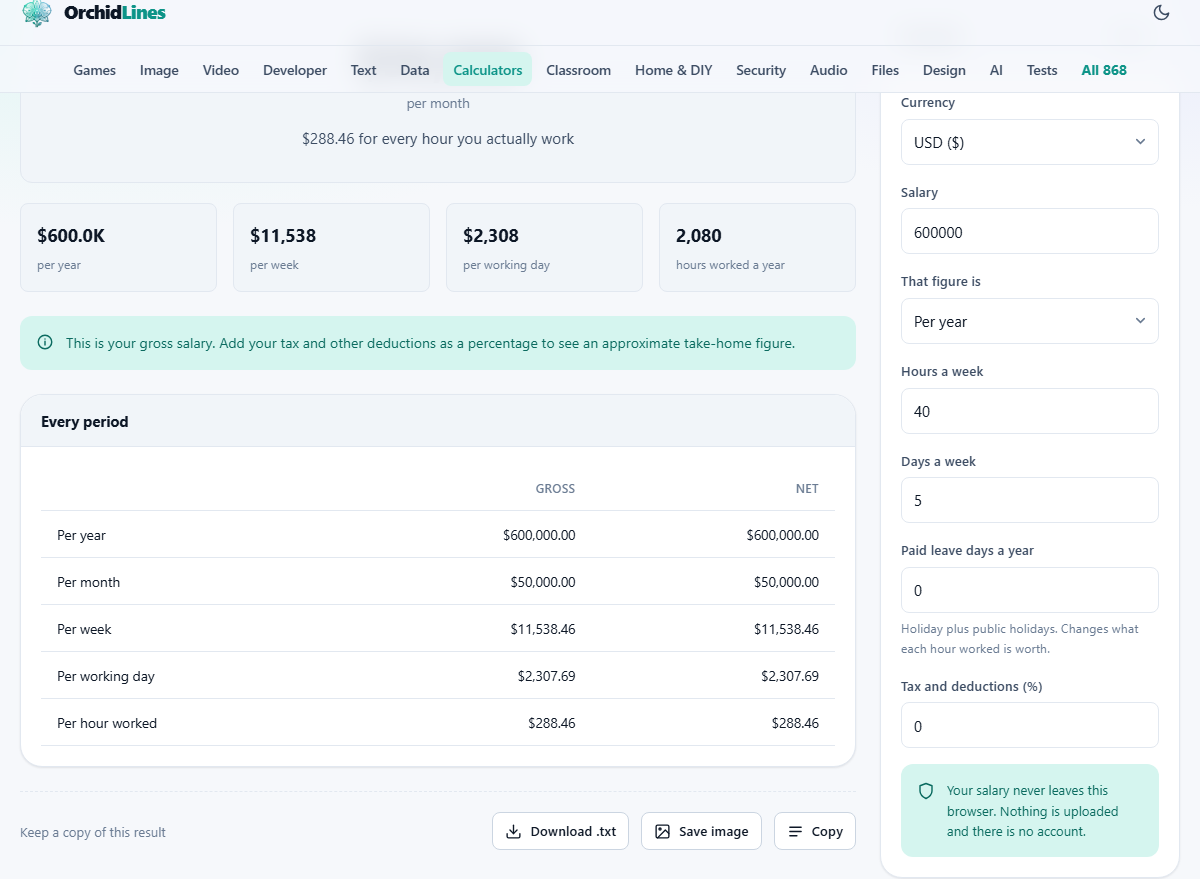
The panel on the right has seven fields. Currency picks the symbol that appears in the results. Salary takes the number itself, and That figure is tells the calculator which period it belongs to. You can enter a yearly, monthly, weekly, daily or hourly number and the rest are worked out from it.
Hours a week and Days a week describe your working pattern. Paid leave days a year is for holiday and public holidays combined. Tax and deductions is a single flat percentage that gives you a rough take-home figure.
Once those are filled in, a table appears showing the gross figure for every period, the after-deduction figure, and the per-hour and per-day rates that account for your actual working time. The table updates immediately whenever you change a field, so you can experiment with different numbers without pressing any button.
The hours field is the one that matters
Most salary tools divide the annual figure by 2,080, which is forty hours times fifty-two weeks. That gives a tidy number, but it is almost never the truth. Very few people work exactly forty hours every single week.
If you regularly stay until six or open your laptop at nine in the evening, those hours count. The calculator uses whatever you type, not a fixed assumption. Entering forty-five instead of forty drops your effective hourly rate by about eleven per cent. Entering fifty drops it further still. The pay has not changed. The picture of what it buys you has.
For part-time work the same logic applies in reverse. Twenty hours a week at thirty thousand a year sounds modest until you see the hourly figure. It might beat a full-time offer that looks bigger on paper.
How leave changes the hourly rate
Paid leave does not change your pay. You still receive the same amount over the year. What it does change is the number of hours you work for that amount.
Think of it this way. Someone working fifty weeks a year at forty hours puts in two thousand hours. Someone with thirty days of leave, which is six working weeks, puts in one thousand eight hundred and forty. The second person earns the same money for fewer hours, so each hour is worth more.
That is why the leave field is not a nice extra. It is one of the three numbers, along with pay and hours, that decide what a job is really offering you. When one company gives twenty-five days and another gives fifteen, the gap in effective hourly pay can be several per cent.
Deductions and their limits
The Tax and deductions field takes a single percentage and applies it across the board. This is a rough estimate, not a payroll system. Real income tax is banded in nearly every country. A flat percentage cannot capture bands, personal allowances or region-specific rules.
Use it to get a ballpark. If you know that your effective rate, after all deductions, is around twenty-eight per cent, type twenty-eight and the after-tax column will be close enough to compare two offers. For a precise take-home figure, check your government's own calculator or look at a recent pay slip.
Pension contributions, national insurance and similar charges all belong in this number. Add them up and enter the total. Benefits like private health cover or a company car are not included, so factor those in separately when making a decision.
Running a side by side comparison
The most useful thing to do with this calculator is to run it twice. Fill in the first offer, write down the per-hour figure, press Reset, then fill in the second one.
Suppose offer A is sixty-five thousand a year, forty hours a week, twenty days of leave. Offer B is sixty thousand, thirty-seven hours, twenty-eight days of leave. On paper offer A pays more. In practice offer B might pay more per hour worked, because the shorter week and longer leave shrink the divisor.
This sort of reversal is not unusual. It happens any time the less generous salary comes with meaningfully better conditions. Looking at the hourly figure catches it. Looking at the annual figure alone never will.
Tips that save you from a bad read
Enter the hours you actually work, not the ones on the contract. If nobody leaves at five and you know it, the contract number is fiction. Be honest with yourself about the real pattern, because an optimistic entry only hides the truth from you.
Count every public holiday in the leave field. In some countries there are a dozen of them, and skipping them understates how much each hour is worth. Add them to your annual leave days and enter the total.
Remember that the conversion from monthly to yearly is not simply times twelve in every case. Some contracts define a month as four weeks, giving forty-eight paid weeks, not fifty-two. Know which convention your offer uses before you type the number in.
When comparing international offers, watch out for currency and purchasing power. A higher number in a weaker currency or a more expensive city is not necessarily a better deal. Cost of living can swallow a raise that looks generous on a screen.
Overtime and unpaid hours
Many salaried jobs do not pay overtime at all. The salary stays the same whether you work forty hours or fifty-five. In that case the only honest way to see what the job pays is to divide by the hours you truly give it, not by the number on the contract.
If your job does pay overtime, and at a different rate, this calculator does not split the two. It handles a single salary for a single working pattern. For jobs with variable overtime the best approach is to enter the total pay you received last year and the total hours you worked, choosing Per year for the period. That gives you the blended rate.
Unpaid overtime is the silent thief in salaried work. An extra hour a day, five days a week, is two hundred and sixty hours a year. On a salary of sixty thousand, those hidden hours drop the effective hourly rate from about twenty-nine to roughly twenty-five. The pay slip does not show this. The calculator does, but only if you give it the real number.
Privacy and where the numbers live
Your salary never leaves your own device. The page runs entirely in your browser. There is no server involved, no account to create, and no data stored anywhere except on your own machine. The figures you enter are kept locally so they are still there when you come back, and closing the tab is the only cleanup you ever need.
This matters because salary information is personal. You should not have to wonder whether a web tool is keeping a copy of your pay. Here, the answer is straightforward: it is not.
You can prove it by disconnecting from the network after the page loads. Every field, every calculation and every result still works. There was nothing on the other end to begin with, and there is nothing to delete when you are done.