
Working out your retirement number without drowning in future money
Retirement calculators love to show enormous numbers that are hard to judge. This article explains how the calculator works in today's money instead, what each input means, and why the gap between your projected savings and your target matters more than any single figure.
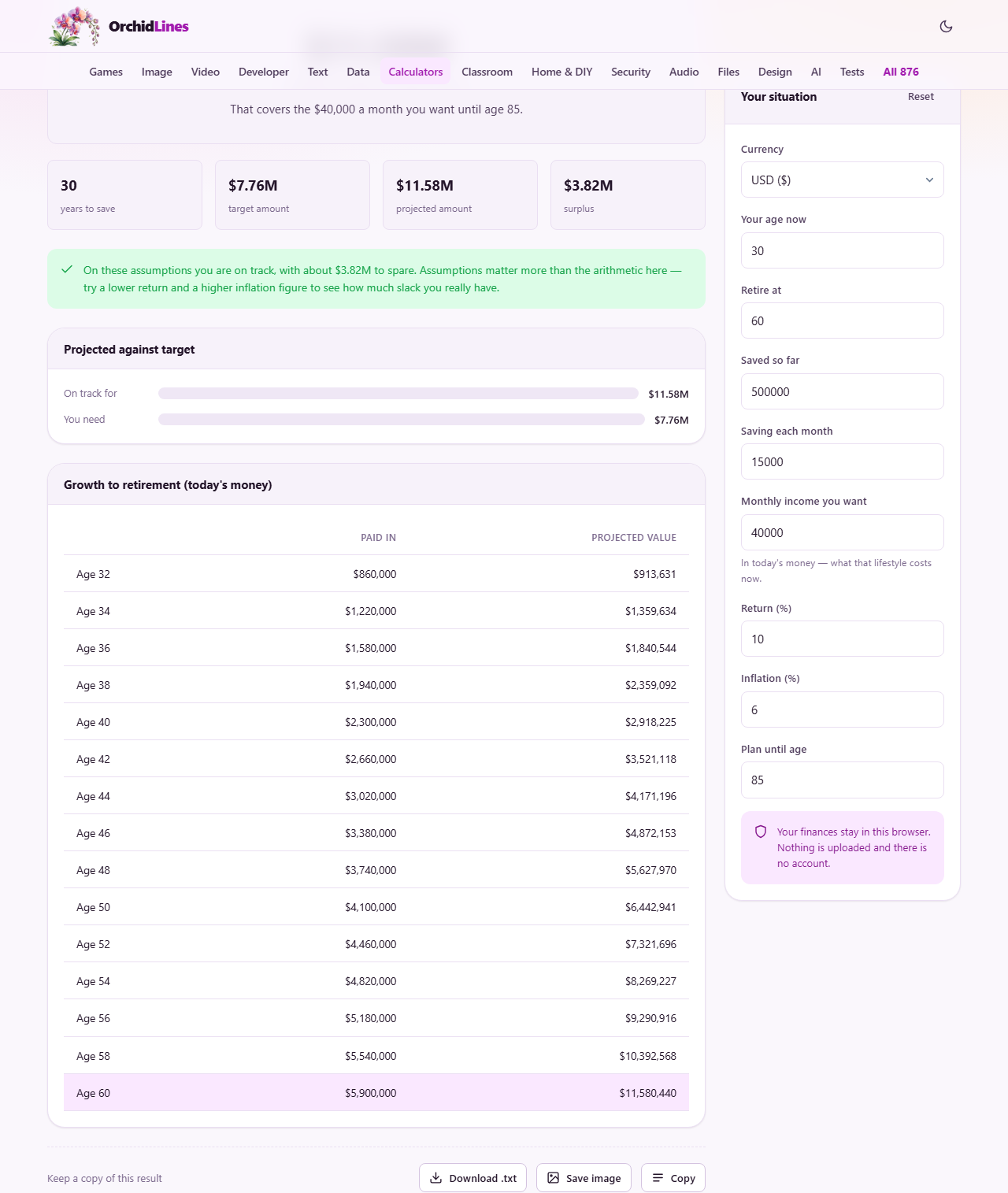
Two calculations that meet in the middle
The calculator runs two projections at once. The first takes what you have saved so far, adds your monthly contribution, and grows the total at the real return rate until you reach retirement age. That gives you the projected amount: how much you are on track to have.
The second works backwards from the income you want. You say how much you need each month in retirement and how long you need it. The calculator figures out how large the pot must be at retirement to pay that income for that many years, again at the real return rate. That is your target amount.
The gap between the two is the only number that matters. If the projected amount is larger, you have a surplus and some room for setbacks. If it is smaller, there is a shortfall, and the calculator tells you how much more you would need to save each month to close it.
Why everything is stated in today's money
Most retirement tools show the future value of your savings. If you are thirty and retiring at sixty, that number includes thirty years of inflation baked into it. A figure of fifty million rupees sounds enormous, but if prices have tripled by then, it buys what seventeen million buys today. The large number is technically correct and practically useless.
This calculator strips inflation out. It uses the real return, which is the investment return minus the inflation rate, calculated properly with the Fisher equation rather than the common shortcut of subtracting one from the other. Every figure it shows is in today's purchasing power, so you can compare it directly with what things cost right now.
The trade-off is that the actual balance in your account at retirement will look much larger than the number shown here. That difference is inflation, not an error. If the calculator says you need a certain amount, that is what it buys in today's terms, which is the only comparison that means anything.
The inputs and what to put in them
Your age now and Retire at set the saving period. The more years you have, the more time compounding has to work. Plan until age sets the end of the drawdown period. A longer planning horizon is the cautious choice, because running out of money at eighty-five is worse than having a surplus at ninety.
Saved so far is everything you have earmarked for retirement: pension balances, investment accounts, savings funds. Saving each month is what you add to that total regularly. Monthly income you want is the amount you need to live on in retirement, stated at today's prices. Think about what your current lifestyle costs and adjust for anything you expect to change.
Return is the nominal annual return you expect from your investments. Inflation is the annual rate of price increases. These two numbers together determine the real return. A return of ten per cent with inflation at six per cent is roughly the same outcome as a return of six per cent with inflation at two per cent. The gap between them is what drives real growth.
The assumptions matter more than the arithmetic
Change the return by two percentage points and the answer moves enormously. That is not a flaw in the calculator. It is the reality of compound growth over decades. A small difference in the annual rate, applied for thirty years, creates a vast difference in the final amount.
Run the calculator three times. Once with the figures you expect. Once with a low return and high inflation, the pessimistic case. And once with a high return and low inflation, the optimistic case. If the plan survives the pessimistic run, it is robust. If it only works with optimistic numbers, it depends on luck.
Nobody knows what returns or inflation will be over the next thirty years. The people who claim to know are selling something. What you can do is build enough margin that the plan works across a range of outcomes.
Closing the gap when there is a shortfall
When the projected amount falls short of the target, the calculator works out what monthly contribution would close the gap. That figure replaces the one you entered and assumes your existing savings continue to grow as before.
Saving more each month is one lever. There are three others. Retiring later adds years of saving and removes years of spending, and those two effects multiply. Even three extra years can move the shortfall dramatically. Planning on a lower income in retirement is another option. And earning a higher return helps, though that comes with higher risk.
The calculator does not tell you which lever to pull. It shows you what each one does to the numbers so you can decide. Changing one input at a time and watching the result move is the most useful thing you can do with this page.
State pensions and employer contributions
The calculator sizes what your own savings must provide. It does not include a state pension, an annuity, or any other income you expect to receive from outside your personal savings.
If you expect a state pension, subtract it from the monthly income you enter. If you need forty thousand a month and expect a state pension of ten thousand, enter thirty thousand. The calculator then sizes the pot for the gap only, which is the part you need to fund yourself.
Employer contributions to a pension fund should be counted in Saving each month if they are going into a pot you control. If they buy a defined-benefit pension that pays a fixed income, subtract that income from your target instead.
The growth table and what it shows
Below the headline figures, a table tracks your savings from now to retirement. Each row shows your age, how much you will have paid in by then, and the projected real value of the pot. The paid-in column rises in a straight line because contributions are steady. The projected-value column curves upward because of compounding.
The final row is highlighted. It shows the pot at retirement age, in today's money. Compare it with the target to see the gap at a glance. The bars above the table draw the same comparison visually: one bar for what you are on track for, another for what you need.
If the projected bar is longer, you are ahead. If the target bar is longer, there is work to do. The size of the gap tells you how urgent the work is.
This is arithmetic, not advice
The calculator does not know your tax position, your risk tolerance, your health, or your family situation. It cannot tell you whether to invest in equities or bonds, whether to buy an annuity, or whether your employer's pension scheme is good value.
What it can do is answer one narrow question: given these assumptions, are you saving enough to fund the income you want for the period you need? That is a useful starting point for a conversation with a qualified financial adviser, not a replacement for one.
For a decision with this much riding on it, a professional opinion costs less than a mistake. Use the numbers from this page to walk in with a clear picture of what you are aiming for and how far away it looks.
Your financial data stays on this device
Your savings, your income target, and every other number you type are processed entirely in your own browser. Nothing is sent to any server. There is no account, no login, and no one at the other end who could see your figures.
The inputs are saved in your browser's local storage so they are still there when you come back. That storage belongs to this browser on this computer only. Clearing your browsing data removes it. If you want a permanent record, note down the figures and the date. Assumptions change, and revisiting the calculation once a year keeps it useful.