
Drawing at random with cryptographic fairness
This article covers all six modes of the random picker, explains why it uses your browser's cryptographic generator instead of the usual shortcut, walks through each mode from number draws to coin flips, and describes the draw history that gives you a record of every result.
Why most random pickers are slightly unfair
The obvious way to pick a number between 1 and 10 is to generate a random fraction, multiply by 10 and round. Nearly every online picker does exactly this, and it has two problems.
The first is the random source itself. The standard random number generator built into browsers is fast but predictable. Given enough previous outputs, the next one can be worked out. That matters if someone has an incentive to game a draw.
The second problem is subtler. When you map a large range of possible values onto a smaller one using a remainder, some outcomes become fractionally more likely than others. The bias is small, often less than one part in a billion, but it is real, and it is easy to avoid.
This tool uses your browser's cryptographic random generator, the same source that protects bank logins, and it discards any value that falls in the uneven leftover portion of the range. The result is that every outcome is equally likely, with no bias at all. If a prize depends on the draw, that is the minimum standard.
Choosing a mode
The Mode dropdown at the top of the panel offers six choices: Random numbers, Pick from a list, Shuffle a list, Split into teams, Roll dice and Flip a coin. The controls below it change to match whichever mode is selected. A number draw shows range and count fields. A name draw shows a text box for the list. Dice shows fields for quantity and sides. Only the controls that matter for the current mode are visible.
Switching modes does not clear the list you typed in. Names stay in the text box when you move to a number draw and back, because re-entering a long list after an accidental mode switch is annoying.
Drawing random numbers
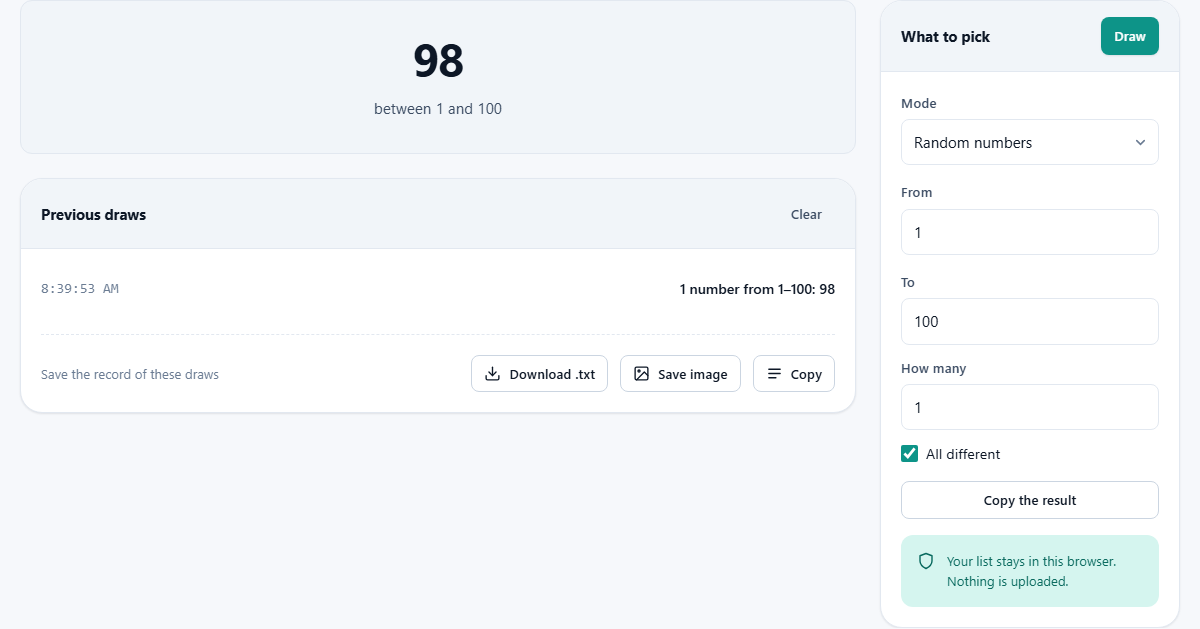
Set a range with the From and To fields, then decide how many numbers to draw using How many. Press Draw and the results appear immediately.
The All different checkbox controls whether repeats are allowed. When it is ticked, every number in the result will be unique, like pulling lottery balls from a bag. If you ask for more numbers than the range contains, the tool tells you rather than looping forever. When the checkbox is off, the same number can come up more than once, which is how dice work.
A single number draw shows the result as a large headline. Multiple numbers are listed together, separated by commas. Each draw is also added to the history panel below.
Picking and shuffling names
Pick from a list takes a text box of names, one per line, and draws one or more at random. Set How many to pick and press Draw. The selected names appear in the result and the draw is logged.
Shuffle a list takes the same names and puts them in a completely random order. Every possible ordering is equally likely. The full shuffled list is displayed as a numbered sequence.
For picking several winners from a group, shuffling is better than picking one at a time and crossing names off by hand. Shuffle the whole list once and take the first few. It is faster, leaves no room for mistakes, and the history records the result.
Your list is saved in your browser so it is still there next time you open the page. Nothing is sent anywhere. Clear the text box to remove it.
Splitting into teams
The Split into teams mode takes the same name list and divides it into however many groups you choose using the Number of teams field. People are dealt out in a round-robin pattern after being shuffled into a random order, so no team ever has more than one person more than any other team.
This is useful for classroom exercises, sports pickup games and office team-building. The randomness means nobody can accuse the organiser of stacking the groups, and the even distribution means no team is stuck with a lopsided number.
If the number of people does not divide evenly by the number of teams, the extra people are spread across the first teams. With 11 people and 3 teams, two teams get 4 and one gets 3. Nobody is singled out, and nobody gets an unfair advantage from team size.
Rolling dice and flipping coins
Roll dice lets you set the number of dice and how many sides each one has. The defaults are two dice with six sides, the standard pair. The result shows each individual roll and the total. Setting sides to 20 gives the twenty-sided die common in tabletop games. Setting it to 100 gives a percentile die. Any number of sides from 2 upward works. Up to 50 dice can be rolled at once, which covers any tabletop scenario.
Flip a coin is the simplest mode. One flip gives a single Heads or Tails. Multiple flips show the sequence and the count of each outcome. Up to a thousand flips are supported, which is enough to demonstrate that a fair coin really does land on heads about half the time.
Both modes use the same cryptographic source as the number draw. A die roll is a number from 1 to the number of sides, and a coin flip is a number from 0 to 1. Each one goes through rejection sampling to eliminate the modulo bias that would otherwise creep in.
The draw history and why it matters
Every draw is recorded in the Previous draws panel that appears below the result. Each entry shows the time and what was drawn. Up to twenty-five draws are kept, and the list can be cleared with the Clear button.
The history exists because a draw that nobody can verify is not a draw, it is just a claim. If you are picking a raffle winner in front of a room, the timestamped log provides a record that the result came from the tool and when it happened. For informal contests and classroom exercises, that small audit trail makes a real difference.
The record can be saved as a text file or a summary image using the export controls. The file includes every draw in the session, its timestamp and its result.
Copying the result
The Copy the result button below the controls puts the current result text on your clipboard. Whether it is a single name, a list of numbers or a full team split, one click copies it ready to paste into a message, a spreadsheet or a document.
For number draws and name picks, the copied text is compact. For team splits it includes the team labels and members. The format is plain text with no special characters, so it pastes cleanly into any program.
Limits and what this is not suitable for
The picker is fine for raffles, classroom activities, game nights and any draw where the stakes are social rather than legal. The cryptographic randomness is genuine and the lack of bias is real.
It is not suitable for regulated gambling or any draw that falls under lottery or competition law. Those require a certified random number generator with external audit trails, tamper-proof logging and regulatory oversight. No browser-based tool provides that, and this one does not claim to. If there is a law governing your draw, you need a system built for that law.
The upper limit on number draws is 1,000 at once. For name lists, the practical limit is the size of the text box, which handles hundreds of names without slowing down. These limits cover every realistic use case from a classroom raffle to a large office party.
Privacy and where the data stays
Everything runs on your own device. The name list you type is saved in your browser's local storage so it persists between visits, but it is never uploaded anywhere. The draw results exist only in the page's memory and disappear when you close the tab.
There is no account, no login and no server processing the draws. You can disconnect from the internet and the tool works exactly the same, because the cryptographic random generator is built into your browser and needs no outside connection. For sensitive name lists, like employee names in a company draw, that matters.