
How to work out your running pace and predict race finish times
This article walks through the Running Pace Calculator from the input fields to the race predictions. You will learn how pace, time and distance connect, how to use the standard distance presets, what the race prediction table is based on, and where those predictions stop being trustworthy. Everything runs on your own device with no data sent anywhere.
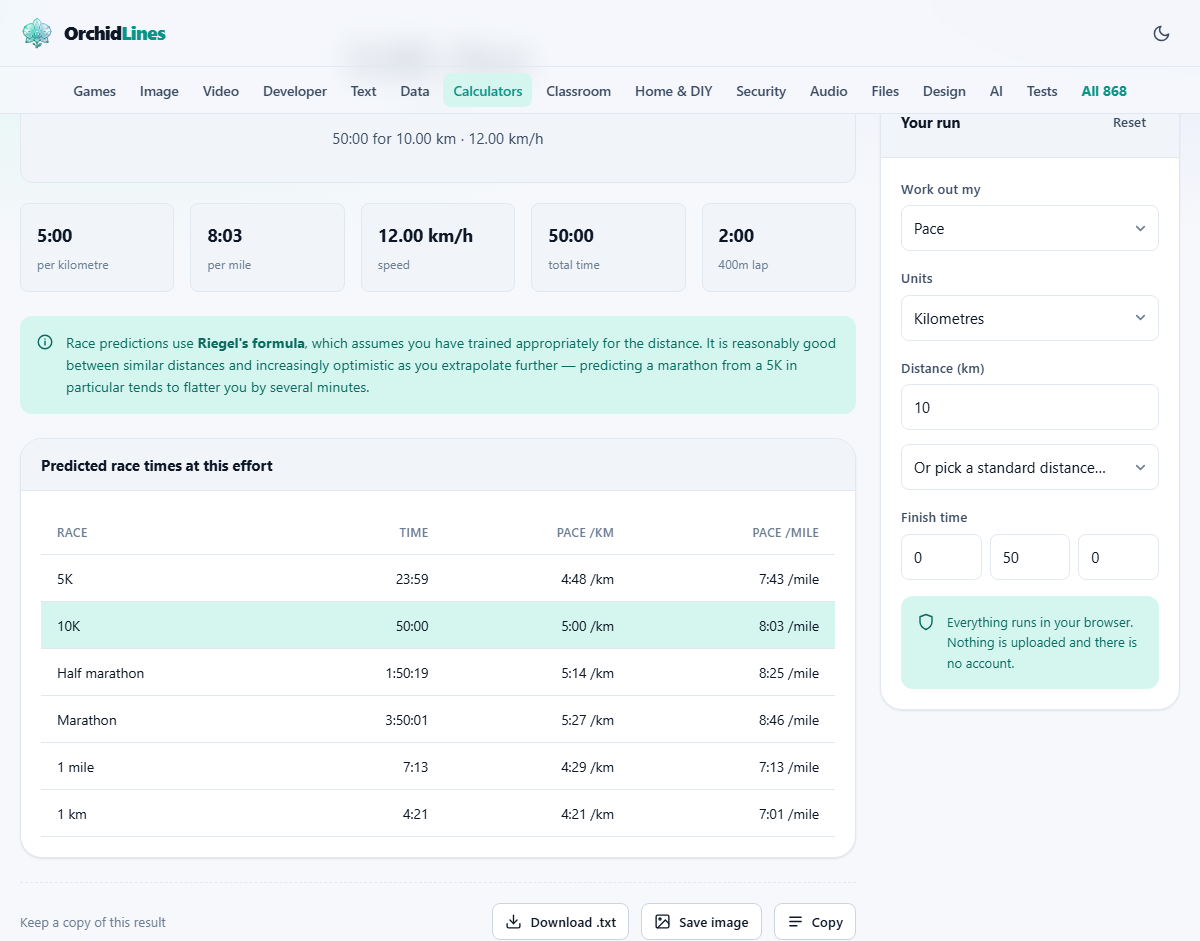
Pace, time and distance are one equation
The three numbers at the heart of every run are linked by a simple relationship. Pace is how long it takes to cover one unit of distance, usually one kilometre or one mile. If you know two of the three values, the third follows from basic division. The calculator does that division for you and shows the result in both metric and imperial units at the same time.
The dropdown at the top, labelled Work out my, lets you pick which of the three you want to solve for. Set it to Pace when you have a distance and a time from a run you have already done. Set it to Finish time when you have a target pace and want to know how long a certain distance will take. Set it to Distance when you know your pace and your time but want to see how far you went.
Entering your numbers
The Units dropdown switches between Kilometres and Miles. This controls which unit the distance field and the pace field use, but the results panel shows both pace per kilometre and pace per mile regardless of which you pick. That dual display is useful because training plans and race distances often mix the two systems.
The Distance field takes a decimal number. Below it sits a dropdown labelled Or pick a standard distance with shortcuts for 5K, 10K, Half marathon, Marathon, and 1 mile. Choosing one of these fills the distance field with the exact value so you do not have to remember that a half marathon is 21.0975 kilometres or that a marathon is 42.195.
Finish time is split into three boxes for hours, minutes and seconds. Pace is split into minutes and seconds per unit. These separate boxes avoid any confusion about decimal minutes versus minutes and seconds, which trips people up surprisingly often when they type into a single field.
Reading the results
The result panel shows your calculated value first, then repeats all three numbers together so you can see the full picture at once. Pace appears in both minutes per kilometre and minutes per mile. Speed appears in kilometres per hour and miles per hour, which is the format GPS watches and treadmills often use.
Below the main figures you get a 400-metre lap time. This is the time it would take to complete one lap of a standard running track at your current pace. Track sessions are a common part of training plans, and knowing your target lap split makes it much easier to hold the right effort by feel rather than staring at a watch while running.
How the race predictions work
Below the pace figures is a prediction table showing estimated finish times for 5K, 10K, half marathon and full marathon. These are not wild guesses. They come from a formula published by Pete Riegel that has been used by runners and coaches for decades.
The formula takes your actual time at one distance and scales it to another. The scaling uses an exponent of 1.06, which accounts for the fact that you cannot hold the same pace over a longer distance. Doubling the distance costs you more than double the time because fatigue builds and your body switches energy systems. The exponent captures that slowdown in a single number.
For distances close to the one you entered, the prediction is usually accurate to within a minute or two. A 10K predicted from a 5K is reliable for most runners. A half marathon predicted from a 10K is close. The further apart the distances, the more the prediction drifts from reality.
Where the predictions fall apart
Predicting a marathon from a 5K is famously flattering. The formula might say 3 hours 30 minutes, but a runner who has never trained beyond 10 kilometres would almost certainly run closer to four hours, if they finished at all. The reason is that a marathon is limited by endurance, fuelling, and how well your legs hold up over two or more hours, not by raw speed. The formula has no way to know whether you have put in the long runs that a marathon demands.
Heat, hills and wind also change things. The predicted times assume a flat course in still, cool air. A hilly race or a hot day can add five or ten minutes to a marathon time and the formula cannot model any of that. Treat marathon predictions from short races as a ceiling you might reach with proper training, not as a time you could run next weekend.
Using the calculator for training
Race pace and training pace are not the same thing. Most of your weekly running should be at an easy effort that feels comfortable and lets you hold a conversation. That easy pace is typically one to two minutes per kilometre slower than your race pace for shorter distances. Running every session at race pace is the fastest route to an injury or burnout.
The calculator helps with training in two ways. First, it gives you a clear target for the few sessions each week where you do run fast, such as intervals or tempo runs. Second, by predicting times across distances, it helps you choose a realistic goal for your next race. If your recent 10K time predicts a half marathon of 1 hour 50 minutes, you can train with that target in mind rather than picking a number out of thin air.
For track intervals, the 400-metre lap figure is especially handy. If your target 5K pace corresponds to 96 seconds per lap, you can run repeats at that pace and know exactly what the watch should read at the end of each loop.
Predicting from the right distance
The single most useful tip for accurate predictions is to enter a time from a distance as close as possible to the one you care about. A recent 10K is a far better basis for a half marathon estimate than a recent 5K. A recent half marathon is a better basis for a full marathon than either of the shorter races.
Race conditions matter too. A time from a flat, well-paced race is more useful than one from a hilly fun run where you stopped at a water station for three minutes. The calculator takes whatever time you give it at face value, so a noisy input produces a noisy output. Your best recent effort on a measured course in decent conditions gives the most honest prediction.
Kilometres, miles and why both appear
Runners worldwide are split between metric and imperial. Most countries use kilometres, but the mile is deeply rooted in running culture. A four-minute mile remains one of the sport's iconic benchmarks even in countries that measure everything else in metres. Training plans often quote paces in one system while races are measured in the other.
The calculator solves this by showing both units in the output no matter which one you select for input. If you enter a 5K time in kilometres, you still see your pace per mile. If you enter a distance in miles, you still get a pace per kilometre. This dual display means you never have to do the conversion in your head or open a second tool.
Privacy and where the numbers are stored
All the arithmetic runs inside your browser on your device. No times, distances, or paces are sent to any server. There is no account to create and nothing to log into. Your values stay in your browser so they are there the next time you visit, but they never leave your machine.
For runners who log every session and guard their data, this is worth knowing. Many running apps upload every detail to a cloud server, sometimes sharing it with advertising partners you did not choose. Here, the data goes nowhere. You can load the page, disconnect from the internet, and the calculator keeps working in exactly the same way it does when you are online.