
Working out molar mass from a chemical formula
Molar mass is the bridge between a formula on paper and a weight you can measure on a scale. This article explains what the calculator does, walks through formulas from simple to complex, and covers the common mistakes that throw the answer off by more than you might expect.
What molar mass means in plain terms
Every element has a standard atomic weight. Hydrogen is about 1 gram per mole, carbon about 12, oxygen about 16. A mole is simply a fixed count of atoms or molecules, roughly six hundred thousand trillion of them. That number is called Avogadro's number, and it is the same for every substance. When you add up the weights of every atom in a formula, the total is the molar mass, measured in grams per mole.
That number tells you how many grams of a substance you need to have one mole of it. Water, for instance, has a molar mass of about 18 grams per mole, so 18 grams of water gives you one mole. Double the grams and you have two moles. The link between mass and quantity is that direct. The calculator does this addition for you. Type in a formula and it totals the atomic weights, giving you the molar mass along with a clear breakdown of how much each element contributes to the total.
Typing a formula correctly
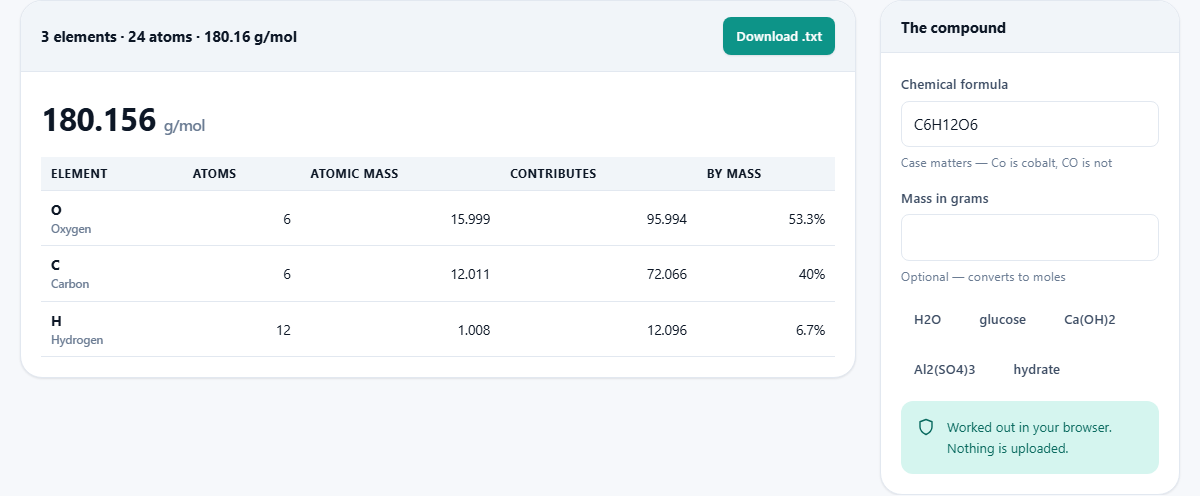
The field labelled Chemical formula accepts standard chemical notation. H2O works. C6H12O6 works. Ca(OH)2 works. Brackets nest to any depth, so a formula like Al2(SO4)3 is handled without trouble. Even more complex structures with multiple layers of brackets parse correctly. There is also a row of quick buttons for common compounds like water, glucose, calcium hydroxide and a hydrate example. Pressing any of those buttons fills the formula field in one click, which is handy for a quick check or for seeing how the notation should look.
Letter case matters here, and it matters a lot. Co is the symbol for cobalt, a metal. CO is carbon plus oxygen, which is carbon monoxide, a gas. These are completely different substances with very different molar masses, and the calculator does not try to guess which one you meant. If the case is wrong, the result will either be wrong or the formula will not parse at all. This strictness is on purpose. A silent correction that picked the wrong substance would be far worse than a clear error message, because you might not notice it and would carry the wrong number into your work.
Hydrates and the dot that changes everything
Some compounds form crystals with water molecules trapped inside their structure. Copper sulphate pentahydrate, written CuSO4 with a dot and then 5H2O, is one of the best-known examples. You might have seen it in a school lab as bright blue crystals. The dot in the formula is not decoration or a separator you can ignore. It means five separate water molecules are attached to each unit of copper sulphate in the crystal lattice.
If you ignore the dot and calculate only the CuSO4 part, you get about 160 grams per mole. The full hydrated form weighs about 250 grams per mole. That gap of 90 grams per mole is a third of the total mass, and getting it wrong throws off every measurement that follows. If you prepare a solution at the wrong strength because you used the wrong molar mass, the whole experiment goes sideways. The calculator handles the dot correctly, treating everything after it as a separate group of atoms whose weight is added to the main compound.
Reading the results
After you type a formula, the page shows the total molar mass in grams per mole. Below that is a list of every element found in the formula, along with the count of atoms and the percentage each element contributes to the total mass. For example, glucose shows carbon, hydrogen and oxygen with their respective shares. This percentage breakdown is exactly what you need for empirical formula problems, where the question asks what fraction of the total mass comes from each element.
A Download .txt button in the panel header saves the full result as a plain text file. This is handy when you need to paste the numbers into a report or keep a record of several calculations side by side. The file includes the formula, the total mass and the element-by-element breakdown, all in a simple readable format.
Converting grams to moles and molecule counts
The second input field, labelled Mass in grams, is optional. When you fill it in, the calculator divides that mass by the molar mass to give you the number of moles. It then multiplies by Avogadro's number to tell you roughly how many individual molecules that mass contains. The result is often a number with twenty or more digits, which gives you a sense of just how many particles sit in an ordinary lump of material.
This is the conversion that comes up constantly in lab work. You weigh a sample on a balance, look up or calculate the molar mass, and divide to find how many moles you have. From there you can work out how much of another substance you need for a reaction, because chemical equations are written in moles. The calculator does the division and the molecule count in one step. Leave the grams field empty and it simply shows the molar mass on its own. No error message appears and no complaint is shown. It simply skips the conversion and shows the mass alone.
Atomic weights and where they come from
The weights used here are the standard atomic weights published by IUPAC, the international body that maintains the official values for chemistry. These are averages across the natural mix of isotopes that each element has. Carbon, for instance, is mostly carbon-12 but contains a small fraction of carbon-13. The standard weight of 12.011 reflects that blend.
The calculator uses the 2021 edition of these weights. This means the results will match a modern textbook. Older textbooks sometimes used slightly different values, especially for elements whose isotope mix has been measured more precisely in recent years. If you are working in mass spectrometry, you might need monoisotopic masses instead, which are the mass of the most common isotope alone. Those are different numbers, and this calculator does not provide them. For all other purposes, the standard weights are the right ones to use.
Common mistakes and how to avoid them
The biggest source of error is getting the letter case wrong. Na is sodium. NA would be nitrogen followed by an unrecognised uppercase A, and the parser will reject it. If you see an error or an unexpected result, check the case of every letter first. Every element symbol starts with an uppercase letter. If it has a second letter, that letter is always lowercase. Fe is iron. FE is not a valid symbol.
The second most common mistake is forgetting brackets. Ca(OH)2 means one calcium, two oxygen and two hydrogen. Writing CaOH2 without the brackets means one calcium, one oxygen and two hydrogen, which is a different compound with a different mass. The brackets group the O and H together so that the subscript 2 applies to both of them. Skipping the brackets changes the meaning of the formula entirely.
Charges like 2+ or 2- can be left off when you type the formula. The mass of an electron is far too small to change the result at this level of precision, so the molar mass of a sulphate ion is the same as the molar mass of the neutral SO4 group. The calculator does not expect charges in the input and will not know what to do with a plus or minus sign.
Privacy and where the calculation runs
The entire calculation happens in your browser. Nothing is sent to a server. There is no account to create, no login to manage and no data to store. The atomic weight table is built right into the page itself, so the calculator works even without an internet connection once the page has loaded. Your formulas stay on your own device and are never recorded, tracked or shared. Whether you are checking one compound or running through a list of fifty, every formula is processed locally and then forgotten the moment you close the page.