
How to work out calories burned during exercise
Every gym machine, fitness watch and calorie tracker uses a number called a MET to turn activity into calories. This article explains what that number means, walks through the calculator step by step, and shows why the net figure matters more than the gross one most people see.
What a MET value actually tells you
MET stands for metabolic equivalent of task. It compares the energy cost of an activity to doing nothing at all. Sitting quietly scores a 1. Brisk walking lands around 5, which means it costs five times as much energy per minute as resting. Running at a good pace might reach 10 or higher. The scale has no upper limit, but most everyday activities fall between 1 and 14.
These numbers come from lab studies where researchers measure how much oxygen people use during each activity. The results are collected in the Compendium of Physical Activities, a published research database that assigns a MET value to hundreds of movements. The calculator on this page draws from that same source, so the figures match what a sports scientist would use. Because one MET roughly equals one kilocalorie per kilogram per hour, the jump from sitting to any given activity translates directly into a calorie multiplier.
The formula behind the result
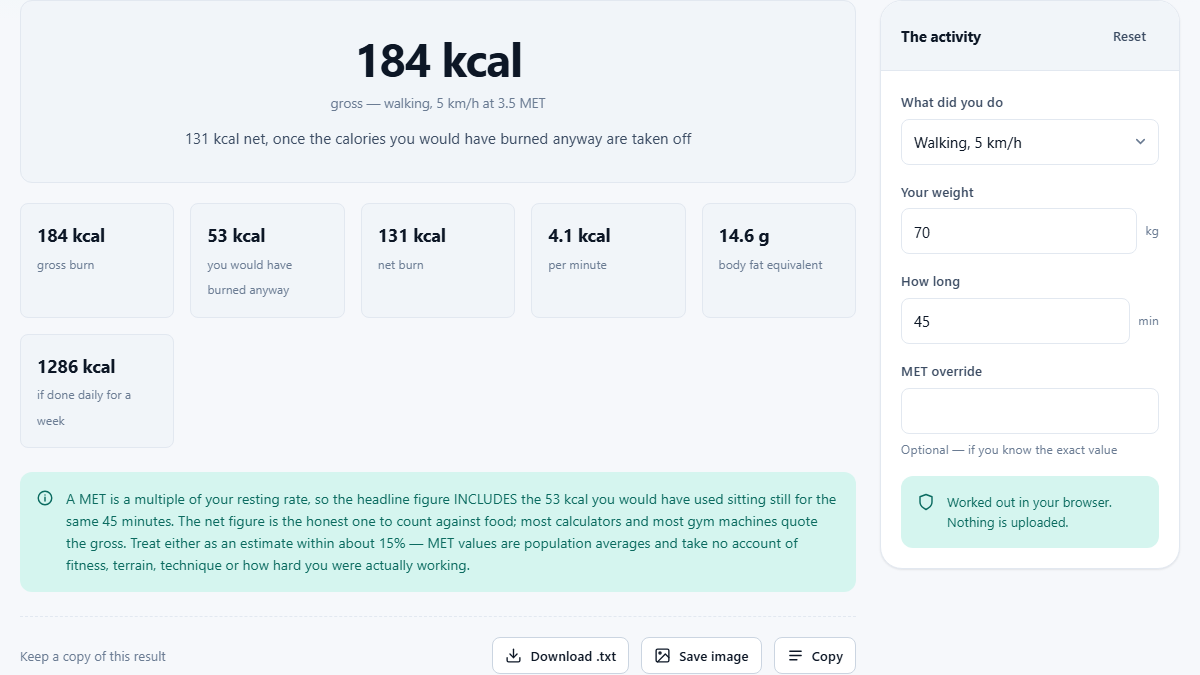
The gross calorie formula is simple. Multiply the MET value by your body weight in kilograms, then multiply again by the duration in hours. A 70 kg person walking briskly for 45 minutes uses a MET of about 5, so the maths reads 5 times 70 times 0.75, which gives roughly 263 kilocalories.
That is the gross figure. It includes everything your body spent during those 45 minutes, even the calories you would have burned sitting on the sofa instead. The net figure strips that resting cost away by subtracting 1 MET's worth from the total. For the same walk, net comes out around 210 kcal. That smaller number is the one that actually represents extra work.
Why weight changes the answer so much
Your body weight sits right in the middle of the formula as a multiplier, so it scales the result directly. A 90 kg person doing the same jog for the same time burns nearly 30 percent more than a 70 kg person. This is not a quirk of the maths. Heavier people carry more mass through every stride, and moving more mass takes more energy.
This also means the calculator cannot give a useful answer without an honest weight entry. Round to the nearest kilogram and move on without worrying about decimal places. There is no need for decimal precision here because the MET values themselves are averages, not exact measures of your personal metabolism.
Choosing the right activity from the list
The dropdown labelled What did you do offers twenty-two activities. Walking appears at three different speeds because the energy cost rises sharply as pace increases. A slow stroll at 3 km/h sits well below a brisk walk at 6.5 km/h on the MET scale, even though both feel like walking. The same is true for cycling and swimming, each of which has entries at moderate and faster intensities. Football, tennis and dancing each carry their own published value, and the list also covers rowing, yoga and general HIIT.
Strength work is covered by a single weight training entry, while circuit and interval sessions fall under the higher-MET option. Everyday tasks like gardening, housework and climbing stairs have their own entries too, which is useful for people who want to see how much their daily routine adds up to. If nothing in the list matches what you did, the MET override field lets you type a specific value. You can look up the number for almost any activity in the published Compendium and enter it directly.
Gross versus net, and which one to trust
Most fitness trackers and gym machines report the gross figure because it is bigger and looks more rewarding. But the gross number counts your resting calories twice. Once inside your daily needs, where they already live, and once again inside the exercise total. If you add the gross exercise number on top of your daily requirement, you have double-counted and will overestimate what you actually spent.
The net number avoids that trap. It tells you only the extra calories the activity added beyond what you would have spent anyway. When you plan meals around exercise, or when you want to know how much a workout really cost, net is the honest figure. The calculator shows both so you can see the gap for yourself. For a typical hour of walking, the difference between gross and net is about 70 kilocalories, which is enough to matter if you are tracking closely.
How accurate are MET-based estimates
MET values are population averages gathered from groups of subjects in controlled settings. They cannot account for your personal fitness level, your running form, the terrain you covered, or the temperature outside. Two people doing the same activity for the same time can burn meaningfully different amounts.
A reasonable rule of thumb is to treat the result as accurate to about fifteen percent in either direction. That is good enough for planning, but not good enough to eat back every calorie a tracker claims. Over-reporting exercise calories and under-reporting food calories is the most common way people undo a calorie deficit, which is worth keeping in mind.
Fitness also shifts the needle. A trained runner moves more efficiently than a beginner, so the same distance at the same speed costs fewer calories. Progress tends to show up as faster times rather than higher burn numbers, which can feel backward but is actually a sign that the body has adapted.
Practical tips for using the calculator well
Start with the activity that best matches what you did. If you mixed things up, run the calculator once for each segment and add the net results together. A session that includes twenty minutes of cycling and twenty minutes of rowing is better handled as two separate entries than as forty minutes of whichever activity appears first in the list.
Enter the time in minutes. The calculator handles the conversion to hours internally, so there is no need to do that yourself. If you only know the distance, estimate the time instead. A five-kilometre walk at a normal pace takes about an hour, and a five-kilometre run at moderate speed takes roughly thirty minutes.
Everything runs right on your own device. No account is needed, no data leaves the page, and you can use the Reset button in the panel to start fresh whenever you like.
Common activities compared side by side
It helps to see a few activities next to each other to build an intuition for what METs mean in practice. Walking at a normal 5 km/h pace carries a MET around 3.5. Jogging at 8 km/h roughly doubles that. Running at 12 km/h sits near 11 or 12, which means a fast run burns about three times what a gentle walk does, minute for minute.
Swimming at a moderate pace lands in the 6 to 7 range, and vigorous laps push it well above 9. Yoga tends to sit around 3, making it close to a slow walk in pure calorie terms. Weight training, despite feeling intense, usually scores between 3 and 6 because the rest periods between sets bring the average down. Housework and gardening both land in the 3 to 5 band, which adds up over a full afternoon even though neither feels like exercise.
When to look beyond the number
Calorie burn is one part of a much larger picture. Sleep quality, stress, hydration and the composition of what you eat all matter at least as much as the number on a calculator. A single workout rarely makes or breaks a week, and chasing a precise calorie count can become its own distraction.
Use the result as a rough guide, not as a contract with your dinner plate. If the calculator says you burned 300 net calories on a run, the real number could be anywhere from 250 to 350. Plan around the lower end and you will stay on safer ground. And if a gym machine tells you a much higher number, now you know why: it is quoting gross, not net. The calculator runs entirely in your browser, so you can revisit it as often as you like without creating an account or sharing any personal data.