
Margin and markup explained with real pricing
Margin and markup are two different ways of measuring the same profit, and mixing them up is one of the fastest ways to lose money in a small business. This article walks through both numbers, shows how the calculator handles them, and explains the mistakes that catch people most often.
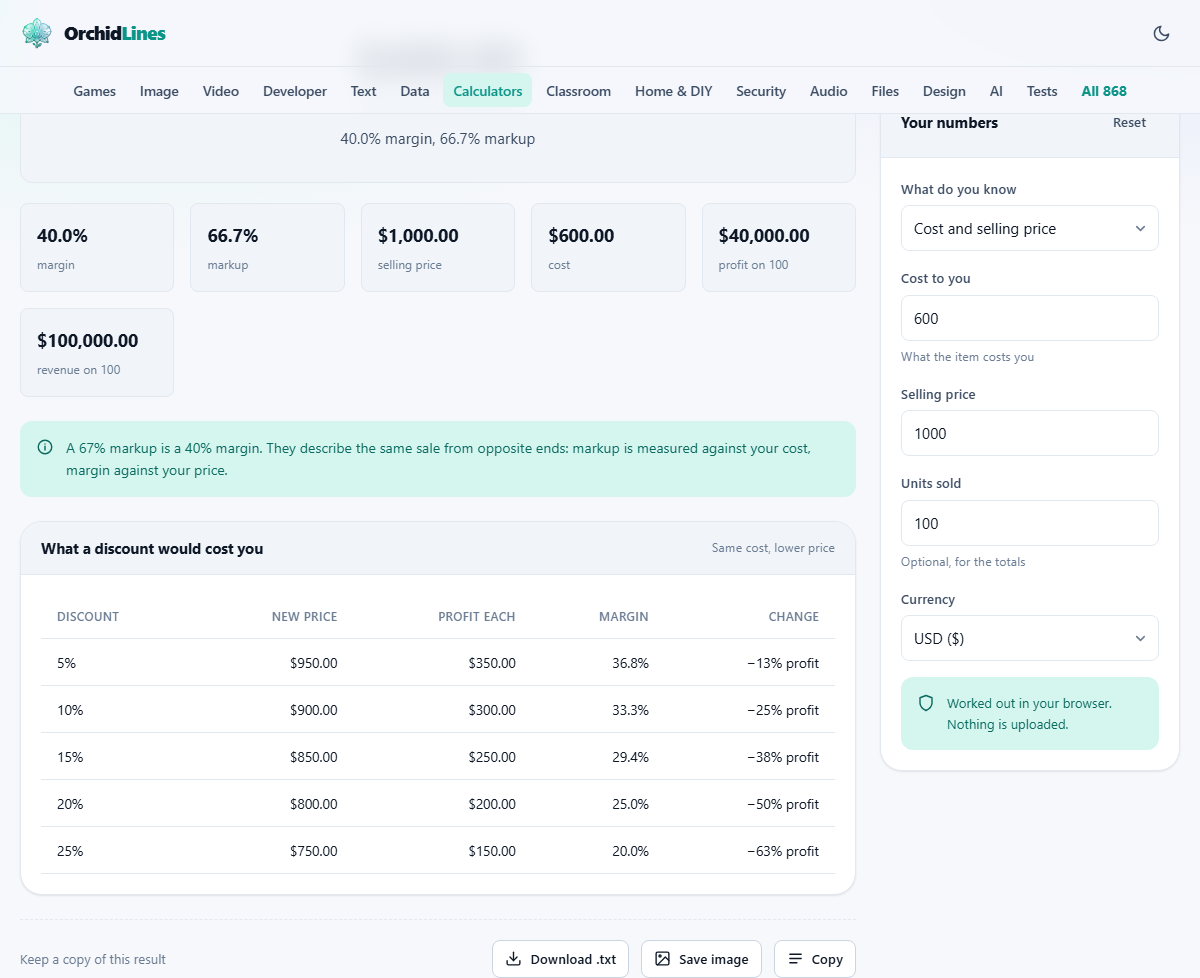
Two percentages from the same sale
You buy something for sixty and sell it for a hundred. Your profit is forty. So far everyone agrees. The disagreement starts when someone asks what percentage that is. Margin says it is forty per cent, because forty out of a hundred is forty per cent. Markup says it is sixty-six point seven per cent, because forty out of sixty is sixty-six point seven. Both are correct. They just measure against different things.
Margin divides profit by the selling price. Markup divides profit by the cost. The same transaction always gives a smaller margin than markup, and the gap between them grows as the numbers get larger. A hundred per cent markup is only a fifty per cent margin. A three hundred per cent markup is a seventy-five per cent margin. Knowing which one a supplier or a marketplace is quoting at you is the difference between making money and wondering where it went.
The four modes on the calculator
The What do you know dropdown at the top of the panel sets which pieces of information you have and which one the tool should work out. The first option, Cost and selling price, is the most common starting point: you know what you pay and what you charge, and the tool shows both the margin and the markup. The second, Cost and the margin I want, works backwards from a target margin to tell you what price to charge.
The third, Cost and the markup I want, does the same thing but using a markup target. And the fourth, Selling price and the margin I want, starts from the price the customer sees and works backwards to the maximum you can afford to pay for the goods. Each mode hides the fields you do not need and shows the ones you do, so the panel never looks cluttered.
Setting the cost correctly
The Cost to you field should include everything you pay for each item: the wholesale price, the packaging, the inbound shipping, any duty or handling charges. Leave out costs that do not scale with each unit, like rent, wages, insurance and software subscriptions. Those are overhead, and they come out of the margin after the fact.
Getting the cost right matters more than getting the price right, because every penny you forget to include looks like profit that is not really there. If a marketplace charges a percentage of the sale, add that into the cost too. A platform taking fifteen per cent of the selling price removes fifteen percentage points from your margin, not fifteen per cent of your profit, and the difference between those two statements is large enough to break a business. Returns and refunds also eat into the real cost per unit sold, so factor in your return rate if it is significant.
Reading the results
Once the fields are filled, the results show the profit per item, the margin as a percentage, and the markup as a percentage, all side by side. Seeing both percentages together is the point of the tool. A supplier might tell you a deal offers a fifty per cent markup, which sounds generous until you realise that translates to a thirty-three per cent margin, which may not cover your operating costs.
Below the per-item figures, a Units sold field lets you see the totals across a batch. Profit per item can feel like a small number, and it is easy to dismiss a price change that moves it by a pound or two. Multiply that by a month of sales and the figure stops being small. This is also the field that shows you the real cost of offering a discount before you agree to one.
Why discounts hurt more than they look
At a thirty per cent margin, a ten per cent discount on the selling price wipes out a third of your profit, not a tenth. That surprises most people, and it is worth seeing in the calculator before committing to a sale. Set up your normal cost and price, note the profit, then reduce the selling price by ten per cent and watch what happens to the margin.
The reason is that the discount comes off the top line, but the cost stays the same. So the entire discount comes straight out of profit. To earn back the same total profit after a ten per cent discount, you need to sell roughly fifty per cent more units, and that is a steep ask. Promotions can work, but they need to be planned with the real numbers in front of you, not with a vague sense that the percentage looks small.
Working backwards from a target margin
The most useful mode for pricing a new product is the second one: Cost and the margin I want. Enter what the item costs you, type the margin you need, and the calculator shows the selling price. For a forty per cent margin, the price is your cost divided by 0.6. For a fifty per cent margin, divide by 0.5. The arithmetic is not hard, but doing it wrong by accidentally treating the number as a markup instead of a margin leads to a price that is too low.
This mode is also the way to reverse-engineer a competitor's cost. If you know their selling price and can estimate their margin from industry averages, the tool will show roughly what they pay. That is useful when negotiating with suppliers, because it tells you whether the price you are being offered is in the right range. The fourth mode, Selling price and the margin I want, is the mirror image: you know the retail price the market will accept and you need to find the highest cost you can afford to pay.
What good margins look like in different trades
There is no such thing as a universally good margin. Grocery retail runs on a gross margin of a few per cent and makes money on volume. Fashion and cosmetics sit in the fifties and sixties. Software and digital products can reach eighty per cent or higher because the cost of producing one more copy is close to zero. Comparing your margin to an industry average is useful; comparing it to a different industry is not.
What matters more than the headline margin is what it covers. A thirty per cent gross margin is healthy if your overheads are fifteen per cent of revenue. The same margin is dangerous if your overheads are twenty-eight per cent, because that leaves only two per cent net profit and a single bad month puts you in the red. The calculator gives you the gross figure; the rest of the picture comes from your accounts.
Common mistakes to avoid
The most common error is treating a markup as though it were a margin. A business that adds fifty per cent to its cost and then budgets as if it has a fifty per cent margin will consistently spend more than it earns, because the real margin is thirty-three per cent. Every sale brings in less than the spreadsheet predicted.
The second mistake is forgetting that margin can never reach a hundred per cent. Margin uses the selling price as the bottom of the fraction, so it can only hit a hundred if the goods cost nothing. Markup has no ceiling at all, which is another reason the two are easy to confuse. If someone quotes you a margin above a hundred per cent, they are talking about markup whether they know it or not.
Privacy and how the tool runs
All calculations happen on your own device. Nothing is uploaded, no figures are stored once you leave, and there is no account or login. You can test real costs and prices freely without exposing your pricing strategy to anyone. That matters when you are working out how thin your margin can go on a competitive tender, or when you want to model a discount without anyone seeing the numbers before you are ready.