
How to find out what you need on a final exam
This article explains the arithmetic behind the final grade calculator, walks through each field on the page, and covers the situations students run into most often: targets that are still reachable, targets that are not, and what extra credit changes about the picture.
The question this tool answers
You have been graded on coursework, assignments and midterms throughout the term. One exam is left, and it carries a fixed share of the overall mark. The question is simple: what score do you need on that exam to finish with the grade you want?
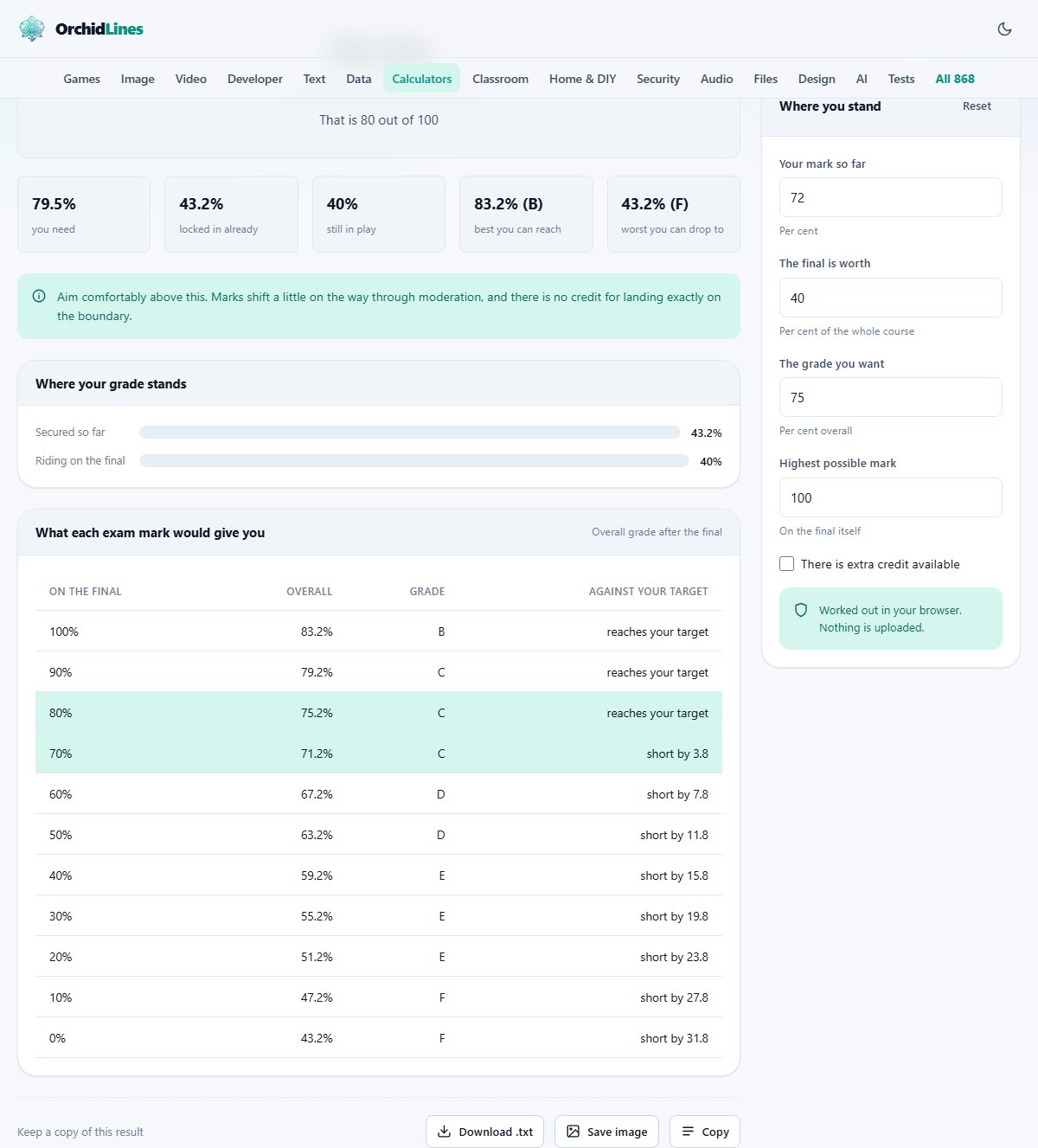
The calculator takes three numbers and returns the answer. It also builds a table of outcomes so you can see what different exam scores would leave you with overall, which is more useful than a single threshold when you are deciding where to aim.
Filling in the three main fields
The first field, labelled Your mark so far, is the average you have earned on everything already graded, as a percentage. Most learning platforms show this number on the course overview page. If yours does not, add up the weighted marks from each graded piece and divide by the total weight of the graded portion.
The second field, The final is worth, is the weight of the exam as a percentage of the whole course. This comes from the syllabus. A final worth forty per cent means forty per cent of your overall mark is still in play. A final worth ten per cent means the exam can barely move the needle in either direction.
The third field, The grade you want, is your target overall. Enter the lowest percentage you would be happy with. The calculator works backwards from this to tell you the exam score that lands you exactly there.
How the arithmetic works
The overall grade is a weighted sum. The mark you have already earned is multiplied by the share of the course that has been graded, and the exam mark is multiplied by its weight. Adding those two products gives the final percentage.
To find the exam score you need, the formula flips that around. It takes the target, subtracts what your coursework has already contributed, and divides by the weight of the exam. If your coursework covers sixty per cent of the grade and you have earned seventy-two per cent on it, your coursework contribution is 0.60 times 72, which is 43.2 points. To reach seventy-five overall, the exam must supply 75 minus 43.2, which is 31.8 points. The exam is worth forty per cent, so you need 31.8 divided by 0.40, which is 79.5 per cent on the exam itself.
When the target is out of reach
Sometimes the formula spits out a number above one hundred. That means no possible exam score can get you to your target. This happens when the weight of the exam is too small relative to the gap between where you are and where you want to be.
The calculator tells you this plainly rather than hiding it. It also shows the best grade you could still reach if you scored full marks on the exam, so you can reset your sights on something realistic. This is genuinely useful information. It is better to know in advance that a certain grade is no longer available than to spend a week studying for something that stopped being possible after the midterm.
The highest possible mark on the exam
Below the three main fields is one labelled Highest possible mark. It defaults to one hundred, and for most courses you can leave it there. Some courses cap the exam at a different figure, or use a raw-score system where the maximum is something like fifty or seventy-five. If that applies, change this number and the calculation adjusts.
When the highest possible mark is less than one hundred, the range of outcomes narrows. The calculator uses this ceiling to decide whether your target is still reachable, so getting it right matters if your exam has an unusual maximum.
Extra credit and what it adds
A checkbox labelled There is extra credit available appears in the settings. Tick it and a field opens where you enter how much extra credit is on offer, as a percentage added to the final exam's effective weight.
Extra credit widens the window of what is possible. If the exam is worth forty per cent and there are five points of extra credit, your effective ceiling on the exam portion rises. That can turn an unreachable target into a reachable one, or simply lower the score you need on the main exam questions. The calculator folds extra credit into the same formula, so the required-mark figure you see already accounts for it.
Reading the outcomes table
Below the headline answer, the tool lays out a table showing what your overall grade would be for each possible exam score. A column of exam marks runs down the left side, and the matching overall percentage sits next to each one.
This table is worth scanning even if you already have your target number. It shows how sensitive the outcome is to the exam. When the final is worth a large share of the course, a ten-point swing on the exam moves the overall grade by several points. When the final is worth a small share, the same swing barely registers. Seeing the whole range at once helps you decide how much effort is proportional to the reward.
Pass marks and minimum exam requirements
Setting the target to the pass mark gives you the lowest exam score that still results in a passing overall grade. Anything above that number is a pass, and anything below it is not. This is the single most common use of the tool, and it takes about five seconds.
One caution. Some courses require a minimum score on the final exam itself, separate from the overall average. You might need fifty per cent overall and also forty per cent on the exam. The calculator covers the overall figure but not a separate exam floor, because it has no way of knowing whether your course imposes one. Check the syllabus for that detail.
Rounding and boundary grades
If the score you need is seventy-four point eight and the grade boundary is seventy-five, you are relying on rounding. Some institutions round up at the half, some truncate, some leave it to the lecturer. The calculator shows the unrounded number so you can see exactly where you stand.
The practical advice here is to aim above the boundary, not at it. If you need eighty-two, study for ninety. Exam marks are noisy. A careless mistake, a misread question or a harsh marker can drop you a few points below what you expected, and there is no credit for landing precisely on the line.
Using the tool to plan your study time
The outcome table does more than answer one question. It helps you decide how to spend your time. If the gap between a B and an A requires an extra twenty points on the exam, you can weigh that against the effort involved and the impact on your other courses.
Try running the numbers for several courses at once, each in its own tab. A student carrying five courses might find that a modest improvement in one final lifts the overall GPA more than a heroic effort in another, simply because the weights differ. The tool makes those comparisons concrete and quick.
It is also worth checking the downside. Set the exam mark to your worst realistic score and see whether you still pass. If the answer is yes, that can take a lot of pressure off. If the answer is no, you know exactly how much ground you need to cover and can study with a clear target instead of a vague worry.
All of this runs on your own device
The page does all its arithmetic entirely inside your browser. No grades, no targets and no coursework marks are sent to a server. There is no account, no login and no record kept anywhere except on your own screen. Close the tab and the numbers are gone. That matters here because marks are personal, and there is no reason for them to leave your machine when the calculation is this straightforward.