
How the geometry calculator works for flat shapes and solids
This article walks through all ten shapes the calculator covers, from a simple rectangle to a cone. It explains what each one needs as input, what derived figures come back, and points out the mistakes that catch people most often when measuring circles, cylinders and ellipses.
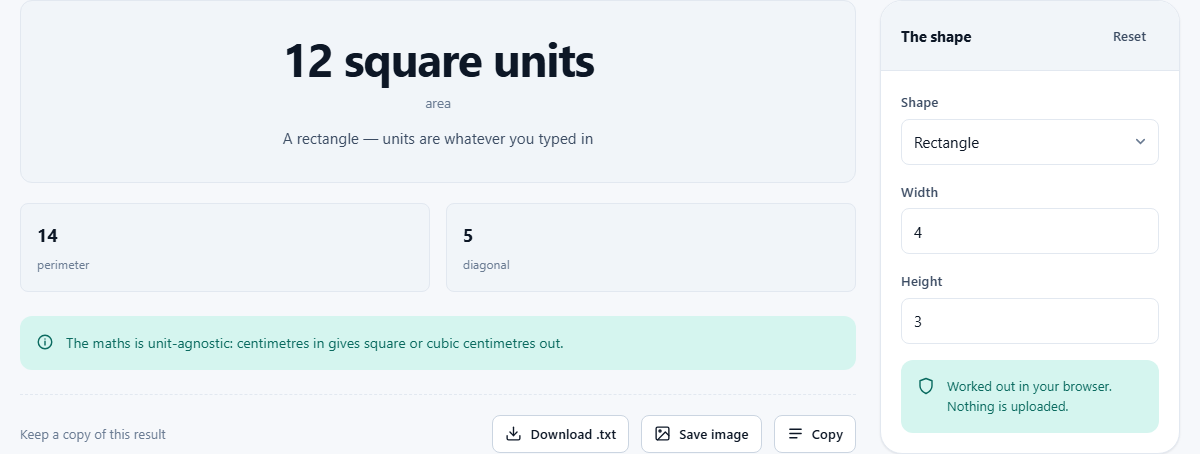
Pick a shape and everything else follows
The Shape selector at the top of the settings panel is the only decision you make up front. Choose one and the input fields below it change to match. A rectangle asks for width and height. A sphere asks for a radius. A pyramid asks for three measurements. You never see fields that do not belong to the shape you are working with, which keeps the page clean and removes a whole class of mistakes.
Once you type the measurements, the results panel fills in immediately. It does not stop at one number. A rectangle gives you the area, the perimeter and the length of the diagonal. A cylinder gives you the volume, the curved surface on its own, and the total surface area with both ends included. The idea is that whatever you came for, the next thing you will need is already there.
Flat shapes: rectangle, circle, triangle, trapezium and ellipse
The first five entries in the Shape list are two-dimensional. Each one reports its area and its perimeter, and some add extra figures that come in handy.
A rectangle returns the diagonal alongside the area and perimeter. A circle needs only the radius and gives back the area, circumference and diameter. A triangle takes a base and a height and returns the area. For a triangle defined by sides and angles, the page points you toward a separate triangle calculator that solves with the law of sines and cosines. A trapezium asks for the two parallel sides and the height. An ellipse takes the semi-major and semi-minor axes and returns the area plus an estimate of the perimeter.
Why the ellipse perimeter is approximate
There is no simple, exact formula for the perimeter of an ellipse. This is one of those results that surprises people, because circles and rectangles are so easy. The perimeter of an ellipse can be written as an infinite series, but not as a tidy expression with the basic operations.
The calculator uses Ramanujan's approximation, which is accurate to a few parts per million. That is far more than good enough for any practical purpose. The naive guess many people reach for, multiplying the sum of the two axes by pi, is much less accurate and drifts badly when the ellipse is long and thin. If your project needs the perimeter of an ellipse, the figure from this tool is as close as you will get without a numerical integration.
Solids: box, cylinder, sphere, cone and pyramid
The second half of the Shape list covers three-dimensional objects. All five report their volume. Most of them add a surface area as well, and several report extra figures that save a trip to a second calculator.
A box, listed as cuboid, asks for a length, a width and a height, and returns the volume, the total surface area and the space diagonal from one corner to the opposite corner. A cylinder asks for the radius and the height and reports the volume, the curved surface area by itself and the total surface area including both ends. A sphere needs only the radius. A cone asks for the radius and the height and gives back the volume, the slant height and the total surface area, base included. A pyramid asks for a base length, a base width and a height, and returns the volume together with the area of its base. It does not work out the sloping faces, so no surface-area total is offered for it.
Radius, not diameter: the most common input mistake
Circles, cylinders, spheres and cones all ask for the radius. The radius is half the width across, and it is the number that appears in every standard formula. Entering the diameter instead is the most common mistake people make with this tool, and the effect is dramatic.
Area scales with the square of the linear dimension, so doubling the input quadruples the area. Volume scales with the cube, so doubling the input multiplies the volume by eight. If a sphere's area looks four times too big, or a cylinder's volume looks eight times too much, check whether you accidentally gave the full width instead of half of it.
How units pass through the calculation
The calculator does not ask you to choose a unit. Whatever unit you use for your measurements is the unit the answers come back in. If you type centimetres, areas come out in square centimetres and volumes come out in cubic centimetres. If you type metres, you get square metres and cubic metres. The arithmetic is the same either way; only the label on the result changes.
The catch is that you have to use the same unit for every measurement of a given shape. A rectangle with a width in centimetres and a height in inches will give you a number that is not in any real unit at all. Convert everything to one system before you start, and the results will be clean. If you need to convert between units, a unit converter can handle that step in a moment.
The triangle on this page versus the triangle calculator
The triangle option here takes a base and a perpendicular height and returns the area. That is the quick version: half the base times the height. It is all you need when a floor plan or a worksheet hands you those two numbers directly.
But many triangle problems start with sides and angles instead, and for those you need the law of sines, the law of cosines, and sometimes the full set of derived quantities: the other angles, the other sides, the area, the circumscribed circle and more. A separate triangle calculator on the site does all of that. The version on this page is deliberately simple, so it fits alongside the rectangles and circles without trying to be a full triangle solver.
Working through a real example: painting a cylinder
Say you need to know how much paint covers the outside of a water tank that is shaped like a cylinder. The tank is 1.2 metres across and 2 metres tall. The radius is half the diameter, so you enter 0.6 for the radius and 2 for the height.
The results show the volume, the curved surface area and the total surface area. For painting the sides only, you want the curved surface. For painting the sides and the top, add the area of one circle. The total surface area includes both ends, which is what you would need if the tank were going to be wrapped entirely. Having all three numbers at once saves you from working out which formula to use; you just read the one that matches your situation.
The pyramid and what its base shape means
The pyramid here has a rectangular base. You give it a base length, a base width and a height, and it returns the volume and the base area. The volume formula is the area of the base multiplied by the height and divided by three. That divide-by-three rule holds for any pyramid or cone, regardless of the shape of the base, which is a result from basic calculus that applies more broadly than most people realise.
If your pyramid has a square base, enter the same number for width and depth. If it has a triangular or hexagonal base, the formula on this page does not apply directly, but the one-third rule still holds, and you can calculate the base area by hand and multiply.
All the work happens on your own machine
Every calculation runs inside your browser. The page does not contact a server, and no measurement you enter is transmitted anywhere. You can load the page, turn off your internet connection and carry on using it. There is no login, no history stored on someone else's computer, and no limit on how many shapes you can work through in a session.
This matters in practical settings. A builder on a job site can open the page on a phone with spotty reception, measure a room, and get the area without waiting for anything to load. A student on an exam prep session can run through dozens of shapes without creating an account or handing data to a third party.