
Measuring the distance and bearing between two coordinates on Earth
This article explains how to use the distance and bearing calculator to find how far apart two places are, which compass heading connects them, and where the midpoint falls. It covers both formulas the tool offers, the coordinate formats it accepts, and what the two different bearing numbers actually mean.
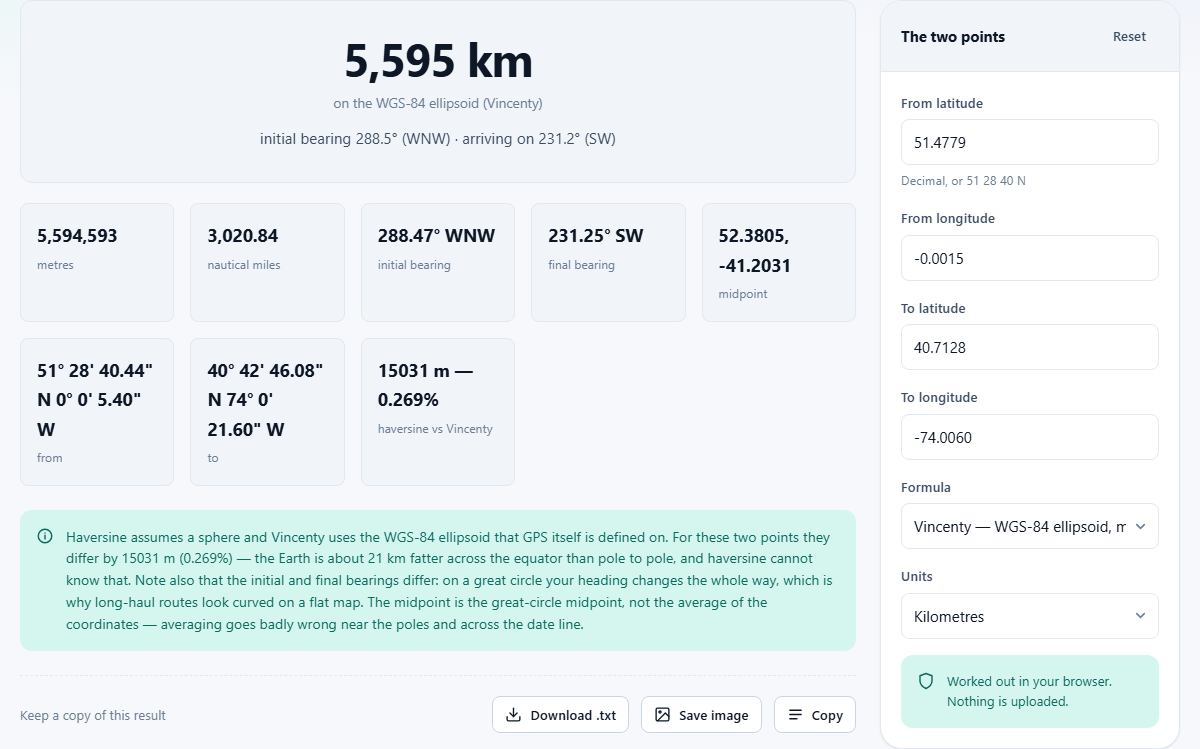
What the tool works out
Give it two points on the Earth's surface and it returns the great-circle distance between them, the compass bearing you would set off on, the bearing you would arrive on, and the coordinates of the halfway point. Those four answers together describe the shortest path between the two places as if you could draw a line across the globe.
The headline distance is shown in whichever unit you pick, kilometres or miles, with a metre figure and a nautical-mile figure listed alongside it. The bearings are given in degrees from north, running clockwise. All of this appears the moment you change a coordinate, so there is no button to press and no waiting.
Entering coordinates in any format you have
The four input fields are labelled From latitude, From longitude, To latitude and To longitude. Decimal degrees are the simplest way to fill them in. Most mapping services and GPS apps will show you coordinates in this form, and you can paste them straight in.
If your source uses degrees, minutes and seconds instead, that works too. Type something like 51 28 40 N or use the symbols if you prefer. The page reads both styles and treats a hemisphere letter the same as a minus sign, so negative numbers for south and west are just as valid as the letter S or W. You do not need to worry about matching the format the page expects, because it accepts all the common ones.
Two formulas and why both are offered
The Formula selector gives you two choices. Vincenty works on the WGS-84 ellipsoid, the same mathematical shape GPS satellites use to describe the Earth. It is accurate to a fraction of a millimetre and is the right choice whenever the answer matters for anything practical.
Haversine treats the Earth as a perfect sphere. That makes the maths shorter and the code faster, but it is wrong by up to about half a per cent. On a thousand-kilometre leg that half per cent is roughly five kilometres, because the real Earth is about twenty-one kilometres wider at the equator than it is from pole to pole. The tool reports the difference between the two answers so you can judge for yourself whether it matters for your case.
When Vincenty does not converge
Vincenty's method is iterative. It starts with a guess and refines it over many steps until it settles on the answer. For nearly antipodal points, two places that are almost exactly opposite each other on the globe, the refinement can fail to settle at all. This is a known property of the algorithm, not a bug in the tool.
When it happens, the page says so clearly and shows the haversine result instead. In practice you will only run into this if you deliberately pick two spots that are within a fraction of a degree of being on opposite sides of the planet. For every other pair of coordinates, Vincenty finishes in well under a second.
Why the two bearings are not the same
On a short walk, the compass heading at the start is the same as the heading at the end. On a long journey across the globe, it is not. A great circle crosses every meridian at a different angle, which means the direction you face keeps changing as you travel along the curve.
The tool reports both the initial bearing and the final bearing. The initial bearing is the heading you would set off on from the first point. The final bearing is the heading you would be following when you arrived at the second point. From London to New York, for example, the initial bearing is roughly 288 degrees and the final bearing is roughly 237 degrees. That gap is large, and it is the reason long flights look curved on a flat map even though they are taking the shortest path.
A route that keeps a constant compass heading is called a rhumb line. It is easier to steer but it is always longer than the great circle. The tool calculates the great circle, which is the shorter of the two.
The midpoint and why averaging does not work
Below the distance and bearing figures, the tool shows the coordinates of the midpoint along the great circle. This is not the same as taking the average of the two latitudes and the average of the two longitudes. Simple averaging goes badly wrong in two situations: near the poles, where longitude lines crowd together and a small longitude gap covers very little ground, and across the international date line, where averaging 170 east and 170 west puts the midpoint in the wrong ocean.
The great-circle midpoint avoids both traps by working in three-dimensional space, finding the halfway point on the curve, and then converting back to latitude and longitude. The result is always the point that is equally far from both ends along the surface of the Earth, which is what you usually mean when you say halfway.
Surface distance versus travel distance
The number the tool gives is the distance along the surface of the Earth between two points. It is what a plane flying in still air would cover, or what a ship navigating open water would log. It is not road distance. A highway between two cities is always longer than the straight-line figure because it follows terrain, bends around obstacles, and rarely takes the most direct route.
Altitude is not included either. Two points that are three kilometres apart horizontally but separated by a five-hundred-metre climb are further apart on foot than the tool reports. If you need walking or driving distance, a mapping service that knows the road network is the right answer. If you need how far apart two coordinates are on the globe, this is the right tool.
Practical uses beyond the classroom
Pilots use great-circle distances to plan fuel loads. Radio engineers use them to estimate signal strength over a given range. Sailors use the nautical-mile figure to lay out legs of a passage. Photographers planning a shot sometimes need to know how far away a mountain is to work out what focal length will frame it.
The tool is also useful for simpler things. How far is it from one city to another, in a straight line? How far north or south of the equator is a place? What bearing would you walk on to head from one GPS waypoint to the next? These are all the same calculation, and the answer appears instantly.
Hikers and geocachers often have a set of waypoints stored as coordinates. The fastest way to estimate total leg distance is to run each pair through the tool and note the figure. Since each result appears the moment you change a field, checking a dozen legs takes well under a minute.
Choosing between kilometres and miles
The Units selector switches the main distance figure between kilometres and miles. Nautical miles always appear alongside, since they are defined by the geometry of the Earth itself: one nautical mile is one minute of latitude. Whichever unit you choose, the bearing and midpoint figures stay the same, because angles and positions on a sphere do not depend on how you measure length.
If you are working in a field that uses nautical miles, such as aviation or marine navigation, the figure is ready to use directly. One degree of latitude is sixty nautical miles, and one minute is one nautical mile, which is why the unit ties so neatly to coordinate geometry. The conversion from kilometres to nautical miles is baked into the result, so you never need to do it by hand.
Everything stays on your device
The coordinates you type are not sent anywhere. All of the arithmetic, the Vincenty iteration, the haversine formula, the midpoint calculation, runs in your own browser. You can disconnect from the internet after the page loads and every feature continues to work. There is no account, no stored history and no server involved at any point.