
Working out the freelance rate that actually pays the bills
Most people starting out as freelancers take their old salary, divide by the number of working hours in a year, and quote that figure. It is always too low, because it ignores tax, business costs, holiday, and the hours spent finding work rather than doing it. This article walks through the Freelance Rate Calculator field by field, explains why the answer is higher than you expect, and covers the thinking behind each input.
Starting from what you need, not what you earned
The first field asks for the take-home you want, after tax, per year. This is the money that actually reaches your life: rent, food, savings, everything that is not the business. Starting from this number and working backwards through the costs is the whole point. Most rate calculators start from the rate and tell you what you might earn. This one works the other way around, because the income target is the number that matters and the rate is just the lever that gets you there.
Set this figure honestly. It does not have to match your old salary. It can be more if you want freelancing to improve your situation, or less if you are trading income for flexibility. What matters is that the final rate covers it. If you set this number too low to seem modest, you are not being cautious. You are building a rate that will not sustain you for a full year.
Business costs that a salary hid from you
The Business costs field takes a yearly total for everything the business spends that is not your pay. Software subscriptions, professional insurance, equipment, coworking space, accounting fees, travel to client sites, and all the small things that add up over twelve months. An employer absorbed these invisibly. As a freelancer, every one of them comes out of your revenue before you see a penny.
If you are just starting and have no idea, tally the tools you already know you will need and add a margin. Software and insurance alone can run to several thousand a year in many fields. A reliable laptop, a decent internet connection and a chair you can sit in all day are costs too, even if you already own them, because eventually they need replacing. Underestimating here does not change reality; it just means the rate you quote will not cover your actual spending.
Billable hours and the time that vanishes
You work forty hours a week but nobody pays you for all of them. The Of which billable field, expressed as a percentage, captures the fraction of your working time that a client actually sees on an invoice. The rest goes to finding the next job, writing proposals, chasing invoices, doing the accounts, answering emails that do not relate to a project, learning new skills, and maintaining the systems that keep you running.
Sixty-five percent is a decent target for someone with steady clients. In the first year, while you are still building a pipeline, forty to fifty percent is more realistic. Nobody reaches one hundred percent, ever. If you set this slider too high you will quote a rate that looks affordable but leaves you working unpaid hours every week to keep the machine turning.
Weeks off, and why six is not generous
The Weeks off a year field covers holiday, sick days and the quiet spells between contracts when nobody is buying. Six weeks is not a luxury; it is roughly what a salaried employee gets when you add up annual leave, public holidays and a few sick days. Freelancers do not get paid for any of them, so those weeks must be earned during the weeks that remain.
This is the input that surprises people most, because holiday costs twice. Taking six weeks off does not reduce your income by six fifty-seconds. The other forty-six weeks have to carry the entire annual target, so each of those weeks has to earn proportionally more. Cut the weeks off to zero and the rate drops, but so does your health.
Tax, pension and the numbers on top
The Tax and contributions field takes your effective rate as a percentage. This is not the marginal rate on your top band of income; it is the blended rate across everything you earn. It varies enormously depending on where you live and how you trade. Self-employment, a limited company, and working through an umbrella arrangement can differ by twenty percentage points on the same gross income. If you do not know your effective rate, ask your accountant or look at last year's total tax as a fraction of total income.
The Pension field adds a percentage of your take-home on top. An employer might have contributed five or ten percent to your pension without you thinking about it. As a freelancer, that contribution is your job. Setting it to zero does not mean you do not need a pension. It means you have chosen not to include it in the rate, and your future self will notice.
Reading the results
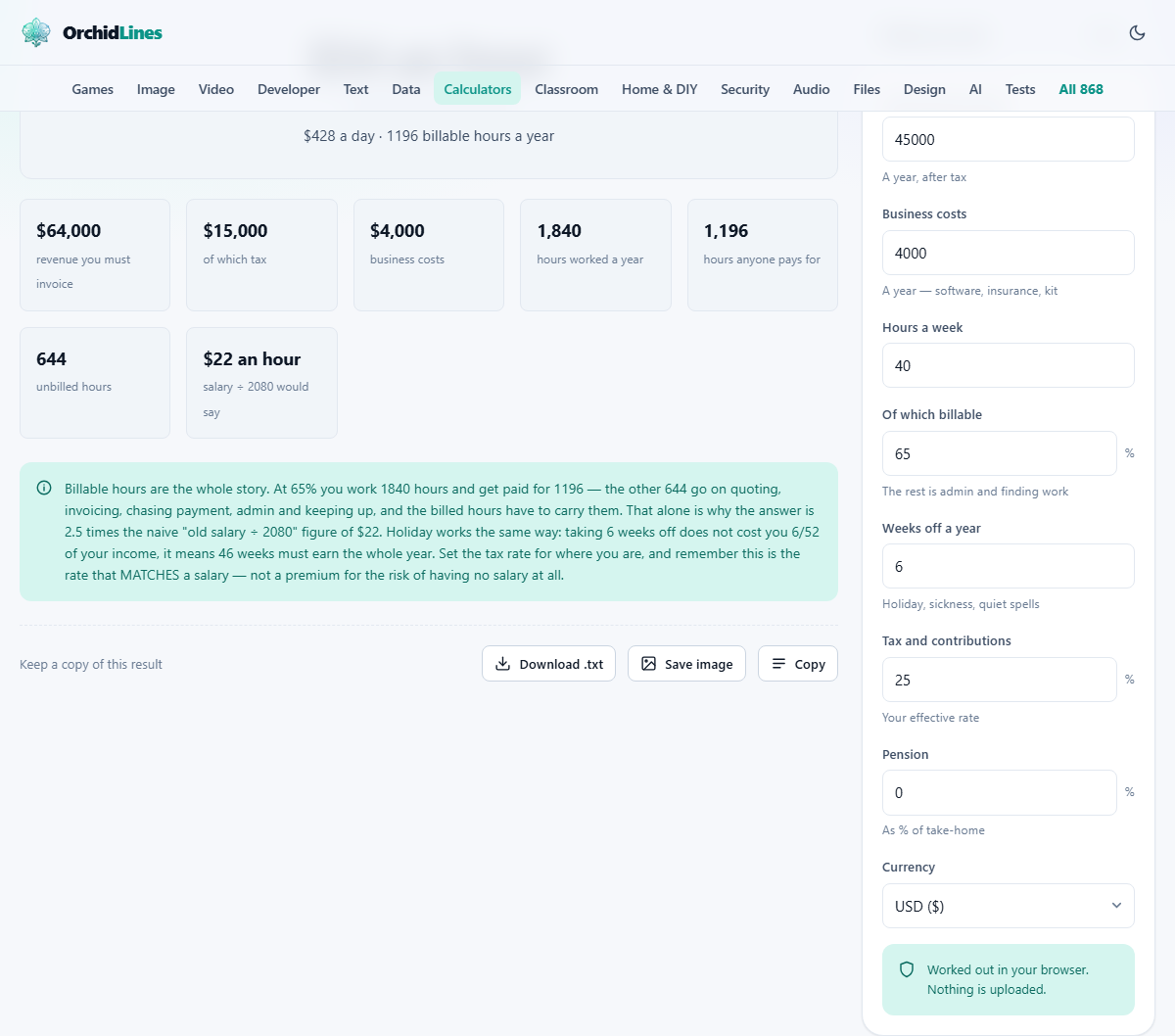
The output shows an hourly rate and a day rate. The day rate assumes eight hours. Below that comes the revenue you have to invoice over the year, how much of it goes in tax, and what your business costs take. Then three hour figures: hours worked, hours anyone pays for, and the unbilled hours in between. That last pair is what makes the headline rate so much larger than the take-home figure.
There is also a comparison with the naive calculation that people do when they first go freelance: salary divided by two thousand and eighty hours. The gap between that number and the real rate is the size of the mistake you would make by guessing, and it is bigger than most people imagine. On the figures the page opens with, the honest rate is about two and a half times the naive one. That is why so many freelancers undercharge in their first year.
The rate is a floor, not a ceiling
Everything this calculator produces is the minimum rate that matches a salary. It does not include a premium for the risk you carry. A salaried employee has a notice period, statutory sick pay, employer pension contributions, and a guarantee of work for as long as the contract lasts. A freelancer has none of that. The rate should be higher than the floor to compensate for the uncertainty.
What you can actually charge depends on the value your work creates for the client, not on your personal costs. If a project saves a company fifty thousand, the fact that your cost-based rate works out to three hundred a day is interesting to you but not to them. The calculator tells you the lowest figure that keeps the lights on and feeds you properly. Pricing is a separate conversation entirely.
VAT and sales tax stay out of the picture
If you are registered for VAT or collect sales tax, that money is not yours. It passes through your business on its way to the government. Do not include it in the take-home figure, and do not fold it into the tax percentage. The rate the calculator shows is the net figure you quote before tax is added on top.
Some clients, particularly larger companies, expect to see VAT on invoices and will ask for it. Others, especially in countries where freelancers sit below the registration threshold, will not. Either way, the rate you need to cover your costs is the pre-tax number, and adding VAT changes what the client pays but not what you earn.
Privacy and where these numbers stay
Income, tax rates and business costs are personal financial data. Nothing you enter on this page leaves your device. The calculation runs entirely in your browser, and there is no account, no login and no server to send the numbers to. You can verify this by disconnecting from the internet after the page loads: the calculator keeps working, because it has nothing to phone home about.
That matters here more than on most calculators. The combination of desired income, tax rate and business costs paints a detailed picture of your financial situation, and the rate at the end is something you might not want a competitor to see. None of it is transmitted or stored anywhere other than the browser tab you are looking at.