
Fractions with every step written out
Most fraction calculators give you the answer and nothing else, which is no help at all if you are trying to learn the method. This page shows every intermediate step: the common denominator, the cross-multiplication, the cancelling and the final simplification. This article walks through each mode the calculator offers, explains the rules behind the steps, and covers the places where fractions confuse people most.
Choosing what you want to do
The What do you want to do dropdown has five modes. The first and most common is Calculate with two fractions, which covers addition, subtraction, multiplication and division. Below that, Simplify one fraction reduces a single fraction to its lowest terms. Turn a fraction into a decimal converts the other way. Turn a decimal into a fraction goes back again. And Compare two fractions tells you which of two fractions is larger, or whether they are equal.
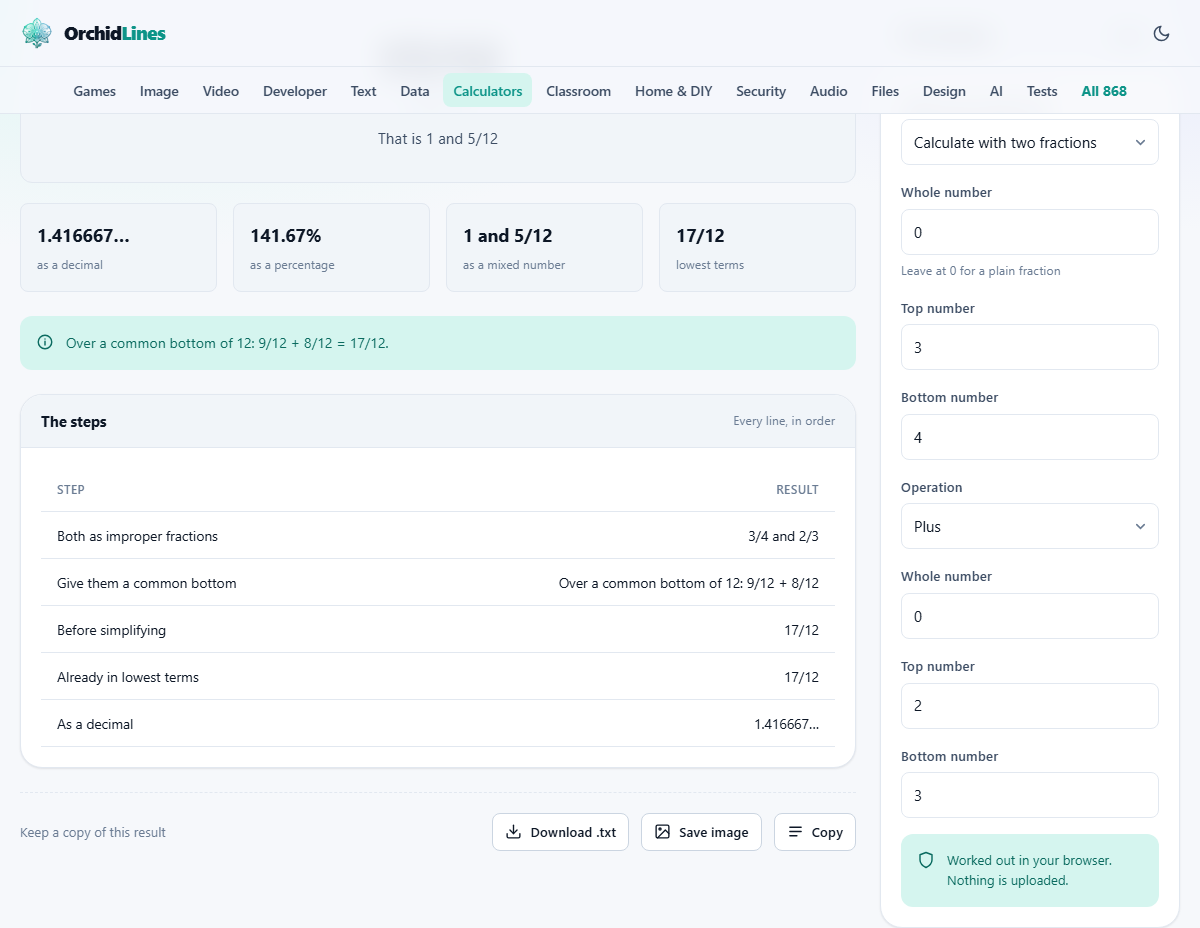
The page rearranges itself depending on which mode you choose. In the two-fraction modes, fields for both fractions and an operation selector appear. In single-fraction modes, only one set of fields shows up. In decimal mode, a separate Decimal input replaces the numerator and denominator boxes. Everything recalculates the moment you change a number or switch modes.
Entering fractions and mixed numbers
Each fraction has three fields: Whole number, Top number and Bottom number. For a plain fraction like three quarters, leave the whole number at zero, type 3 in the top and 4 in the bottom. For a mixed number like two and a half, put 2 in the whole number, 1 in the top and 2 in the bottom.
The tool converts mixed numbers into improper fractions before it does anything else, and shows that conversion as the first line of working. Two and a half becomes five halves, because two times two is four, plus one is five, over two. This step matters because adding or multiplying mixed numbers directly leads to mistakes. The whole part and the fraction part interact in ways that catch people out if they try to handle them separately. The conversion is done for you, but seeing it written out is part of the point.
Adding and subtracting fractions
Adding fractions with the same bottom number is straightforward: keep the bottom, add the tops. Three eighths plus two eighths is five eighths. The difficulty arrives when the bottom numbers differ, because you cannot add parts of different sizes without making them the same size first. You would not add centimetres to inches without converting first, and fractions work the same way.
The tool finds a common denominator, rewrites both fractions with that bottom number, adds the new tops, and then simplifies. Each of those stages appears as a separate line. You do not strictly need the lowest common denominator for this to work. Multiplying the two bottom numbers together always gives a valid common denominator. It just produces bigger numbers that need more simplifying at the end. The tool uses the least common multiple when it can, to keep things tidy.
Subtraction follows exactly the same process. The only difference is that you subtract the tops instead of adding them. If the result is negative, the tool shows a negative fraction in its simplest form. The common denominator step is identical regardless of whether you are adding or subtracting, so once you understand one you have understood both.
Multiplying and dividing fractions
Multiplication is the easy one, and many people find it more natural than addition because it does not require a common denominator. Multiply the tops together and the bottoms together. Three quarters times two thirds is six twelfths, which simplifies to one half. The working shows the multiplication and then the cancelling step where both sides are divided by their highest common factor.
Division looks harder but follows a single mechanical rule: turn the second fraction upside down and multiply. Three quarters divided by two thirds becomes three quarters times three halves, which gives nine eighths. The reason this works is that dividing asks how many of the second thing fit inside the first. It often produces a result that is larger than either of the two inputs, which surprises people who associate division with making things smaller. Half divided by a quarter is two, not an eighth, because two quarters fit inside one half. If the answer to a division looks suspiciously large, it is probably correct.
Simplifying and the highest common factor
Every answer the tool produces is already in its simplest form, but you can also feed it a single fraction and ask it to simplify. The process is always the same: find the largest number that divides evenly into both the top and the bottom, and divide both by it. Twelve eighteenths becomes two thirds, because six goes into both twelve and eighteen.
The working shows which factor was used, so you can check it against your own reasoning. If the top and bottom share no common factor other than one, the fraction is already in its simplest form and the tool says so. Spotting common factors is a skill that gets faster with practice, and checking your answer against the tool is a good way to build that speed.
Converting between fractions and decimals
Turn a fraction into a decimal divides the top by the bottom and shows the result. Some fractions produce terminating decimals: one quarter is 0.25 and that is the end of it. Others produce repeating decimals: one third is 0.333 recurring, and the tool says so in as many words, adding a trailing ellipsis to the digits it prints.
The pattern depends on the bottom number. If its only prime factors are 2 and 5, the decimal terminates. Anything else repeats. Sevenths, for instance, produce a six-digit repeating cycle. The tool shows enough digits to make the pattern clear.
Going the other way, Turn a decimal into a fraction, takes a decimal in the Decimal input and converts it. For a terminating decimal like 0.375, the result is exact: three eighths. For a long or rounded decimal, the tool finds the simplest fraction that matches.
Comparing two fractions
The compare mode rewrites both fractions with a common denominator and then reports which top number is larger. This tells you at a glance whether three fifths is more or less than five eighths, without having to convert both to decimals in your head. The output also shows the decimal equivalents side by side, which can make the comparison more intuitive for people who think in decimals.
Comparison is useful in everyday life more often than it seems. Choosing between a discount of one third off and one of three tenths off is a fraction comparison. Deciding whether a recipe that uses two fifths of a cup needs more or less than one that calls for three eighths is the same problem. The common denominator method always gives a clear answer.
The output formats
Every answer appears in several forms at once. The fraction in its simplest terms is always shown. Beside it you get the decimal equivalent, the percentage, and the mixed number form if the fraction is improper. This saves a second trip to a different converter when the original question wanted the answer as a percentage or as a number-and-a-fraction.
The working section is the long part, and it is meant to be read top to bottom like a textbook solution. Each line follows from the last. If you are learning fractions, reading this working with your own numbers is more useful than reading a generic explanation with letters standing in for the values.
Everything runs locally in your browser
The arithmetic is done on your own device. No numbers are sent to a server, and there is no account or login. You can load the page once and then work offline, which makes it handy for homework sessions without an internet connection. All the computation happens in the browser tab you are looking at, and closing it clears everything.
The page is a calculator, not a tutor. It shows the mechanical steps faithfully, but it does not explain why those steps work in the way a teacher would. If the working raises a question you cannot answer on your own, use it as a starting point for a conversation with someone who can. The value is in seeing the method applied to your own numbers, not in reading a textbook explanation with abstract letters in place of real values.