
Settling group expenses without the arguments
Shared trips and group dinners end with the same question every time: who owes what to whom? Working it out by hand means chasing fifteen tiny debts when three bigger payments would do the same job. This article explains how the Shared Expense Splitter builds a short settle-up list, how weighted shares handle couples and children, and the mistakes that trip people up when they try to do it themselves.
The problem with settling pair by pair
Six friends go on a trip. Everyone pays for different things. At the end, there are fifteen possible pairs of people who could owe each other money. Settling each pair separately means a wave of tiny bank transfers the next morning, half of which are for amounts nobody cares about. Most people give up halfway through and agree to call it even, which quietly means the person who paid for the most is out of pocket.
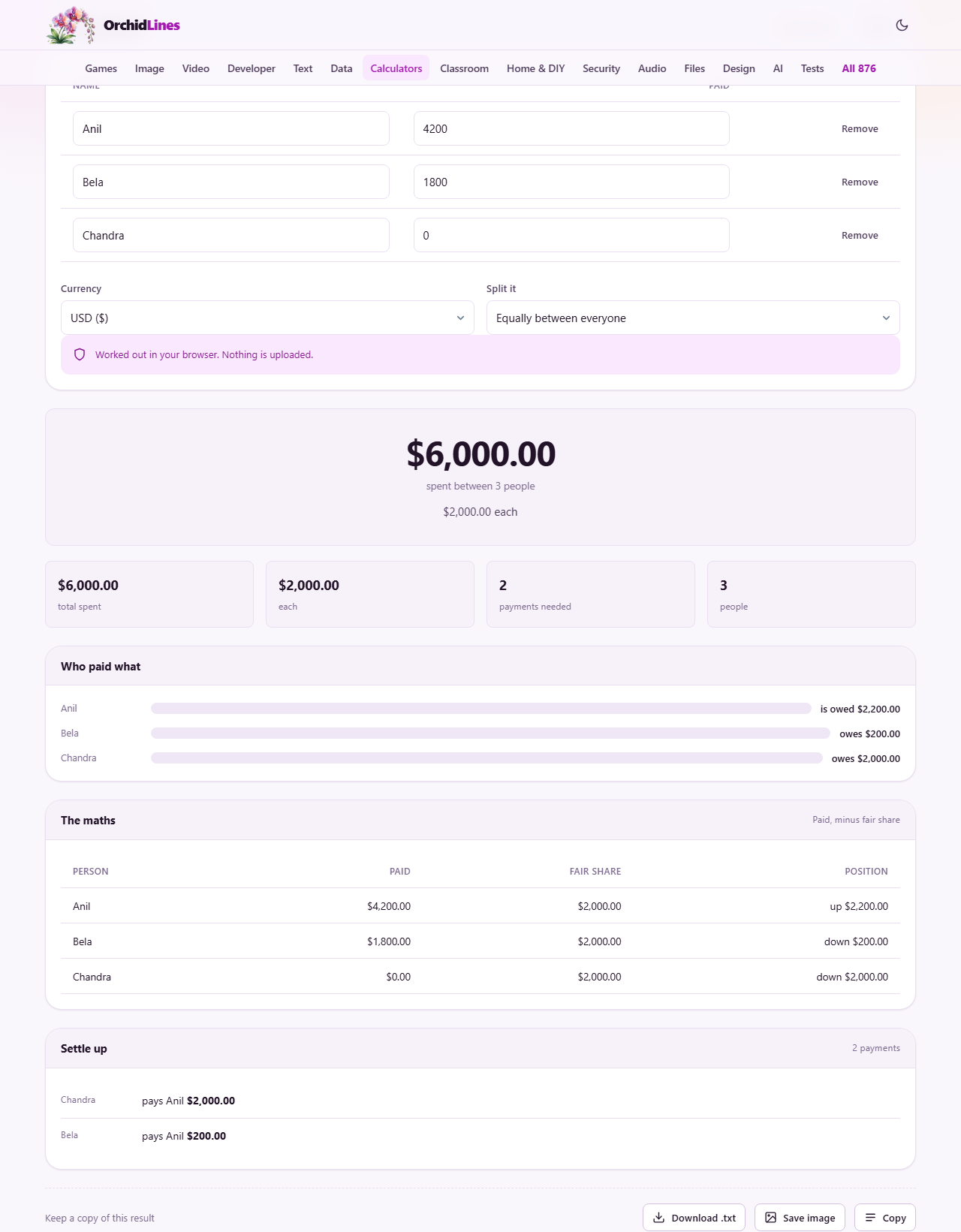
A smarter approach starts from the average. Add up everything that was spent and divide by the number of people. Anyone who paid more than the average is owed the difference. Anyone who paid less owes the difference. The settle-up list then matches the biggest debtor with the biggest creditor, subtracts as much as it can, and moves on to the next pair. This greedy matching always settles a group of any size in at most one fewer payment than there are people, and usually far fewer than that.
Adding people and what they paid
The page starts with a short list and an Add a person button. For each person, type a name and the total they spent during the trip. You do not need to break it down by receipt or by meal. A single combined figure per person is all the arithmetic needs.
People who came along but paid for nothing still belong in the list. Enter zero for them. Leaving them out entirely changes the average and shifts the burden onto everyone else. Removing a person works the same way in reverse: the average recalculates the moment the row disappears. The Reset button clears everything and puts the page back to its starting state. You can add and remove people at any point, and the settle-up list updates every time you make a change.
Equal splits and weighted shares
By default the split is equal. Every person carries the same share of the total bill, no matter what they ordered or how much floor space they used. This works well when the group is roughly similar and nobody wants to count pennies.
When it does not work, the shares column appears. Switch the Split it dropdown from Equally between everyone to By the share column and a weight field shows up next to each name. A couple sharing one room might get a share of 2 while a child who ate half as much gets 0.5. The maths divides the total by the sum of shares instead of by the head count, then multiplies each person's share by their weight. The result is the same structure, a list of who pays whom, but the amounts reflect the weights you chose.
Reading the settle-up list
Once you have everyone entered, a result panel appears below the input. It lists each payment that needs to happen: who pays, who receives, and the exact amount. The list is deliberately short. Three payments that move the right amounts of money do the same job as a dozen smaller ones, and everyone finishes settling up sooner.
Each line in the list is a single transfer. It names the person who should pay, the person who should receive, and the exact figure in the chosen currency. You can read it aloud to the group or screenshot it and share it over a messaging app. Once every transfer on the list has been made, the group is square and nobody owes anybody anything.
The Currency selector sits under the list of people and sets the symbol that appears in the output. Pick it before you start entering amounts, and keep everything in the same currency. There is no built-in conversion, so if someone paid in a different currency on the trip, convert it yourself before typing it in. Mixing two currencies in the same list will produce a total that does not match either one.
How the minimisation works
The algorithm is simple enough to trace by hand. First it works out each person's balance: what they paid minus their fair share. Positive means they are owed money, negative means they owe it. Then it sorts those balances and repeatedly pairs the most negative with the most positive, transferring as much as the smaller balance allows. One of the two is zeroed out each time, so the list shrinks by at least one person per round.
This is not promised to be the smallest possible list. Finding the true minimum means testing every way of carving the group into sub-groups that already balance, and that gets slow very quickly. Greedy pairing is instant, it comes close, and it never needs more than one payment fewer than there are people. If two of your friends would rather swap who pays whom for personal or social reasons, they are free to do so, as long as every balance still reaches zero at the end.
Common mistakes and how to avoid them
The biggest mistake is leaving someone out. If four people went but you only enter three, the average goes up and the three who are listed overpay relative to what they should actually owe. Always include everyone, even if their total is zero.
The second mistake is double counting. If one person bought the groceries and a different person cooked dinner using those groceries, only the grocery bill is a cost. The cooking is labour, not a payment. Enter amounts that actually left a wallet, not the value of a contribution.
A third trap comes from entering amounts after tax or before tax inconsistently. Pick one approach and stick to it. If one person enters the total on their receipt and another enters only the pre-tax price, the average is wrong and the settle-up list will not balance.
Planning ahead on a longer trip
The data stays in your browser between visits, so you do not need to do the maths at the end of the trip. Add each day's spending as it happens and watch the settle-up list update. By the last evening you already know who owes what, and you can settle on the spot before everyone flies home and forgets.
There is no account and no login. The names and numbers live in your browser's local storage, which means they survive closing the tab but do not follow you to a different device. If you want a record, copy the settle-up list before you clear the page.
When a spreadsheet might be better
This tool handles the common case well: one pot of money, one group, one currency. If your trip had sub-groups who split certain meals differently, or rooms that were shared by two people while activities were shared by five, the single-pot model does not capture that. You would need a spreadsheet with a row per expense and a column per person marking who joined each one.
Shared houses with monthly bills are another case where a more detailed record helps. Gas, electricity, internet and groceries might all be split differently depending on who uses what. A one-number-per-person model does not track those distinctions. For that kind of ongoing arrangement, a proper ledger with categories works better than a trip splitter.
For most weekend trips, holidays and shared dinners, though, one total per person and an equal or weighted split does the job. The goal is to finish settling up in a few payments with no arguing, and the page does exactly that.
Privacy and where the numbers go
Every calculation runs on your own device. The page does not send names, amounts or results anywhere, and you can confirm that by loading it once and then turning off your internet connection. The splitter carries on working, because there is no server involved.
That matters here more than it might on other calculators. Expense lists contain names and money, and people are understandably cautious about typing both into a website. Nothing typed on this page is transmitted, stored remotely or visible to anyone but you.