
Solving linear, quadratic, cubic, and simultaneous equations step by step
Plugging numbers into the quadratic formula is easy to describe and surprisingly easy to get wrong: a missed minus sign, a squared term that should have been negative, a discriminant worked out in the wrong order. This article explains every mode of the Equation Solver, walks through worked examples with real coefficients, and covers the extra information the tool gives beyond the bare roots.
What the solver covers
The tool handles four kinds of equation. A linear equation in the form ax + b = c, where the answer is a single value of x. A quadratic in the form ax squared plus bx plus c equals zero, which can have two roots, one root, or no real roots at all. A system of two linear equations with two unknowns, solved by elimination. And a cubic in the form ax cubed plus bx squared plus cx plus d equals zero, which always has at least one real root and can have up to three.
For each type you enter the coefficients -- the numbers in front of each term -- and the solver returns the roots together with the working that produced them. The working is the part that matters for anyone learning, because copying an answer without understanding the steps is not actually solving anything.
Choosing the equation type
The dropdown labelled Type sits at the top of the panel. It offers four options: Quadratic, Linear, Two equations two unknowns, and Cubic. Picking one changes which coefficient fields appear below it. For a quadratic you see a, b, and c. For a linear equation you see a, b, and c as well, but they map to the form ax + b = c rather than to the squared form. For simultaneous equations, a second row of three fields appears for the second equation. For a cubic, four fields appear: a, b, c, and d.
The labels beside each option show the standard form, which is helpful when you need to rearrange your own equation to match. Everything must be on one side with zero on the other before the coefficients make sense. If your equation reads 2x squared equals 5x minus 3, you must rewrite it as 2x squared minus 5x plus 3 equals zero before entering a as 2, b as minus 5, and c as 3.
Getting the signs right
The single most common mistake with equation solvers is dropping the minus sign. In the equation x squared minus 5x plus 6 equals zero, b is minus five, not five. The subtraction is part of the coefficient, not part of the formula. If you enter 5 instead of minus 5, the formula still runs, but the roots are completely wrong.
The tool accepts negative numbers directly in the input fields. Type -5 in the b field and the working shows the formula filled in with your actual numbers, so you can check each substitution visually. If the roots look wrong, the first thing to verify is whether every sign matches your original equation.
A worked quadratic: x squared minus 5x plus 6 equals zero
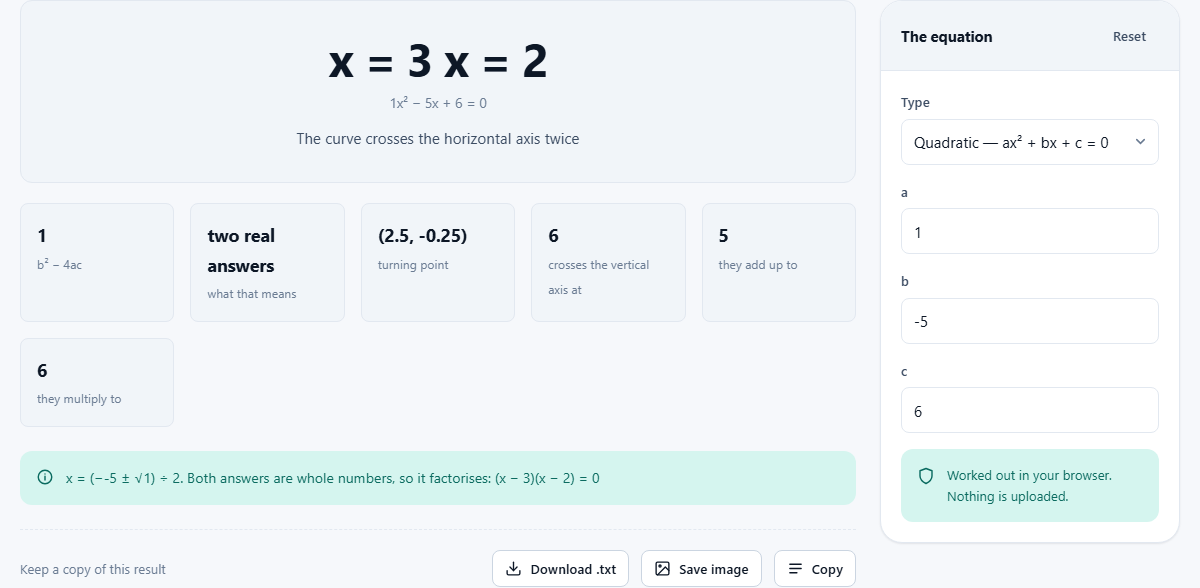
Set the type to Quadratic and enter a as 1, b as -5, and c as 6. These are the default values on the page. The discriminant, which is b squared minus 4ac, comes to 25 minus 24, which is 1. Because the discriminant is positive, there are two distinct real roots.
The quadratic formula gives x equals 5 plus or minus the square root of 1, all divided by 2. That produces x equals 3 and x equals 2. The output also shows the factorised form, which is (x minus 2)(x minus 3), because both roots are whole numbers. It gives the vertex of the parabola, at x equals 2.5 and y equals minus 0.25, and notes where the curve crosses the vertical axis, which is at y equals 6 when x is zero.
All of this appears in the output without any extra button press. Change a coefficient and the result updates instantly.
The discriminant: one number that decides everything
In the quadratic formula, the expression b squared minus 4ac sits under the square root sign. Its value determines how many real solutions exist before you do any further arithmetic. If it is positive, there are two real roots and the parabola crosses the horizontal axis in two places. If it is exactly zero, there is one repeated root and the parabola just touches the axis. If it is negative, there are no real roots at all.
When the discriminant is negative, the square root of a negative number produces an imaginary component. The solver still shows the complex roots in the form a plus or minus bi, and it notes that the parabola sits entirely above or below the axis without crossing it. This is the answer, not an error, and many courses expect students to give it.
Checking the discriminant first saves a lot of pointless work. If you know from the start that there are no real roots, you can skip the attempt to factorise and go straight to the complex form.
Simultaneous equations: two lines, one crossing point
Switch the type to Two equations, two unknowns and six fields appear. The first three are relabelled First equation: a, First equation: b and First equation: c, and below them sit Second equation: a, Second equation: b and Second equation: c. Each equation is in the form ax + by = c.
Enter a = 1, b = 1, c = 5 for the first equation and a = 3, b = -1, c = 5 for the second. The solver multiplies and subtracts to eliminate one variable, then back-substitutes to find the other. The result is x equals 2.5 and y equals 2.5, and the working shows which equation was scaled by what factor at each step.
Two parallel lines never cross, and the solver says so when it detects that case. If the two equations are multiples of each other, every point on the line is a solution, which is also reported. Checking the output message saves time when the equations were copied wrong and are accidentally identical.
Linear and cubic modes
The linear mode solves ax + b = c for x, which is straightforward subtraction and division. It exists because people sometimes need to check a rearrangement, and because entering a quadratic where a is zero would cause a division-by-zero error. The solver catches that case: if you set a to zero on a quadratic, it treats the equation as linear rather than crashing.
The cubic mode solves ax cubed plus bx squared plus cx plus d equals zero. A cubic always has at least one real root. It may have three distinct real roots, or one real root and two complex ones. When all three are real the solver lists them. When only one is real, it gives that root and the leftover quadratic, and marks the other two as complex rather than printing their values. Cubics are rarer in everyday homework but common enough in engineering and physics that having them here saves reaching for a more specialised tool.
Mistakes that waste time
Beyond the sign error already mentioned, a few other mistakes come up regularly.
- Not rearranging to standard form. If the equation is 3x squared equals 12, rewrite it as 3x squared minus 12 equals zero before entering a as 3, b as 0, and c as minus 12.
- Forgetting that a missing term has a coefficient of zero. In x squared minus 9 equals zero, b is zero, not missing. Enter it as 0.
- Confusing the vertex with a root. The vertex is the highest or lowest point of the parabola, not a solution of the equation. It sits at x equals minus b divided by 2a.
- Using the solver as a substitute for understanding. The working is there to be read. If the steps do not make sense, go back to the formula and trace each substitution by hand.
When a different approach is needed
This solver works with polynomial equations that have been arranged into standard form with known coefficients. It does not handle equations with variables in the denominator, trigonometric equations, logarithmic equations, or anything that requires an iterative numerical method. For those, a computer algebra system is the right tool.
It also does not graph the equation, though the vertex and axis-crossing information it provides are enough to sketch a rough curve by hand. If you need a precise plot, a graphing calculator or graphing tool is the better fit.
Privacy and where the solving happens
The entire calculation runs in your browser. Nothing you type is transmitted to a server. You can load the page, disconnect from the internet, and the solver continues to work. There is no login, no account, and no history of the equations you have entered stored anywhere outside your own device.
For students, this means homework equations stay private. For professionals checking a calculation, it means proprietary parameters are not exposed. The arithmetic is the same either way, but knowing that the data stays local removes one reason to hesitate.