
Working out what each appliance actually adds to your electricity bill
Most people know the kettle draws a lot and the phone charger does not, but almost nobody can put a number on what that difference means in money over a month. This article walks through the Electricity Cost Calculator control by control, shows a full worked example, and explains the gap between what the numbers say and what the bill says.
What the calculator does
The tool takes the power an appliance draws, the number of hours you use it per day, and the price you pay for each unit of electricity, then multiplies them together to show the running cost per hour, per day, per month and per year. A unit of electricity is one kilowatt-hour, which means a thousand watts running for one hour. A 100-watt ceiling fan running for ten hours uses exactly one unit.
That conversion from watts to units to money is all the arithmetic there is, but people get it wrong in a consistent way. They see 2000 W on a heater and think it costs 2000 of something. Watts measure how fast an appliance draws power at any given moment. Units measure how much it has drawn over a stretch of time. The heater uses two units per hour, so one hour a day for a month is about sixty units. The same heater left on for ten minutes costs a third of a unit.
Finding the wattage
The first thing the calculator needs is the number after the W on the appliance's rating label or plate. This is usually on the back, near the plug, or inside the battery compartment. If you cannot find the label, or the appliance is still in a shop, the dropdown labelled Pick a common appliance offers a list of everyday items with their typical wattage. Choosing one fills the Power it draws field, and you can still edit the number afterwards.
The preset list covers air conditioners at one ton and 1.5 ton, water heaters, electric kettles, microwaves, fridges, ceiling fans, LED bulbs, old filament bulbs, televisions, desktop computers, laptops, washing machines, clothes dryers, irons, hair dryers, dishwashers, water pumps, electric ovens, Wi-Fi routers, set-top boxes, games consoles, and phone chargers. Each shows its wattage in brackets beside its name.
Usage and rate: the numbers that matter most
Below the wattage are two fields that shape the bill more than anything else. Hours used per day is how many hours the appliance actually runs in a day, not how many hours it is plugged in. Days used per month is how many days per month it runs at all. A washing machine might do five hours a week, which is roughly five days at one hour each, not thirty days at five hours.
The Price per unit field takes the cost of one kilowatt-hour straight from your last bill. This number varies hugely by country, by state, and even by time of day. The default is only a starting point. If you do not know your rate, check the line on your bill that says cost per unit or price per kWh. The Currency dropdown beside it lets you pick the symbol used in the output.
The How many of them field multiplies the result for households with more than one of the same item. If you have five LED bulbs running in the same room, set that to five rather than working out each one separately.
Standby draw: the cost of doing nothing
The Standby draw field at the bottom of the panel is for the watts an appliance uses when it is not actively running but is still plugged in. A set-top box sitting idle can draw 10 to 20 watts around the clock. A games console in rest mode can draw similar numbers. Over a year, the standby draw on a device that is never truly off can cost more than a television that is watched for two hours every evening.
Leave this at zero for things that are properly switched off at the socket or that have no standby mode. For anything with a clock display, a remote sensor, or a status light, putting even a small number here shows what the always-on habit costs over twelve months.
A worked example: a 1.5 ton air conditioner
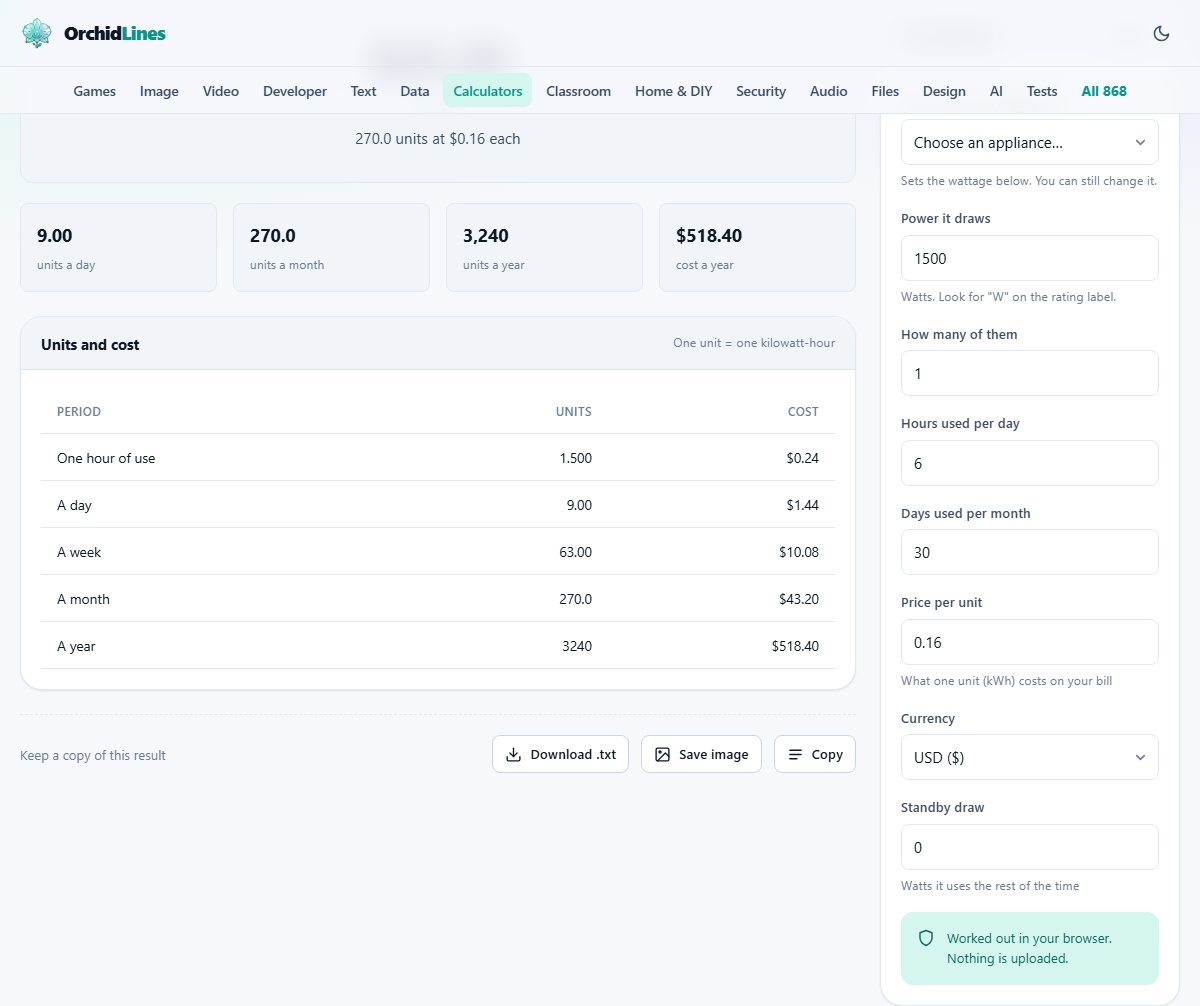
Pick the 1.5 ton air conditioner from the preset list and the Power it draws field fills with 1500 watts. Set Hours used per day to 6, Days used per month to 30, and Price per unit to 8. Leave How many of them at 1 and Standby draw at 0.
The output shows that this air conditioner uses 9 units per day and 270 units per month. At a rate of 8 per unit, the monthly cost is 2,160 in whichever currency you have selected. The yearly figure is 25,920, which is where the real weight of the number sinks in. If the unit has a standby draw of 15 watts, adding that figure shows another 10.8 units per month, or 86.4 per year, on top of the active running cost.
Now try changing the hours from 6 to 4. The monthly cost drops to 1,440, a saving of 720 per month just by running the unit two hours less each day. This kind of comparison is the most practical use of the calculator: seeing what a change in habit actually saves.
Why the bill is always higher
The calculator shows the cost of running one appliance at one rate. A real electricity bill adds several other things on top. There are fixed standing charges that apply regardless of how much you use. There are taxes and levies. And many suppliers use tiered pricing, where the rate per unit rises once you pass a monthly threshold.
If you are deciding whether to run something extra, use your highest tier rate in the calculator, because the extra usage sits on top of everything you already consume. If you are trying to estimate your total bill, add up the results for your main appliances and then add a margin for all the small background items and the fixed charges.
Heating, cooling, and why they dominate
Anything that makes heat or cold -- heaters, geysers, electric ovens, air conditioners, clothes dryers -- draws hundreds of times more power than anything that makes light or sound. A single LED bulb at 9 watts costs almost nothing to run all day. A water heater at 2000 watts costs more in fifteen minutes than the bulb costs in a week.
This is useful knowledge when trying to cut a bill. Replacing every light in the house with LEDs is a good idea, but the savings are modest next to running the air conditioner one hour less per day. Start with the hungry appliances, because that is where the money is. Inverter air conditioners are worth special attention: they throttle back once the room reaches the set temperature, so real-world draw is often 50 to 70 per cent of the rated wattage. Try both the rated figure and a reduced one to get a realistic range.
Common mistakes when estimating costs
The most frequent error is confusing the rated wattage with the cost. A 2000-watt heater does not cost 2000 of anything. The second most frequent is overestimating how long things run. A kettle draws a lot but only runs for three or four minutes per boil. Six boils a day is still only about twenty minutes of actual use, which comes to less than one unit.
Another trap is ignoring the fridge. It never draws much at any given moment, typically around 150 watts, but it never stops. Over a year a fridge can cost more than a kettle despite drawing a fraction of the power, simply because it runs around the clock every single day.
- Do not assume the number on the label is the cost. It is the draw in watts, and the cost depends on how long it runs and what you pay per unit.
- Be honest about hours, especially for the air conditioner. Most people underestimate it.
- Remember that a short burst of high power can be cheaper than a long stretch of low power.
When a different tool is the better answer
This calculator covers one appliance at a time at a single flat rate. If your tariff charges different rates at different times of day, you would need to run the calculator twice, once for the peak rate hours and once for the off-peak hours, and add the results. If you want to compare the cost of running an electric car with the cost of fuel, the EV Charging Cost calculator on the same site is built for that job and accounts for charging losses and the rapid-charge taper.
For a whole-house estimate, an energy audit is a better starting point than adding up individual appliances, because it catches the small always-on items that nobody remembers to list.
Privacy and where the numbers are crunched
Every multiplication happens inside your own browser on your own device. The page does not send your wattage, your tariff, or your usage pattern to any server at any point. You can load the page, switch off your internet connection, and carry on using it. There is no account to create and no data to share.
This is a straightforward calculator, so the privacy claim might sound like it goes without saying. But the inputs -- what you run, how long, and what you pay -- are household data that paints a clear picture of how you live, and it belongs to you.