
Understanding depth of field, hyperfocal distance, and diffraction limits
Every depth of field table is really an opinion dressed up as arithmetic. It depends on how big you print, how far away you stand, and what you call sharp. This article explains the concepts behind the calculator, walks through every control, works out a landscape and a portrait scenario, and explains why the numbers on screen may not match the sharpness you see in your photograph. All the maths runs on your own device.
What depth of field actually means
Only one distance in a photograph is truly in focus. Everything in front of it and behind it is at least slightly blurred. Depth of field is the range within which that blur is small enough that a viewer calls it sharp. The key phrase is small enough: it is a judgement about acceptable sharpness, not a physical boundary. Move the goalposts and the depth changes, which is why every number this calculator gives is conditional on one hidden assumption.
That assumption is the circle of confusion. It is the largest blurred dot that still looks like a point to the viewer. The standard figure for full frame 35 mm film is 0.03 mm, which assumes a print about 20 by 25 centimetres seen from about 25 centimetres away. View the same photograph full screen on a 27 inch monitor and the standard is far too generous. Half the circle of confusion and the depth of field roughly halves too.
The controls on the panel
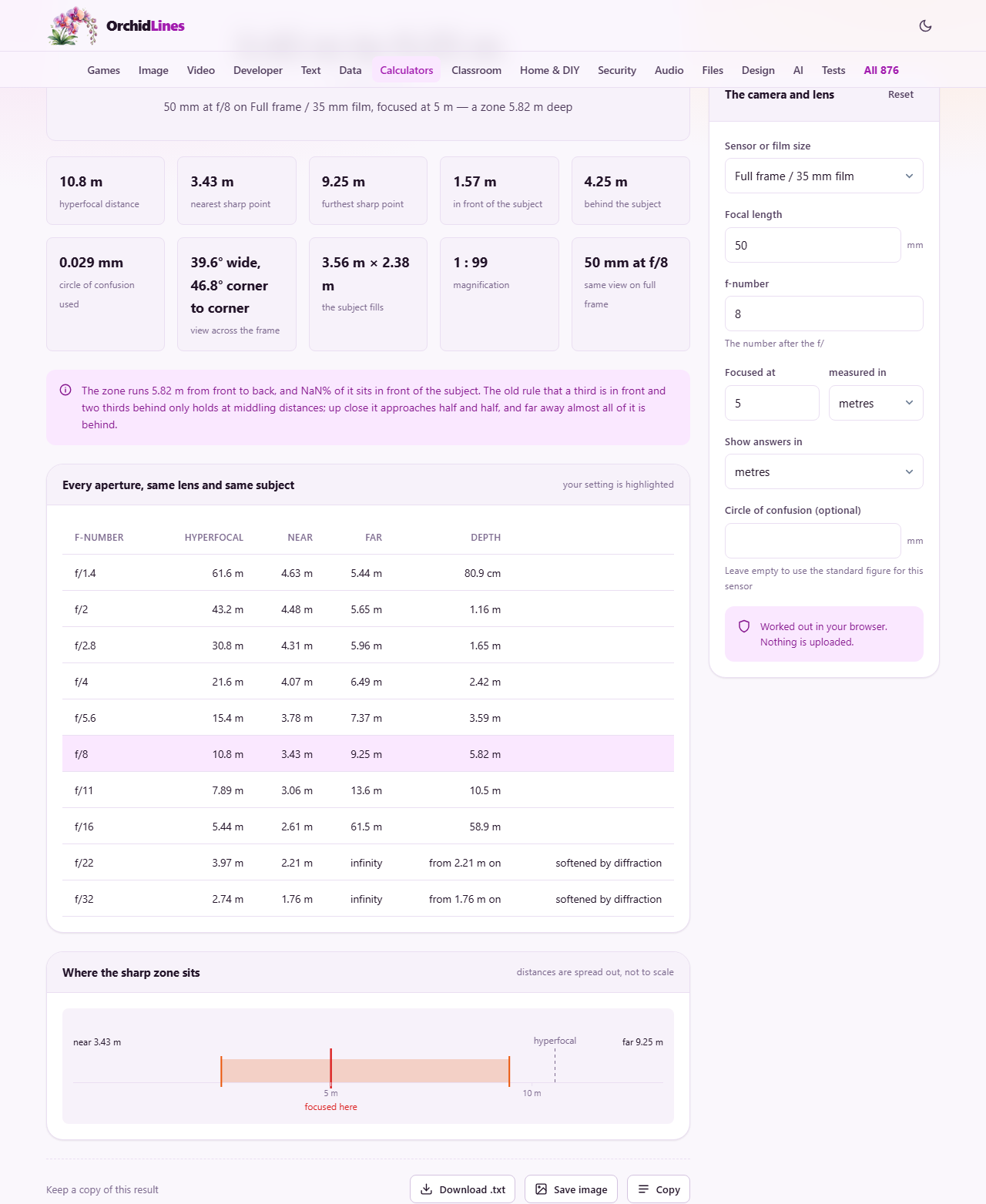
The dropdown labelled Sensor or film size sets both the crop factor and the default circle of confusion. Options include full frame, two APS-C sizes, Four Thirds, one inch, a phone or compact sensor, medium format, 645 roll film, large format, and a custom choice. Picking Something else reveals two extra fields, Sensor width and Sensor height, where you enter your sensor dimensions in millimetres.
Focal length is the lens length in millimetres. The f-number field takes the number after the f slash on your lens barrel. Focused at is the distance to your subject, and the dropdown labelled measured in lets you enter it in metres, centimetres, feet, or inches. Show answers in switches the output between metres and feet.
Circle of confusion (optional) overrides the standard figure when you want a stricter or looser definition of sharp. Leave it empty to use the standard for your sensor size, or type a smaller value when you plan to view the image at high magnification.
Reading the output
The calculator returns several figures at once. The hyperfocal distance is the closest focus point at which the horizon still falls inside the depth of field. The near limit is the closest point that counts as sharp, and the far limit is the furthest. The total depth of field is the distance between those two limits. The horizontal and vertical angles of view tell you how much of the scene fits in the frame.
It also shows the equivalent full-frame focal length and equivalent full-frame f-number. These let you compare cameras with different sensor sizes on an equal footing. A phone shooting at f/1.8 with its tiny sensor might give the same depth as a full-frame camera at f/11, and the equivalent f-number makes that comparison honest.
Below the main result, a table lists the depth of field at every standard f-stop for the same lens and subject distance. This table is the quickest way to see how much one more stop buys you, and where the gains start to shrink.
Worked example: a landscape on full frame
You are shooting a landscape with a full-frame camera, a 24 mm lens, and you focus at 3 metres. At f/8, the near limit is about 1.5 metres and the far limit stretches to infinity. The hyperfocal distance for this combination is about 2.9 metres, and since you focused at 3 metres you are essentially at the hyperfocal point. Everything from roughly 1.5 metres to the horizon is acceptably sharp.
Now open up to f/2.8. The hyperfocal distance jumps to roughly 8.2 metres, well beyond your 3 metre focus point. The near limit moves out to about 2.1 metres and the far limit drops to about 5.6 metres. You have gone from infinite depth to a zone barely 3.5 metres deep by opening three stops. The f-stop table on the page shows this progression at a glance.
Worked example: a portrait on APS-C
A portrait photographer using an APS-C camera with an 85 mm lens focuses on a subject 2.5 metres away at f/2. The near limit is about 2.47 metres and the far limit is about 2.53 metres, giving a depth of roughly 6 centimetres. That is thin enough that one eye can be sharp while the other is not, which is why portrait photographers focus on the nearest eye.
Stopping down to f/5.6 widens the depth to about 17 centimetres, enough to hold both eyes and the tip of the nose. The trade-off is a slower shutter speed or a higher ISO, so the decision is a balance between sharpness depth and exposure. The table at the bottom of the result lets you read off every standard f-stop without changing the input.
The diffraction limit and why stopping down stops helping
Light bends as it passes through a narrow opening, and that bending softens the image. At wide apertures the softening is tiny compared to the circle of confusion, so stopping down improves sharpness by deepening the field. Past a certain aperture the diffraction softening grows larger than the circle of confusion, and the whole image gets softer even though the nominal depth of field keeps growing.
On full frame with the standard circle of confusion, that crossover is around f/22. On a phone sensor it is around f/11. The calculator warns you when you cross this line. Any depth of field gained beyond it is fictional: the table says the zone is deeper, but the picture is visibly worse. Landscape photographers who habitually shoot at f/22 on crop sensors are often disappointed by the results, and diffraction is the reason.
Why your photograph looks less sharp than the numbers promise
The most common complaint is that a photograph looks softer than the calculated depth of field suggests. The reason is almost always the viewing conditions. The standard circle of confusion assumes a modest print seen at arm's length. Pixel-peeping a 50 megapixel file at full zoom on a 4K screen is nothing like that. The sharp zone you see on screen will be a small fraction of the figure the calculator gives.
If you want numbers that match your screen viewing, type a smaller circle of confusion in the optional field. Half the standard value is a reasonable starting point for screen work. Some photographers use a third of the standard, which gives conservative figures but rarely disappoints in practice.
Lens quality also matters. The depth of field formula assumes a perfect lens. Real lenses have aberrations that are worst at the widest and narrowest apertures. The sharpest results tend to come two or three stops down from wide open, which is another reason to check the f-stop table rather than just shooting wide open or fully stopped down.
The old one-third rule and when it fails
A well-known rule of thumb says one third of the depth of field falls in front of the focus point and two thirds behind it. This is roughly true at middling distances, but it breaks down at the extremes. Close up, the split approaches fifty-fifty. At distances near the hyperfocal point, almost all the depth extends behind the subject. The calculator shows the actual near and far limits so you do not need the rule of thumb at all.
When this calculator is not enough
It covers single-frame stills with standard lenses. It does not model tilt-shift lenses, which can angle the plane of focus and make a whole table top sharp at f/4. It does not account for focus stacking, where multiple frames at different focus distances are merged in software to produce a depth that no single aperture could achieve. And it does not model the shape of the blur in the out-of-focus areas, which is what photographers mean by bokeh.
Privacy
All calculations happen in your browser. No camera settings, lens data, or focus distances are sent to any server. You can disconnect from the internet and the page keeps working.