
Understanding dimensional weight and why your parcel costs more than it should
A courier's van runs out of space long before it runs out of weight capacity. To deal with that, carriers charge on whichever is greater: actual weight or a calculated weight based on size. That second figure is the dimensional weight, and it catches anyone shipping bulky items off guard. This article explains how the Dimensional Weight Calculator works, walks through every control, and shows you where the savings hide.
Why size matters as much as weight
Picture a delivery van. It can carry two tonnes, but its cargo area is finite. Fill it with feather pillows and it looks full while the suspension barely notices. Fill it with lead ingots and the springs bottom out before the floor is covered. Carriers need to charge fairly for both, so they invented a formula that converts a parcel's physical size into an equivalent weight.
The formula is simple: multiply the three dimensions of the box together to get its volume, then divide by a number called the divisor. The result is the dimensional weight. If that number is higher than what the parcel actually weighs, the carrier bills you for the dimensional weight instead. This is why a large, light box sometimes costs more to ship than a small, heavy one.
The controls on the settings panel
The panel is headed The parcel and holds eight fields. Currency sets the symbol used in the optional cost estimate. Units lets you switch between centimetres and kilograms or inches and pounds. When you change the unit system, the hints next to each measurement field update to match.
Length, Width and Height are the outside dimensions of the box. Measure at the widest point, including any bulge from contents pressing against the sides. Carriers do the same. Actual weight is what the parcel weighs on a scale. These four measurements are all the formula needs.
The divisor and why it varies
The Carrier divisor dropdown is where the money lives. A divisor of 5,000 is common for international express services using metric measurements. A divisor of 6,000 is typical for economy and air freight. For US domestic services measured in inches and pounds, 139 and 166 are the usual figures. A fourth option, 4,000, covers some regional domestic carriers.
A smaller divisor produces a larger dimensional weight from the same box, which means higher charges. Moving from 6,000 to 5,000 increases the dimensional weight of every parcel by 20 percent. Moving the other way, from 5,000 to 6,000, reduces it by about 17 percent. For regular shippers, the divisor is a normal point of negotiation with the carrier. Even a small improvement here cuts the bill on every single parcel.
Multiple parcels and the optional rate
Two extra fields sit below the divisor. How many parcels multiplies the result by a quantity, which is useful when a shipment travels as several identical boxes. Enter the count and the totals for both actual and dimensional weight scale accordingly.
Rate per kg or lb is marked as optional. If you fill it in, the calculator shows an estimated cost based on the chargeable weight and the rate you entered. This gives a rough idea of the bill, though the real invoice from your carrier will include surcharges, fuel adjustments and zone-based pricing that a simple per-kilo rate cannot capture. Leave it blank if you only want the weight comparison.
A worked example with a real parcel
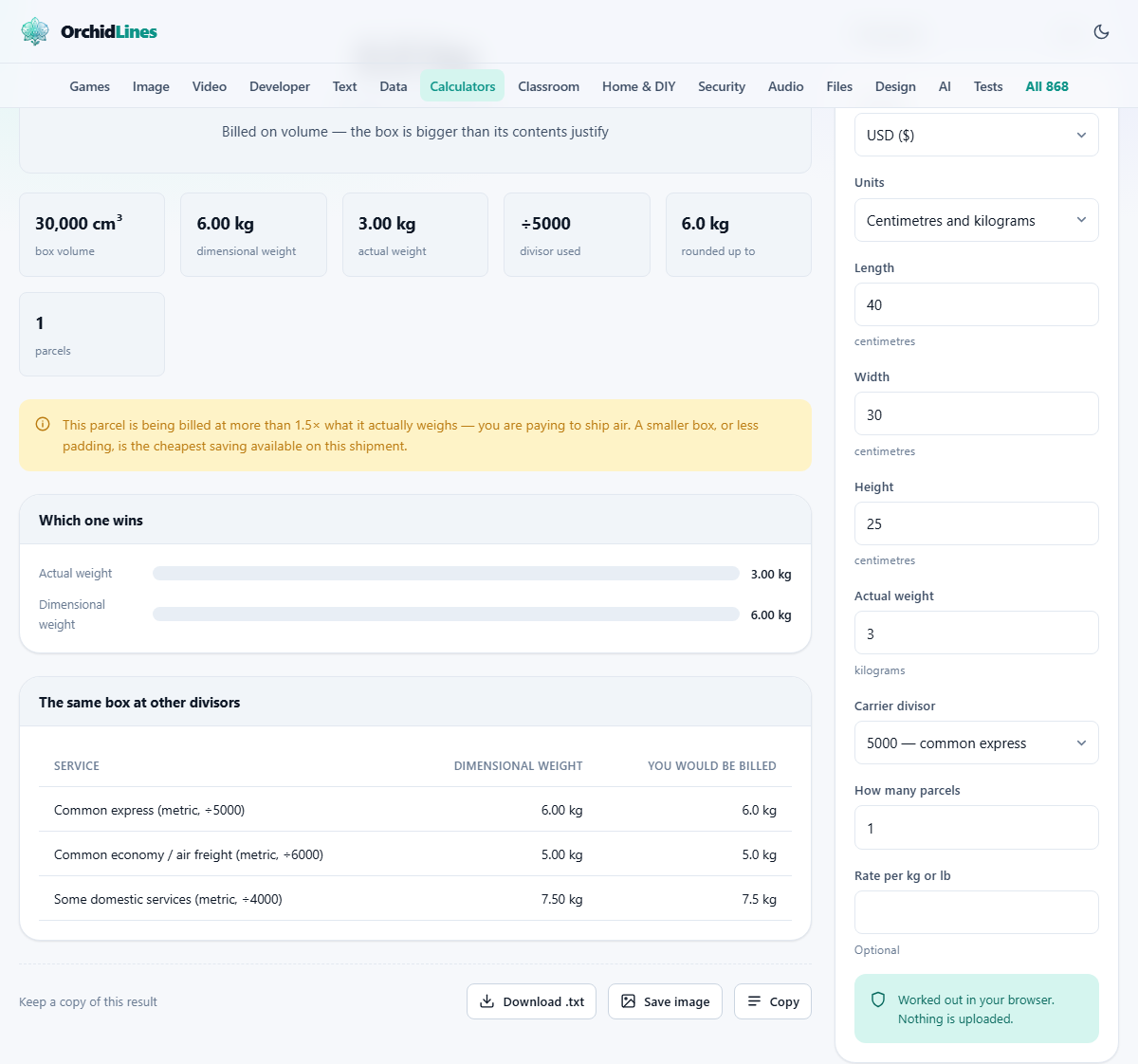
Suppose you are shipping a box that measures 40 cm by 30 cm by 25 cm and weighs 3 kg. The volume is 40 times 30 times 25, which is 30,000 cubic centimetres. With a divisor of 5,000, the dimensional weight is 30,000 divided by 5,000, which gives 6 kg. Since 6 kg is more than the actual 3 kg, the carrier will bill you for 6 kg.
Now imagine you switch to a service that uses a divisor of 6,000. The same volume of 30,000 divided by 6,000 gives 5 kg. Still more than the actual weight, but the chargeable weight has dropped by a full kilogram. If the rate is 50 per kg, that single change saves 50 on this parcel, and the saving applies to every identical box in the shipment. Set How many parcels to 10 and you can see the total chargeable weight for the entire consignment at a glance, which is what you need when comparing carrier quotes.
Reading the result and understanding which weight wins
The output compares the two weights and makes it clear which one the carrier would use. If the dimensional weight exceeds the actual weight, you are paying for the size of your box rather than its contents. That means you are effectively paying to ship air, and the gap between the two weights tells you how much air the carrier is charging you for.
When actual weight wins instead, the parcel is dense enough that its size is not the problem. In that case, switching to a lighter box or removing padding will not reduce the bill. The only way to lower the charge is to reduce the actual weight, perhaps by choosing lighter packing materials or splitting the contents across smaller, lighter boxes.
Practical ways to cut dimensional weight charges
The cheapest saving in shipping is a smaller box. If dimensional weight is winning, every centimetre you remove from any dimension reduces the volume and therefore the chargeable weight. Switching from a standard carton to a snug, custom-sized box often saves more than any negotiated discount would.
Avoid oversized void fill. Bubble wrap and air pillows protect the contents, but they also inflate the box dimensions. Crumpled paper or moulded inserts that fit the product closely keep the box smaller. For soft goods like clothing, poly mailers or flexible satchels collapse around the item and produce a much lower effective volume than a rigid box.
- Measure after packing, not before. The outside of the sealed box is what the carrier scans.
- Watch for rounding. Most carriers round each dimension up to the next whole centimetre or inch, and round the final weight up to the next half kilo or pound.
- Try a different service level. A service with a 6,000 divisor charges less on volume than one with 5,000, even if the base rate is similar.
- For multiple identical items, test whether two in one box or two separate boxes gives a lower total chargeable weight.
When dimensional weight does not apply
Letters and small packets are usually billed by weight and thickness within set size limits. Dimensional weight pricing kicks in once you are shipping parcels above a minimum size. Palletised freight has its own volume-to-weight rules, which are related but use different divisors and often measure the pallet footprint rather than individual box dimensions.
Some postal services do not apply dimensional weight at all for domestic parcels under a certain size. If your typical parcel is small and dense, like books, tools or canned goods, you may be paying actual weight already and this calculation would not change your bill. The calculator still helps you confirm that, because knowing you are safe from dimensional charges is as useful as knowing you are not.
Mistakes that cost money
The most common error is measuring the contents instead of the packed box. The carrier scans the outside of the parcel as it rolls down the conveyor, so bulging sides, protruding labels and taped-on handles all count. Measure the sealed, finished box at its widest points.
Another frequent mistake is using the wrong divisor. Rate cards change, and a contract renewal might shift you from 5,000 to 6,000 or vice versa. Always check the current number on your agreement. Using an old divisor gives you a reassuring estimate that does not match the invoice.
Privacy and where the numbers go
The calculation runs entirely inside your browser. The dimensions, weight and rate you enter stay on your device and are never sent to any server. Your inputs are saved in local browser storage so they are ready the next time you visit, but that storage belongs to your machine alone.
Shipping details can reveal supplier relationships, order volumes and cost structures that a business would rather keep private. Having the arithmetic happen locally means none of that data passes through a third party. There is no login, no account, and nothing stored anywhere you do not control. You can confirm this by disconnecting from the internet after the page loads; the calculator keeps working without any change in behaviour.