
Solving dilution problems with C1V1 equals C2V2 and planning serial dilutions
Making a solution weaker by adding solvent is one of the most common tasks in any lab, kitchen or workshop. The Solution Dilution Calculator handles both single-step dilutions using the C1V1 = C2V2 equation and multi-step serial dilutions, showing the exact volumes to pipette at each stage. This article explains every input, works through both modes, and highlights the ambiguity that quietly ruins serial dilution series.
The equation behind every dilution
C1V1 = C2V2 says that the amount of substance before and after dilution must be the same. C1 is the starting concentration, V1 is the volume of stock you take, C2 is the concentration you want to end up with, and V2 is the final volume of the diluted solution. If you know any three of those values, simple algebra gives you the fourth.
This works because dilution does not create or destroy anything. It just spreads the same quantity of solute across a larger volume of liquid. Whether you are measuring in moles per litre, milligrams per millilitre, percent, or parts per million, the equation holds as long as both sides use the same units.
Single mode and how to leave one field blank
When the Type dropdown is set to Single dilution, the panel shows four fields: Stock concentration, Volume of stock, Final concentration and Final volume. Fill in any three and leave the fourth empty. The tool solves for the missing value automatically.
Most commonly, you know the concentration of your stock and the concentration and volume you need, and you want to find out how much stock to take. Leave Volume of stock blank and the answer appears. But the equation is symmetrical, so you could just as well leave Final volume blank if you have a fixed amount of stock and want to know what total volume it will produce at a given concentration. The result area shows both the volume of stock to take and the volume of diluent to add, so you never have to subtract one from the other by hand.
A worked single-dilution example
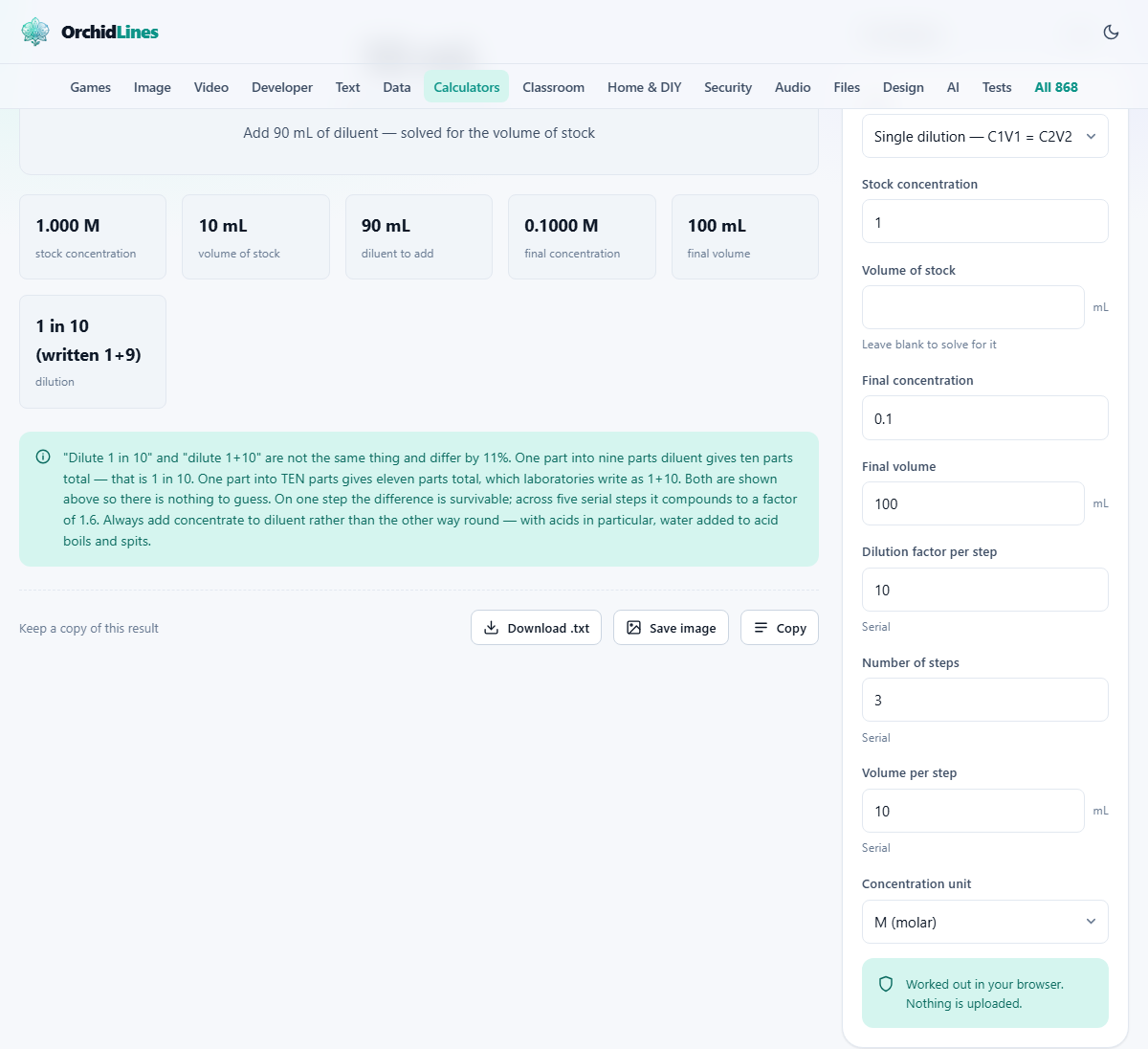
Suppose you have a 1 M stock solution and you need 100 mL of a 0.1 M working solution. Set Stock concentration to 1, Final concentration to 0.1, and Final volume to 100. Leave Volume of stock blank.
The calculator tells you to take 10 mL of stock and add 90 mL of diluent to reach 100 mL total. The arithmetic is straightforward: 1 times 10 equals 0.1 times 100. Both sides give 10, confirming the amount of solute is conserved. In the lab, you would measure 10 mL of stock into a vessel and then bring the total volume up to 100 mL with your solvent. That phrase, bring up to, matters more than it sounds.
Why volumes are not always additive
If you mix 50 mL of ethanol with 50 mL of water, you do not get 100 mL. You get about 96 mL, because the molecules pack together more tightly than either liquid does on its own. For precise work, the correct procedure is to add solute to a volumetric flask and then add solvent until the meniscus reaches the graduation mark. That is what make up to means in a protocol.
The calculator gives you the volume of stock to take and the volume of diluent to add, assuming volumes are additive. For dilute water-based solutions this is close enough. For concentrated acids, alcohols, or anything involving organic solvents, use the result as a guide and make up to the final volume in a flask rather than trusting simple addition.
Serial mode and the fields it adds
Switch the Type dropdown to Serial dilution and three new fields appear. Dilution factor per step sets how much weaker each step makes the solution, typically 10 for a tenfold dilution. Number of steps says how many tubes or wells the series uses, up to twelve. Volume per step is the total volume in each tube after the transfer.
The result is a table listing every step in order: the concentration at that step, the volume to transfer from the previous tube, and the volume of diluent to add. Serial dilutions are the standard way to reach very low concentrations, because trying to hit one part in a million in a single step would mean pipetting a microlitre into a litre, which is too small a volume to measure accurately. Three tenfold steps spread across comfortable pipetting volumes are far more reliable.
The ambiguity that compounds across steps
The phrase dilute one in ten means something different from one plus ten, and the difference is 10 percent per step. One in ten means one part of stock added to nine parts of diluent, giving ten parts total and a tenfold dilution. One plus ten means one part of stock added to ten parts of diluent, giving eleven parts total and an elevenfold dilution.
Over a single step the gap is small. Over five serial steps it compounds to a factor of about 1.6, which means the final concentration is 60 percent off from what was intended. The calculator shows the dilution factor in both conventions at every step so there is nothing to guess. When you write up a protocol, specify which convention you mean. If in doubt, state the total volume and the volume transferred, because those two numbers are not ambiguous.
Concentration units and keeping them consistent
The Concentration unit dropdown offers molar, millimolar, micromolar, milligrams per millilitre, percent and parts per million. Pick whichever your protocol uses, and make sure both the stock and final concentration are in the same unit. The equation does not care which unit you choose, but mixing molar on one side and milligrams per millilitre on the other gives a meaningless answer.
A note on parts per million and milligrams per litre: in dilute water solutions these are numerically the same, because a litre of water weighs a kilogram. That convenient equivalence breaks down in other solvents. If you are diluting something in oil, alcohol or a heavy salt solution, convert to mass-per-volume before relying on ppm.
Lab technique that the calculator cannot enforce
Change the pipette tip between every transfer in a serial dilution. Carryover from a contaminated tip is the largest single source of error, and it compounds across steps rather than averaging out. A tiny excess on the tip at step one becomes a measurable concentration error by step five.
Always add the concentrated solution into the diluent, not the other way round. With strong acids, adding water to the acid causes the mixture to boil and spit because the heat of dilution concentrates at the surface. With biological reagents, adding buffer into a tiny drop of concentrate risks losing material on the walls of the tube. Concentrate into diluent is the universal safe direction. Mix thoroughly at each step before drawing the next aliquot, because incomplete mixing propagates an error that grows with every transfer.
When this tool is the wrong choice
If you need to mix two solutions of known concentration to reach a target that sits between them, that is a mixing or blending calculation, not a simple dilution. C1V1 = C2V2 assumes one of the two liquids is pure solvent with a concentration of zero.
If the solute changes form when dissolved, for example a gas that dissociates in water, the relationship between concentration and volume is no longer linear and this equation does not apply. And if you are working with colloidal suspensions or emulsions rather than true solutions, the volumes and concentrations behave differently because particles do not distribute the way dissolved molecules do.
Privacy and where the arithmetic runs
Every calculation happens inside your own browser. The concentrations, volumes and steps you enter are not sent to any server. Your figures are saved in local browser storage so they are still there when you come back, but that storage sits on your machine and belongs to you.
Lab data can be commercially sensitive or subject to regulatory record-keeping. Running the dilution arithmetic locally means the values stay under your control. There is no account to create, no cloud service involved, and no record of your calculations outside your own device. You can verify this by loading the page and then turning off your internet connection; the calculator continues to work exactly as before, confirming that nothing depends on a remote server.