
Planning a debt payoff with the snowball and avalanche methods compared side by side
Most people carrying more than one debt know they should pay extra toward something, but they are not sure which balance to target first. The Debt Payoff Planner runs both of the popular strategies month by month and puts the results next to each other so you can see what each approach actually costs. This article explains every field on the page, works through a two-debt example, and covers the assumptions you should keep in mind.
Two strategies and why the debate keeps going
The avalanche method sends every spare unit of money at the debt with the highest interest rate. Mathematically, this is always the cheapest path. You pay less interest over the life of the plan because you are shrinking the most expensive balance first.
The snowball method goes after the smallest balance instead. It costs a little more in total interest, but it closes individual debts sooner. Each time a debt disappears, the freed-up minimum payment rolls into the next target, and the monthly attack grows. For many people, that visible progress is what keeps them going month after month. The planner simulates both so you can stop arguing about theory and look at the real gap for your own numbers.
The plan panel and its three controls
At the top of the settings rail, a Currency dropdown lets you pick your local currency. Below it sits the field labelled Extra payment each month. This is the amount you can commit on top of all the minimum payments combined. It does not replace the minimums; it adds to them. The hint underneath is not exaggerating when it says this number changes everything. Even a modest extra payment shortens the timeline dramatically because it compounds in a way that feels out of proportion to the amount.
The Strategy to follow dropdown has two entries: Avalanche, which targets the highest rate first, and Snowball, which targets the smallest balance first. Whichever you pick, the results section shows both strategies side by side anyway, so the dropdown controls which one the month-by-month schedule follows in detail.
Filling in each debt
Below the plan panel are six debt panels, each with four fields. Name is a label for your own reference, such as credit card or car loan. Balance owed is the current outstanding amount. Interest rate is the annual percentage, the number printed on your statement. Minimum payment is the fixed monthly amount you are already required to pay.
You do not have to fill all six. Leave a panel empty and it is ignored. Most people have two or three debts to enter. If you have more than six, group the smallest ones or leave out any that are already close to zero. The order you enter them in does not matter; the tool sorts them by rate or by balance depending on the strategy.
A worked example with two debts
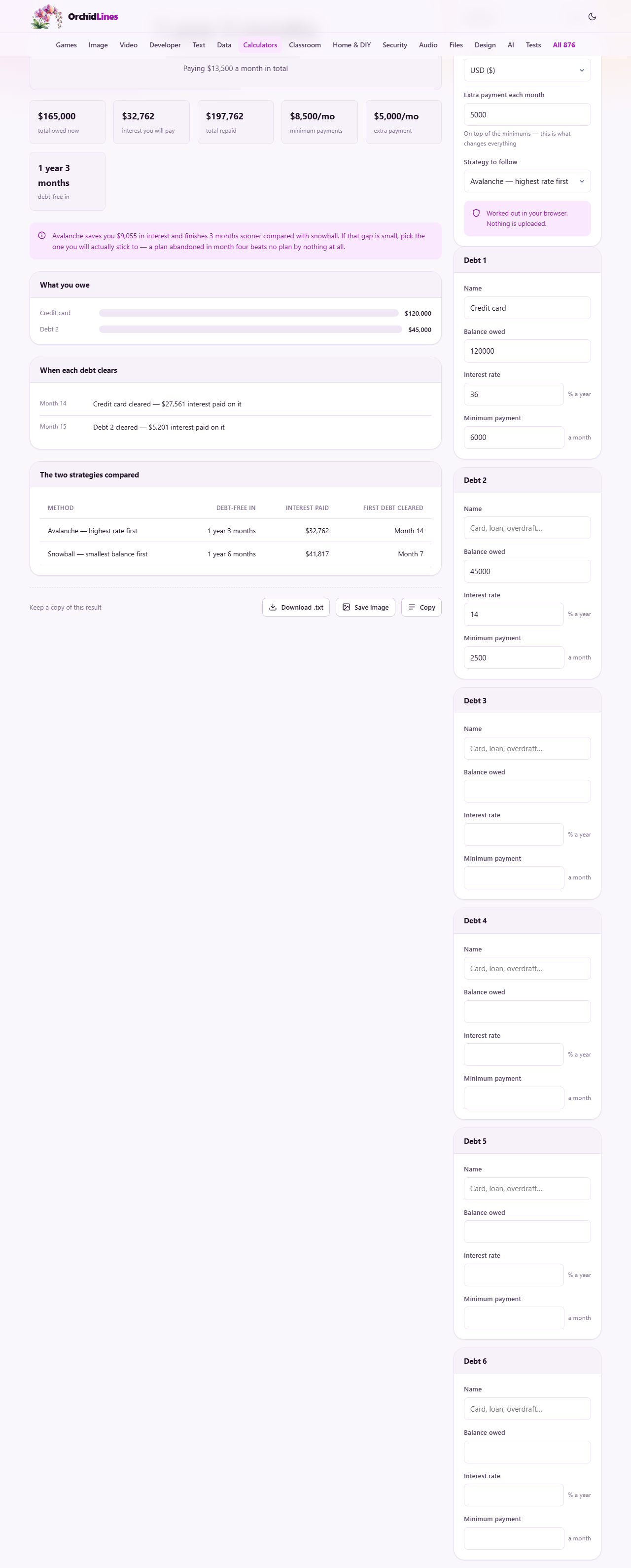
Suppose you have a credit card with a balance of 120,000, an interest rate of 36% a year, and a minimum payment of 6,000 a month. You also have a personal loan at 45,000, a rate of 14%, and a minimum of 2,500. You can put an extra 5,000 a month toward one of them.
Under the avalanche method, all 5,000 of extra payment attacks the credit card first, because 36% is the higher rate. The card clears sooner, and then both the card's old minimum of 6,000 and the 5,000 extra roll onto the personal loan. The total interest paid over the life of the plan is lower than the alternative.
Under the snowball method, the extra 5,000 attacks the personal loan first, because 45,000 is the smaller balance. That debt vanishes quickly, giving an early win and rolling its 2,500 minimum into the credit card attack. The total interest is higher, but the first debt clears months earlier. The comparison table shows both totals so you can see whether the difference is large enough to care about.
How freed-up payments accelerate the plan
The engine behind both methods is the same: when one debt clears, its minimum payment does not go back into your pocket. It rolls forward and joins the attack on the next debt. In the example above, once the first debt clears, the next target suddenly receives the extra 5,000 plus the old minimum, which might be 6,000 or 2,500 depending on which cleared first. The attack grows with every debt that disappears.
This rolling effect is why stopping the plan halfway wastes most of the benefit. The early months are the slowest and the most expensive. The later months are where the compounding reward arrives. If you quit after clearing the first debt and spend the freed-up money, you have paid the hardest part of the toll and left before collecting the payoff.
Assumptions the model makes
Interest is applied monthly at one twelfth of the annual rate. Minimum payments stay fixed for the whole plan. No new borrowing happens on any of the accounts. These are deliberate simplifications.
In practice, credit card issuers recalculate minimum payments as balances fall, which makes real payoff slightly slower than what the planner shows. The fix is simple: keep paying the original minimum even after the card company lowers it. That way the plan stays on track and you clear the debt in the time the tool predicts, or faster. The no-new-borrowing assumption is the one that matters most. No payoff plan survives continued spending on the same cards.
When the plan says it never finishes
If the minimum payments on a debt are not enough to cover the monthly interest charge, the balance grows instead of shrinking. The tool detects this and warns you rather than running a simulation that stretches to infinity.
That situation is not a spreadsheet problem. It means the interest rate is too high for the payments being made, and the solution is either a lower rate or professional debt advice. A card issuer will sometimes reduce a rate for a customer who asks directly, and a balance transfer to a lower-rate card can cut the cost further. Either of those changes moves the needle more than picking between avalanche and snowball.
Common mistakes when using the planner
The most frequent error is entering the total monthly payment in the Extra payment each month field instead of just the extra amount. The extra is what you pay on top of all the minimums combined. If your minimums add up to 8,500 and you can afford 13,500 a month in total, the extra is 5,000.
Another common slip is leaving the interest rate as zero. A zero rate is valid for an interest-free loan, but if you accidentally leave it blank on a credit card, the plan looks unrealistically good. Double check the rate against your latest statement. Also watch for entering a monthly rate where the field asks for an annual one. A 3% monthly rate is 36% a year, and the difference in the simulation is enormous.
Should you clear debt before you save
A sensible general rule is to keep a small emergency fund, enough for one unexpected bill, and then throw everything else at debt whose interest rate is higher than what your savings earn. For credit cards, that comparison is almost always one-sided. A savings account paying four or five percent a year cannot compete with a card charging twenty or thirty.
The emergency fund matters because without one, any surprise expense goes straight back on the card and undoes the plan. A month of rent or a car repair sitting in a separate account protects the payoff schedule from the most common shock. Once the debt is clear, the money that was attacking it becomes savings instead, and it grows fast because the habit is already built.
Privacy and where the numbers stay
Everything is worked out inside your browser. The balances, rates and payments you enter are stored on your own device so they are still there when you return, but they are never sent to any server. You can disconnect from the internet after loading the page and the simulation runs exactly the same way.
Financial figures are among the most sensitive things people type into a calculator. Knowing that the arithmetic happens locally, with no account required and no data leaving the machine, removes one worry from a process that already has enough of them.