
Counting days between two dates and why the answer depends on what you are counting
Knowing how many days sit between two dates sounds like a question with one answer. It is not. Whether you include both endpoints, how you convert days into months, and whether you care about weekdays or calendar days all change the number. This article walks through each control on the Days Between Dates calculator, works a real example, and clears up the confusion that trips people up most often.
Who needs to count days, and why the count varies
HR departments count leave days. Project managers track deadlines. Landlords calculate notice periods. Parents figure out how old a child is. All of them start with two dates and ask the same question, but the answer they need is not always the same number.
Consider a hotel stay that starts on Friday and ends on Monday. The gap between those two dates is three days, yet the guest uses the room on Friday, Saturday and Sunday, which is also three nights. A leave request for the same span covers Friday, Saturday, Sunday and Monday, which is four calendar days. The difference is whether you count both the start and the end, and this calculator lets you choose.
The two date fields and how order does not matter
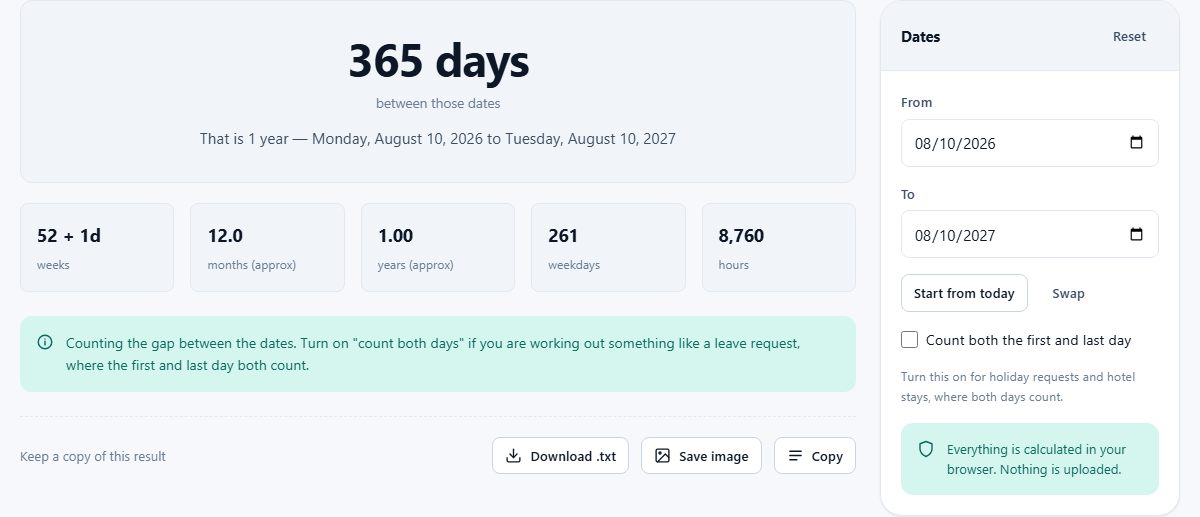
The panel on the right has two date inputs labelled From and To. Pick any two dates using the calendar pickers that your browser provides, or type them in directly. If the second date is earlier than the first, the tool still gives you the correct count and adds a note saying the dates are reversed. You never have to worry about which box gets the earlier date.
Two buttons sit below the date fields. Start from today fills the From field with the current date, which saves a step when you are working out how far away something is. Swap flips the two dates around if you realise you entered them the wrong way and want to tidy the form. Neither button changes the result itself, since the calculator always uses the absolute gap.
The inclusive counting checkbox
Below the date fields is a checkbox labelled Count both the first and last day. When it is off, the calculator reports the pure gap, the number of times midnight passes between the two dates. When it is on, both endpoints are counted, which adds one to the total.
The hint under the checkbox explains when to turn it on: holiday requests and hotel stays, where both the arrival and departure dates are part of the booking. Most workplace leave systems count this way. If you book Monday to Friday off, that is five days of leave, not four. Forgetting to tick this box is the single most common reason people get a number that feels wrong.
What the output shows you
The result area displays a large headline number: the total count in days. Below that headline sits a subtitle that expresses the same gap as a calendar difference, written in the form people actually use in conversation, such as two years, three months and five days. These two numbers are not the same thing dressed up differently. They genuinely answer different questions.
Further down, the tool breaks the total into other units. You see the count in weeks with a decimal remainder, in months using an average month length of about 30.44 days, and in years. A weekday count is also included, which tells you how many Monday-to-Friday working days fall inside the range. That figure excludes Saturdays and Sundays but does not know about public holidays, so treat it as a starting point if you are planning around a work calendar.
A worked example with real dates
Suppose you want to know how long it is from 15 January 2025 to 10 August 2026. Set the From field to 15 January 2025 and the To field to 10 August 2026. Leave the checkbox off for a simple gap count.
The headline shows 572 days. The calendar difference reads one year, six months and 26 days. The weeks readout shows roughly 81.7 weeks. The weekday count comes out at 408, because every week contributes five working days and the partial weeks at each end add a few more. Now tick the checkbox. The total jumps to 573, because both the 15th of January and the 10th of August are now included. Everything else shifts by one day to match.
Why months as a decimal and months on the calendar disagree
This trips people up regularly. The tool shows months in two places, and the numbers look different. The decimal version divides the total days by 30.44, the average length of a month across a full year. The calendar version walks through real months of their real lengths. From 31 January to 28 February is 28 days, which is less than one calendar month. Yet 28 divided by 30.44 gives 0.92, which rounds up to nearly one month in the decimal column.
Neither version is wrong. Contracts and rental agreements almost always mean the calendar version. Medical instructions, like take this for three months, usually mean roughly 90 days. Billing cycles tend to work in exact day counts. Both numbers appear on the page so you can grab whichever one the situation calls for.
Leap years and other calendar wrinkles
The calculator uses real calendar dates, so 29 February is counted whenever it genuinely falls inside the range. You do not need to check or adjust anything. If your range crosses a leap day, the total is one day longer than it would be in a non-leap year, and the calendar difference accounts for the 29-day February automatically.
Time zones are not involved. The tool works with dates, not timestamps. It does not care what time of day it is or where you are sitting. That is a feature, not a missing piece. Most of the questions people bring to a days-between calculator are about whole calendar days, and roping in time zones would only confuse the answer. If you ever do need to count hours across zones, that is a different kind of tool altogether.
Common mistakes and how to avoid them
The most frequent error is forgetting to tick or untick the inclusive checkbox. If you are counting a stay, a leave request, or a medication course, you almost certainly want it on. If you are calculating how many days until a deadline from right now, you probably want it off.
Another common slip is confusing the weekday count with actual business days. The weekday count removes Saturdays and Sundays, but it does not remove Christmas, Eid, Diwali or any other public holiday. If you need a true working-day figure with holidays stripped out, the separate Working Days Calculator on the site handles that. It lets you set your working week and paste in the holidays for your region.
When this is the wrong tool
If your question is about business days with public holidays removed, use the working days calculator instead. If you need to add a fixed number of days to a date and find out what date you land on, that is a date-add problem, not a days-between problem. And if you want the difference in hours, minutes or seconds, you are dealing with timestamps rather than calendar dates, which is a different kind of question entirely.
This calculator answers one thing well: how many days sit between two calendar dates, with or without both endpoints, along with a clean breakdown into larger units. For that job, it is the right choice.
Privacy and where the work happens
The dates you enter never leave your device. The calculator runs entirely inside your browser using ordinary calendar arithmetic, and the page does not send anything to any server. Your dates are remembered in your own browser storage so they are still there when you come back, but that storage belongs to you and stays on your machine.
You can prove this to yourself by disconnecting from the internet after the page has loaded. The calculator keeps working exactly the same way. There is no account to sign up for, no cloud service in the background, and no data collection beyond what your browser keeps locally for your own convenience. That makes it safe to use with sensitive dates, like contract deadlines or personal milestones, without worrying about who might see them.