
Working out concrete volume before you open the first bag
Ordering the wrong amount of concrete costs time and money in both directions. Too little leaves a cold joint across your slab. Too much leaves a pile of hardening mix you paid for and cannot use. This article walks through the concrete calculator, explains each control, works two real examples, and covers the practical details that turn a number on screen into a pour that goes right.
Why volume is the only number that matters
Concrete is sold by volume: cubic metres from a ready-mix truck, or a known yield per bag from the hardware store. Every estimate begins the same way. Measure the space you need to fill, multiply the three dimensions together, and you have a volume. For a rectangle that is length times width times depth. For a cylinder it is pi times the radius squared times the depth.
The complication is that ground is never flat, formwork is never perfectly tight, and you always need a margin. That margin is wastage, and forgetting it is the single most common reason people run short. A ten percent buffer sounds generous until you watch the first wheelbarrow load disappear into a slightly hollow patch you did not notice.
Who reaches for this calculator
Anyone about to mix or order concrete. That includes homeowners pouring a shed base, gardeners setting fence posts, builders pricing a footing, and DIY enthusiasts casting a barbecue pad. Even people ordering ready-mix from a truck benefit from checking the volume themselves before the dispatcher asks how many cubic metres they want.
The calculator is also useful at the planning stage, before any digging has started. Knowing the volume tells you the weight, which tells you whether a wheelbarrow route is realistic or whether you need a pump. It tells you the bag count, which tells you whether bags are sensible at all or whether a truck is the better choice. And it tells you the rough cost, so you know before you commit.
Choosing the shape
The Shape selector at the top of the panel offers two options. Slab, footing or beam is the rectangular shape, and it is the default. Pick this for anything with straight sides: a patio, a path, a strip footing, a beam, or a garage floor.
Round -- column or post hole is the cylindrical shape. Pick this for fence post holes, pier footings, or any round column. When you switch to this option, the Length and Width fields are replaced by a single Diameter field, because a circle only needs one measurement across.
Filling in the dimensions
For a rectangular pour, three fields appear: Length, Width, and Depth or height. All three are in metres. This is where the most common mistake happens: entering millimetres instead of metres. A 100 mm slab is 0.1 m deep, not 100. If the result looks absurdly large, check this first.
For a round pour, the Diameter field replaces length and width. A typical fence post hole is about 0.3 m across, which is 300 mm. The Depth or height field stays the same. Below these sits How many, which multiplies the volume by the number of identical pours. If you are setting twelve fence posts, enter 12 here rather than adding them up by hand.
Wastage, bag size, and cost
The Wastage field defaults to 10%, and that is a good starting point for a slab on reasonably level ground. For post holes, raise it to 15 or even 20 percent. Real holes belly out below the surface, and the extra volume is invisible until the concrete fills it.
Bag size sets the weight of the pre-mix bags you plan to buy, in kilograms. The default is 25 kg, but 20 kg and 40 kg bags are common too. The calculator uses the bag weight to estimate how many you need. Below that, Price per bag is optional. Fill it in and the tool shows a total cost estimate alongside the bag count. A Currency selector at the top sets the symbol.
A slab example worked through
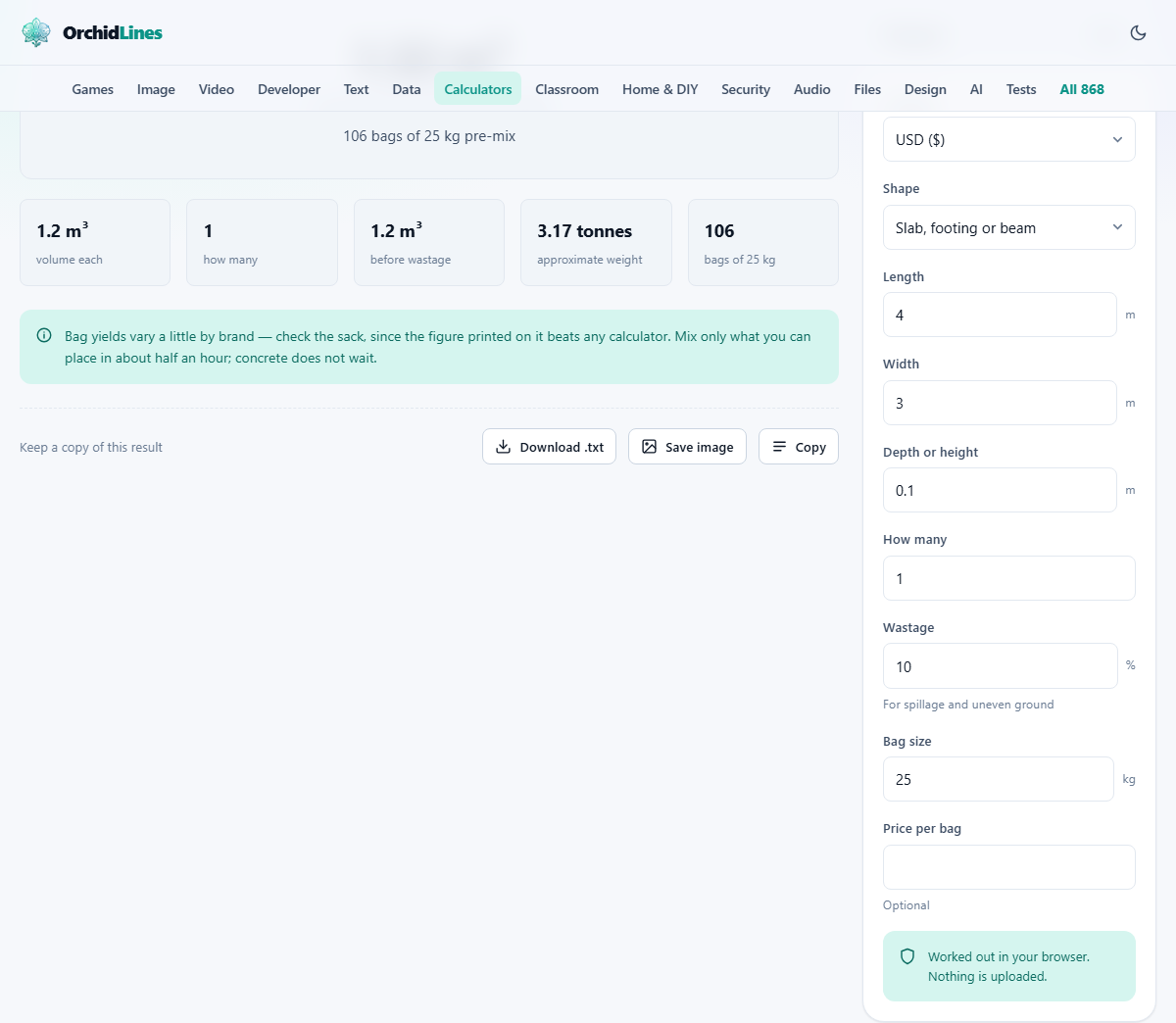
Say you want a shed base that is 4 metres long, 3 metres wide, and 100 mm deep. Enter 4 for Length, 3 for Width, and 0.1 for Depth or height. Leave How many at 1 and Wastage at 10. The raw volume is 1.2 cubic metres, and with wastage it rises to 1.32. At 25 kg bags that is roughly 106 bags, each weighing 25 kg, so the total weight is well over two tonnes.
That bag count should give you pause. Lifting, cutting open, mixing, and placing 106 bags before the first ones begin to set is a serious physical task. The help section on the page flags this clearly: above about 1.5 cubic metres, ordering ready-mix from a truck is usually cheaper per cubic metre and vastly easier on your back.
A post hole example
Now suppose you are setting eight fence posts in holes that are 0.3 m across and 0.6 m deep. Switch Shape to Round, enter 0.3 for Diameter, 0.6 for Depth or height, 8 for How many, and raise Wastage to 15 because post holes are always rougher than they look. The total comes to about 0.39 cubic metres, which is around 31 bags of 25 kg.
That is a manageable number. You can mix a bag at a time in a bucket or barrow, fill each hole, brace the post, and move on. The weight is under a tonne, so a car boot trip to the hardware store might even cover it in one go, though you may want to check your springs.
Understanding the weight figure
Wet concrete weighs about 2.4 tonnes per cubic metre. The calculator shows the total weight because it has practical consequences that go beyond lifting. A cubic metre in a wheelbarrow means many trips, and the route from the mixer to the pour needs to take the load.
If the total weight runs past two or three tonnes and the pour is behind a house with no vehicle access, you may need a concrete pump, which is a truck-mounted arm that can reach over buildings and fences. Knowing the weight early saves you from discovering this on pour day.
Common slip-ups and how to avoid them
A few errors appear over and over. Catching them before you order saves a trip, a delay, or worse.
- Entering millimetres instead of metres for the depth. A slab that is 0.1 m deep is right. One that is 100 m deep is a mineshaft.
- Skipping the wastage. Ground is never perfectly level, and running out during a pour creates a cold joint, which is a permanent weak line through the slab.
- Mixing more than you can place in time. Concrete starts setting as soon as it gets wet. Have everything ready before the first bag is opened, and mix only what you can lay in about half an hour.
- Forgetting to check the printed yield on the bag. Different brands yield slightly different volumes per kilogram. The bag figure beats any calculator.
When to skip the bags and call a truck
Once the volume passes about 1.5 cubic metres, the economics and the labour both favour ready-mix. That is roughly sixty bags of 25 kg to carry, open, mix, and pour before the early batches start to go off. A ready-mix truck delivers the lot in one pour, and the cost per cubic metre drops as the order gets larger.
Trucks do have a minimum order, often around half a cubic metre or one cubic metre depending on the supplier. For a tiny job, the minimum charge can make bags cheaper despite the extra work. The calculator gives you the volume so you can compare prices with a clear head rather than guessing at the counter.
Privacy and where your numbers stay
The entire calculation runs in your browser. No dimensions, no costs, and no quantities are sent anywhere. There is no account, no login, and no record of your pour on any server. You can disconnect from the internet and the calculator still works, because nothing about the arithmetic depends on a remote service.
That keeps your project details private, which matters less for a shed base than it does for a financial calculator, but the principle is the same. Your numbers stay on your device. Run the numbers as many times as you like, change the shape, the wastage, the bag size, and compare costs between suppliers, all without signing up for anything or handing over an email address.