
Splitting your pay with the 50/30/20 rule and knowing when it breaks
This article walks through the budget planner step by step. You will learn what the 50/30/20 rule actually says, how to fill in every field on the page, how to read the output, and what to do when your rent alone makes the standard percentages impossible. A worked example with realistic figures is included.
Where the rule comes from and what it really says
The 50/30/20 framework was set out by Elizabeth Warren and Amelia Warren Tyagi in their 2005 book All Your Worth. The idea is simple. Take your monthly income after tax. Spend no more than half on needs, no more than thirty per cent on wants, and put at least twenty per cent toward saving and paying down debt above the minimums.
The value of the rule is not the exact percentages. It is two disciplines. First, you budget from what you actually receive after tax, not from the larger gross number that never arrives in your account. Second, saving is treated as a fixed share taken off the top on payday, not whatever happens to be left over at the end of the month.
The calculator applies these targets to your real numbers and shows you where you stand. If you are over in one category, it says so. If the whole rule is out of reach because your needs already eat more than half your income, it tells you that plainly too.
The income field and why gross pay does not belong here
The first box in the panel is Take-home pay. The hint beneath it reads After tax, per month. This is the amount that actually appears in your bank account each month, after income tax, national insurance or social security, pension contributions and any other deductions have been removed.
Getting this number right is the most important step. If you use your gross salary instead, every percentage on the page is calculated against money you never see. A person earning forty thousand gross might take home around two thousand eight hundred per month depending on their tax situation. Budgeting from forty thousand divided by twelve gives three thousand three hundred and thirty-three, which is five hundred a month of imaginary money. That gap compounds across every spending category.
Listing your needs
Six boxes cover the needs category. Rent or mortgage is usually the largest line. Utilities and bills covers electricity, gas, water, council tax, broadband and anything you cannot reasonably cancel. Groceries means food bought for cooking at home, not restaurant meals or takeaway. Transport includes your commute, car insurance, petrol and any travel you must do. Insurance covers health, life or contents insurance. Minimum debt payments is the minimum you must pay each month on credit cards, loans or other debts to stay in good standing.
Only the minimum on each debt counts as a need. Anything you pay above the minimum is voluntary and counts in the twenty per cent saving band instead. This distinction matters because the minimum keeps you out of trouble while the extra is a choice about your future, which is exactly the kind of decision the framework is designed to separate.
Wants, saving and what goes where
Wants is a single box with a hint that reads Eating out, subscriptions, hobbies. This is everything you spend on that you could live without. Streaming services, gym memberships, clothes beyond the basics, restaurant meals and holidays all fall here. Some edge cases are genuinely hard to classify, like a phone plan. A basic plan is a need; the premium tier you chose for a better handset is partly a want. Split it if that helps, but do not spend too long on the boundary.
Saving and extra debt payments is the last spending box. This is money going into savings accounts, investment accounts, emergency funds, and any debt repayment above the required minimums. The rule says this should be at least twenty per cent of take-home pay. If you can manage more, that is better.
A worked example
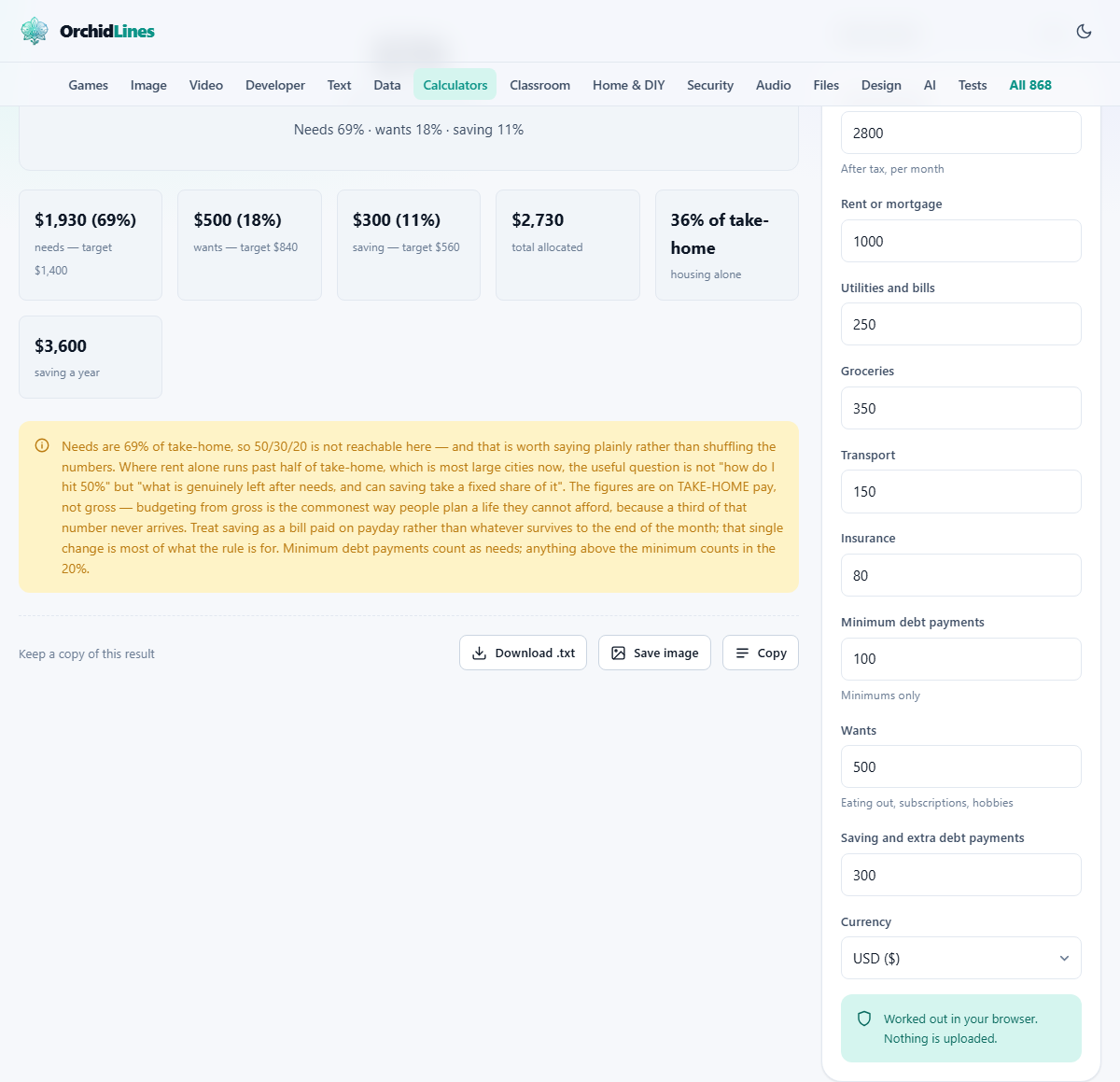
A person takes home 2,800 a month. Rent is 1,000. Utilities and bills are 250. Groceries cost 350. Transport is 150. Insurance is 80. Minimum debt payments come to 100. That gives a total needs figure of 1,930, which is 68.9% of take-home. The 50% target for needs would be 1,400.
Wants are 500, which is 17.9% against a target of 30%. Saving and extra debt payments total 300, which is 10.7% against the target of 20%. The page shows 70 left unallocated.
The results panel would flag the key problem immediately: needs are 69% of take-home, which is well above 50%. The note makes clear that the rule is not reachable at this rent level. The housing line alone is 35.7% of income, and that is before food, bills and everything else.
The annual saving line shows 3,600, which is the 300 monthly figure multiplied by twelve. For someone saving for an emergency fund of three months of expenses, that means about nineteen months at this rate.
When the rule cannot work
In many cities, rent alone exceeds fifty per cent of a typical take-home pay. The calculator handles this honestly. When needs run past the half-way mark, the result panel displays a warning explaining that the rule is not achievable at your current cost of living, rather than quietly adjusting the targets or pretending the maths still works.
This is a genuine feature, not a failure. A framework that says you are fine when your rent consumes sixty per cent of your income would be dangerous. The useful question at that point changes. Instead of asking how to hit fifty per cent on needs, you ask: what is genuinely left after needs, and can saving take a fixed share of whatever that is?
If needs take 70% and wants take 18%, that leaves 12% of income. Putting half of that into saving gives 6%. That is well below twenty per cent, but if you treat it as a non-negotiable amount moved on payday, it will still accumulate. The principle of the rule survives even when the percentages do not.
Reading the output in detail
The headline number is the amount unallocated each month, shown in your chosen currency. If you have spent more than your income across the three categories, this goes negative and the label changes to over budget each month.
Below the headline is a summary line showing needs, wants and saving as percentages. The stats section lists each category with both the target amount and your actual amount side by side. Housing alone gets its own line showing what percentage of take-home it consumes, because that single expense is often the one that makes or breaks the budget. The final stat is saving a year, which is your monthly saving figure multiplied by twelve.
The Currency dropdown at the bottom of the panel changes how the output is formatted. It does not convert any values. If you type your income in euros, the figures are in euros regardless of which currency symbol is selected.
Practical tips for using the result
Move the saving amount into a separate account on the day you are paid. If it sits in your current account alongside your spending money, it will get spent. Automatic transfers work better than willpower for this.
If you have irregular income, perhaps from freelance work or commissions, run the calculator with the lowest monthly income you have received in the past six months. Budget from the floor, not the average. Good months are a bonus, not the baseline.
Review the numbers every few months. Rent goes up. Subscriptions creep in. A budget set in January may not describe October. Re-entering your current figures takes two minutes and shows whether you have drifted.
Mistakes that quietly distort the picture
Using gross pay instead of take-home is the single biggest error and the hardest to spot, because the budget will look achievable on paper while being funded by money that does not exist.
Classifying wants as needs is the second. A car may be a need if you commute by road; the specific car you chose, and its financing cost, may be partly a want. Streaming services feel essential but are not. Be honest in the classification, because the point is to see reality rather than to produce a reassuring spreadsheet.
Ignoring irregular expenses is another common gap. Annual insurance premiums, car servicing, holiday spending and birthday presents do not arrive every month, but they arrive every year. Divide the annual total by twelve and add the monthly share to the right category.
- Always enter take-home pay, not your gross salary.
- Divide annual costs by twelve and include the monthly share.
- Be honest about what is a need and what is a want.
- Re-enter your figures every few months to catch drift.
When you need more than this tool offers
The calculator gives you one snapshot based on monthly totals. It does not track spending over time, set alerts, sync with your bank, or handle multiple income streams. If you want those features, a dedicated budgeting app or a spreadsheet with live data will serve you better.
It also cannot give financial advice. Your tax situation, debts, pension contributions and family obligations are things only you and a qualified adviser can weigh up together. The calculator does the arithmetic. The decisions are yours.
Privacy
Your income, spending and saving figures are processed entirely on your own device. Nothing is uploaded to any server. The page saves your entries in the browser's local storage so they are still there next time you visit, but they belong to this browser on this device only. Clearing your browsing data removes them. There is no account, no login and no server-side record of your finances.