
Working out how many sales it takes to cover your costs
This article explains the break-even calculator from end to end. You will learn what goes into each field, how the contribution margin drives the result, what the profit table shows you, and how to test different pricing and capacity scenarios with a concrete worked example.
What break-even analysis is and who needs it
Every business pays bills that arrive whether or not a single customer walks through the door. Rent, salaries, insurance and software subscriptions all fall due regardless of sales. Break-even analysis answers one question: how many units do you need to sell before the money those sales bring in covers those fixed bills?
The answer is useful at several stages. A person writing a business plan needs to know whether the sales target is realistic before they commit money. A shop owner thinking about a price change needs to see how the number of sales required shifts. A freelancer wondering whether to raise their day rate can plug in the new number and see the effect on how many days they have to bill each month.
The calculator does this arithmetic in the browser while you type. Change a number and the result updates instantly, which makes it easy to compare scenarios without a spreadsheet.
The inputs and what each one means
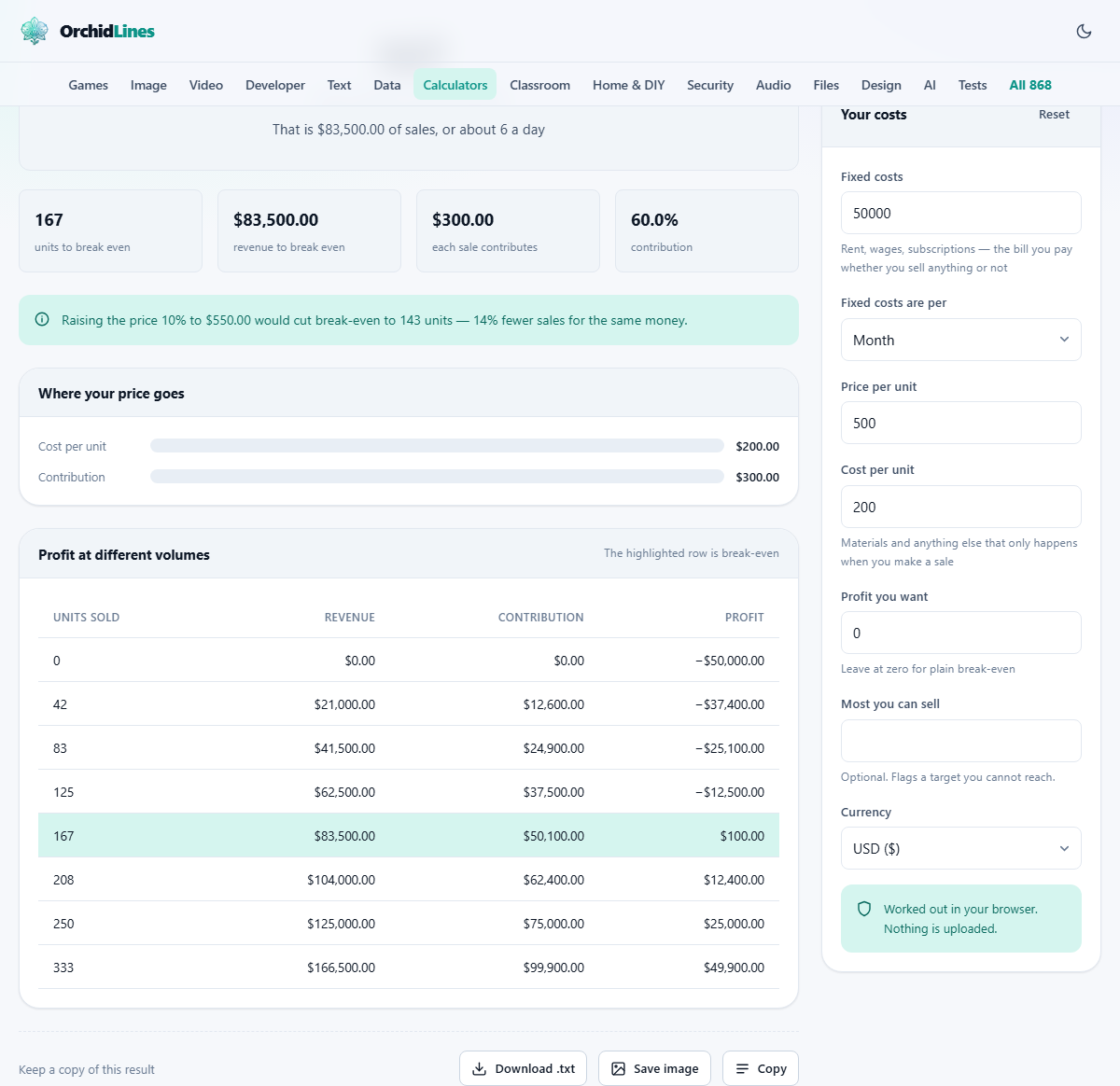
The panel on the right is headed Your costs and contains seven fields.
Fixed costs is the big number at the top. Put everything you owe whether or not you sell anything: rent, wages, insurance premiums, subscriptions, loan repayments that are the same every month. The dropdown Fixed costs are per lets you say whether that figure is per Month, per Year or a One-off project. The calculator adjusts the break-even accordingly.
Price per unit is what you charge the customer for one sale. Cost per unit is what that sale actually costs you to fulfil. This means materials, packaging, payment processing fees, delivery and anything else that only happens because a sale was made. It does not include any share of the rent, because that is already in the fixed cost box.
Profit you want lets you go beyond bare survival. If you type a number here the page treats it as an extra cost that must also be covered, so the break-even rises to show the sales needed to actually earn that profit. Leave it at zero for a plain break-even.
Most you can sell is optional. If your bakery can only produce four hundred loaves a day, type that number. The calculator will warn you if your break-even sits above your capacity. Currency changes the formatting of the output.
The idea behind contribution margin
The whole calculation turns on one number: the gap between what you charge and what each sale costs you to make. This gap is called the contribution. If you charge five hundred and each unit costs two hundred to produce, each sale contributes three hundred toward paying off your fixed costs.
Divide your fixed costs by the contribution and you get the number of sales needed. That is the entire formula. Everything else the calculator shows is a different view of the same thing.
The contribution margin as a percentage tells you how much of each sale is available to cover overheads and eventually become profit. A margin of 60% means sixty pence of every pound earned goes toward fixed costs. A margin of 20% means you need three times as many sales to reach the same point.
A worked example with real numbers
A small candle maker works from a rented workshop. Monthly rent is eight hundred, insurance is one hundred, and a website subscription is fifty, so Fixed costs is 950. Fixed costs are per is set to Month.
Each candle sells for eighteen pounds, so Price per unit is 18. Wax, fragrance, wicks, glass jars and postage come to seven pounds per candle, so Cost per unit is 7. That makes the contribution eleven pounds per candle.
The headline says 87 units a month. Revenue to break even is 1,566 pounds, and each sale contributes 11 pounds, giving a contribution margin of 61.1%. The profit table beneath shows that selling 44 candles, roughly half of break-even, still leaves a loss of 466 pounds, while selling 131 candles, one and a half times break-even, produces a profit of 484 pounds.
Now the candle maker enters 500 in Profit you want. The target rises to 132 units a month, because that extra five hundred pounds of desired profit has to be earned on top of the nine hundred and fifty in costs. That is roughly four and a half candles a day, every day of the month.
Why small price changes have a large effect
The calculator shows an information note about what a ten per cent price rise would do to break-even. In the candle example, raising the price from eighteen to nineteen pounds eighty increases the contribution from eleven to twelve pounds eighty. Break-even drops from 87 to 75 units, a reduction of about 14%.
The effect works in reverse too, and harder. Cutting the price by ten per cent to sixteen pounds twenty reduces the contribution to nine pounds twenty. Break-even rises from 87 to 104 units, an increase of nearly 20%. You now have to sell seventeen more candles every month just to stand where you were before the discount.
This asymmetry catches a lot of small businesses. A discount feels like it should cost a proportional amount of sales. In reality it costs more, because every penny off the price comes directly out of the contribution, which is the only part of the price that matters for covering fixed costs.
Using the capacity check
The Most you can sell box is there for a reason. A break-even number is only useful if you can actually reach it. If the candle maker can pour, set and ship at most sixty candles a month, then a break-even of 87 is not a target; it is a problem.
When capacity is below break-even, the calculator replaces the information note with a warning. It tells you the target is unreachable at this price and shows the minimum price per unit that would bring break-even within your capacity. In this case, if the maker can only do sixty candles, the price would need to be at least 22.83 to cover 950 in costs.
This is one of the most useful checks in the tool, because it forces a concrete question. Can you raise the price, cut the unit cost, reduce fixed costs, or increase capacity? Those are the only four levers, and seeing the number laid out plainly focuses the conversation.
Reading the profit table
Below the main result is a table headed Profit at different volumes. It shows eight rows, each at a different fraction of break-even volume: zero, a quarter, a half, three quarters, break-even itself, then one and a quarter, one and a half and double.
Each row lists the number of units sold, the revenue, the total contribution those sales generate, and the profit or loss. The break-even row is highlighted because that is where profit crosses zero. Rows below it are in the red; rows above it are in profit.
The table makes the shape of the business visible. You can see how steeply losses mount if sales fall short, and how quickly profit accumulates once you pass the break-even line. That shape depends entirely on the contribution margin. A high-margin product climbs out of loss fast. A low-margin one needs a lot more volume before it starts earning.
Mistakes that lead to a wrong answer
The most common error is putting variable costs into the fixed cost box. Payment processing fees, marketplace commissions and delivery charges go up with every sale, which makes them variable. They belong in Cost per unit. Putting them in Fixed costs inflates the fixed number and understates the unit cost, and both errors make break-even look better than it is.
Another frequent slip is forgetting to pay yourself. If you are the owner and you do not put your own wage in the fixed costs, the break-even number covers the business but not the person running it. Add a salary for yourself and look at the result again.
Mixing up monthly and yearly figures is easy to do. If your rent is quoted annually, either divide by twelve or set the Fixed costs are per dropdown to Year. Getting this wrong multiplies the error by twelve in one direction or divides it by twelve in the other.
- Payment fees and delivery costs belong in the unit cost, not in fixed costs.
- Include a wage for yourself in fixed costs, or the break-even is flattering.
- Check whether your fixed cost figure is monthly or annual and set the dropdown to match.
When break-even analysis is not enough
This calculator assumes every unit sells for the same price and every unit costs the same to make. Real businesses often sell at different price points, offer discounts, or have costs that shift with volume. A bakery buying flour in bulk pays less per loaf at high volumes than at low ones, which changes the break-even point as output grows.
It also says nothing about cash flow. You might break even by unit count in month three, but if your customers pay sixty days late and your suppliers want payment up front, you run out of cash before you get there. Break-even is a profitability measure, not a liquidity one.
For a more detailed financial picture, a spreadsheet or accounting software that can model multiple products, variable pricing and payment timing will take you further. This tool is best for the first question: is the basic idea viable at this price and this cost?
Everything stays on your device
The entire calculation runs in the browser. Your costs, prices and profit targets are not sent to any server. There is no account, no login, and no record kept on the other end. The page saves what you entered in local storage so it is still there when you come back, but clearing your browsing data removes it.
If you want to keep a record or share the result, use the download option to save it as a text file.