
How a chemical equation balancer works and when stoichiometry matters
Balancing a chemical equation by hand means trying numbers until the atoms on both sides match, and for anything beyond a simple combustion that process is slow and uncertain. This article walks through an online balancer that solves the problem as a single piece of linear algebra, then follows the balanced equation all the way to moles, masses, the limiting reagent and the percentage yield. Every calculation runs on your own device with nothing sent anywhere.
Who needs this and why
Students working through homework or revision problems are the obvious audience, but they are not the only one. Lab technicians planning a reaction need to know how much of each reagent to weigh out. Teachers building worksheets want a quick check that their own answer is right before they set the question. Hobbyist chemists making soap, developing photographs, or etching circuit boards all face the same arithmetic.
The common thread is that balancing is not the interesting part of any of those jobs. It is a prerequisite that has to be correct before the real question can be answered. Getting it done quickly and reliably frees attention for the part that actually matters.
Typing the equation into the input
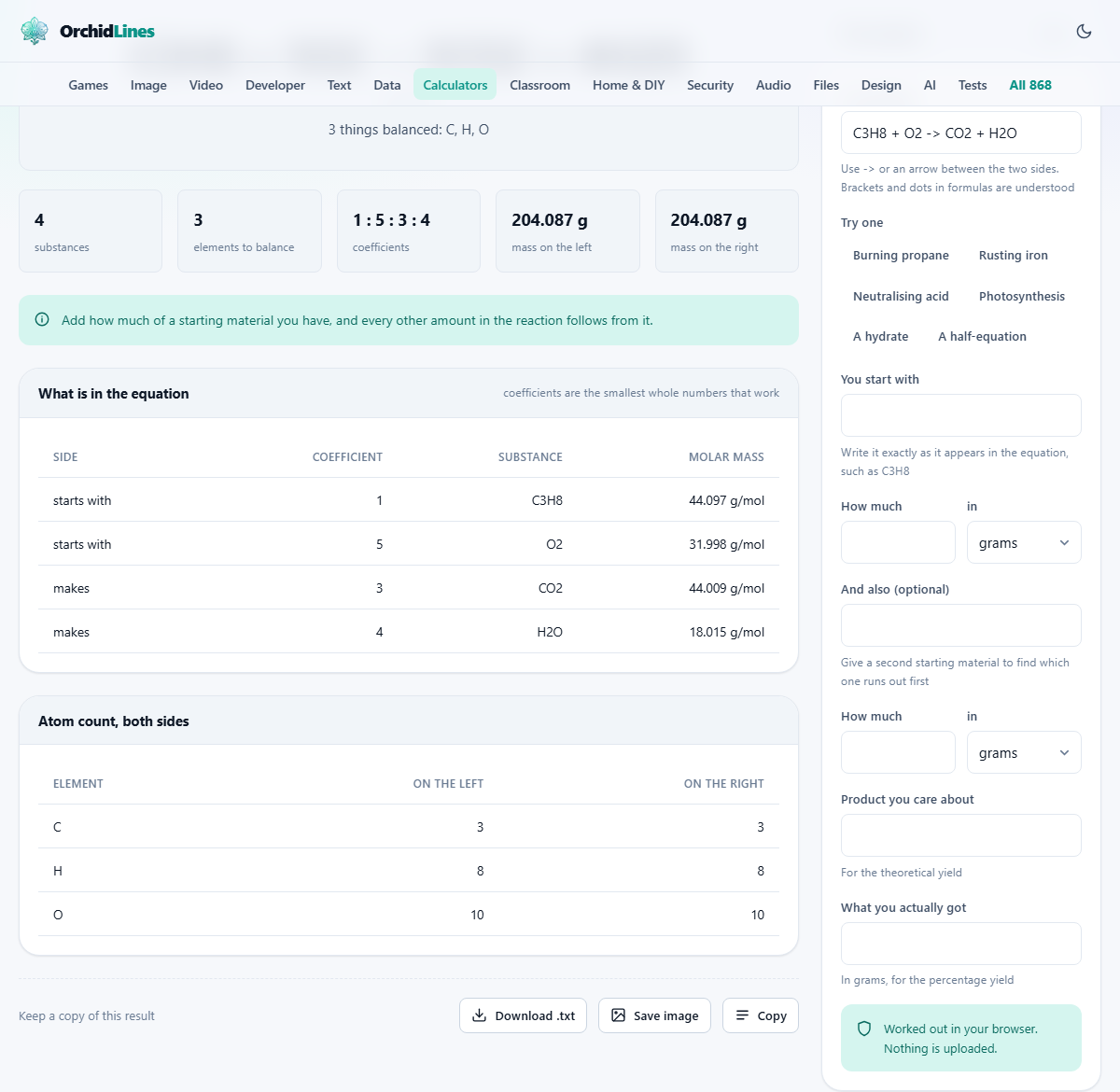
The field labelled The equation expects both sides of the reaction separated by an arrow. A simple dash followed by a greater-than sign works, so C3H8 + O2 -> CO2 + H2O is a valid entry. Brackets are understood, so Ca(OH)2 is fine. The dot notation for hydrates works too, meaning CuSO4.5H2O is accepted without any special syntax. Capitalization matters: Co is cobalt and CO is carbon monoxide, and mixing them up will produce a balanced equation for the wrong reaction entirely.
Charges for ions and half-equations are written with a caret. Mn^2+ means a manganese ion with a two-plus charge, and e^- is an electron. When charges are present the balancer conserves charge alongside every element, so a half-equation comes out correctly without any extra steps. This is useful for electrochemistry problems where you need each half-reaction balanced separately before combining them.
Six preset buttons sit below the input under the label Try one, each loading a ready-made equation. Burning propane, Rusting iron, Neutralising acid, Photosynthesis, A hydrate and A half-equation cover the main styles of notation, so pressing one is the fastest way to see what the output looks like before typing your own. After trying a preset you can edit the equation freely.
Reading the balanced result and the atom table
Once a valid equation is entered, the balanced version appears with the smallest whole-number coefficients that conserve every element. Below it a table counts every atom on each side. That table is not decoration. It lets you see the conservation rather than trust it, which is especially useful in a classroom setting where the student needs to understand why the numbers are what they are.
If the equation cannot be balanced at all, the tool says so rather than producing numbers that nearly work. That usually means a formula has a typo. In the less common case where two independent reactions are described in one equation, there is a whole family of valid answers, and the tool picks one while making the ambiguity clear.
From coefficients to masses with stoichiometry
Balancing gives ratios, but a real experiment needs weights. The field labelled You start with takes the formula of one reactant exactly as it appears in the equation. Beside it, How much accepts a number, and the dropdown labelled in lets you choose between grams and moles.
From that single entry every other substance in the reaction gets its amount calculated. The molar masses come from standard atomic weights built into the page. For elements that have no natural form, the mass number of the most stable isotope is used instead. Nothing is fetched from any server.
Suppose you burn 44 grams of propane. Enter C3H8 in the starting material field, type 44, and leave grams selected. The tool converts that to moles, applies the balanced ratio to every other participant, and reports both the moles and the grams of each.
Finding the limiting reagent with two starting materials
The second pair of fields, headed And also (optional), takes a second reactant and its amount. When both are filled in the tool identifies which one runs out first. That substance is the limiting reagent, and it alone determines how much product the reaction can actually produce.
The excess reagent is reported too, with the amount left over after the reaction. Getting this right matters in practice because many reactions are deliberately run with one reagent in excess to push the reaction to completion or to make purification easier.
A worked example makes the arithmetic concrete. Burn propane with oxygen: enter C3H8 at 44 grams and O2 at 100 grams. Propane needs five moles of oxygen for every mole of fuel. At 44 grams you have one mole of propane, which needs 160 grams of oxygen, but you only have 100. Oxygen is the limiting reagent, and the tool reports exactly how much carbon dioxide and water that 100 grams can produce.
Theoretical yield and percentage yield
The field Product you care about names the product whose maximum possible mass you want. That maximum, the theoretical yield, follows directly from the limiting reagent and the balanced ratio.
Below it, What you actually got takes a weight in grams. The tool divides your actual collection by the theoretical yield and reports the percentage. In a student lab a yield of 60 to 80 per cent is typical. Professional synthesis aims higher, and anything above 100 per cent is a clear signal that the product is still wet or contaminated. The tool warns about that explicitly.
A common classroom mistake is to calculate the yield from the wrong reactant. Using the reagent in excess instead of the limiting one gives a theoretical yield that is too high, which makes the percentage look low. The tool avoids that mistake by always working from whichever reagent limits the reaction.
Mistakes that waste the most time
The most frequent error is a wrong formula. Typing NaO instead of NaOH or H2O2 instead of H2O creates a valid-looking equation that balances into a completely different reaction. The balanced answer will be mathematically correct for the equation you typed, but chemically meaningless for the reaction you meant.
Another common trap is forgetting that coefficients go in front of formulas, never inside them. Changing the subscripts inside a formula changes the substance itself. Water is not hydrogen peroxide, and the balancer will not pretend otherwise.
On the stoichiometry side, the usual slip is entering the formula in a different form from how it appears in the equation. If the equation says Fe2O3 and you type Fe203 with a zero instead of the letter O, the tool will not find it among the participants. Copy the formula exactly.
When a different tool is the better choice
This tool works with well-defined molecular equations. If you need to balance a nuclear equation, the rules are different because mass number and atomic number are conserved instead of element counts. Organic reaction mechanisms that involve electron pushing rather than stoichiometric ratios are also outside its scope.
For thermodynamics, such as calculating enthalpy changes, you need bond energies or formation enthalpies that are not part of a balanced equation. And for kinetics, knowing how much product is possible says nothing about how fast it forms. Each of those questions needs its own dedicated resource.
If your equation involves a very large number of participants and seems to describe two separate reactions happening at once, you may get a valid but arbitrary set of coefficients. The tool warns when this happens. The fix is to split the equation into two separate reactions and balance each one on its own.
Privacy and where the maths runs
The entire calculation runs in your browser. The atomic weights, the linear algebra solver, and the stoichiometry arithmetic are all built into the page. No equation you type leaves your device, and no result is stored after you close the tab. That makes it safe to use on an exam machine or in a restricted lab network where outbound connections are monitored.
Because the page works offline once loaded, you can save it and use it on a flight or in a basement lab with no Wi-Fi. There is no account to create and no usage limit. Press Reset to clear every field and start a fresh problem.