
Reading a loan amortisation schedule and using overpayments to finish early
This guide explains every field on the loan schedule calculator, shows how to read the payment table, walks through a concrete example with real numbers, and covers the two overpayment modes that let you see exactly how much interest you save by paying a little more each month or making a one-off lump sum.
What an amortisation schedule shows you
An amortisation schedule is a table that lists every payment on a loan from the first month to the last. Each row splits the payment into two parts: the interest charged that month and the principal that actually reduces what you owe. A third column shows the balance left after the payment.
The split changes over time. At the start, most of the payment goes to interest and only a small slice chips away at the debt. By the end, almost all of the payment is principal. Understanding this shift is the key to understanding why early overpayments are so valuable.
Anyone with a home loan, a car loan, a personal loan or a student loan can use this schedule to see where their money goes. It is also useful when comparing two loan offers, because the total interest over the whole term is often a better guide than the interest rate alone.
The loan inputs on the settings rail
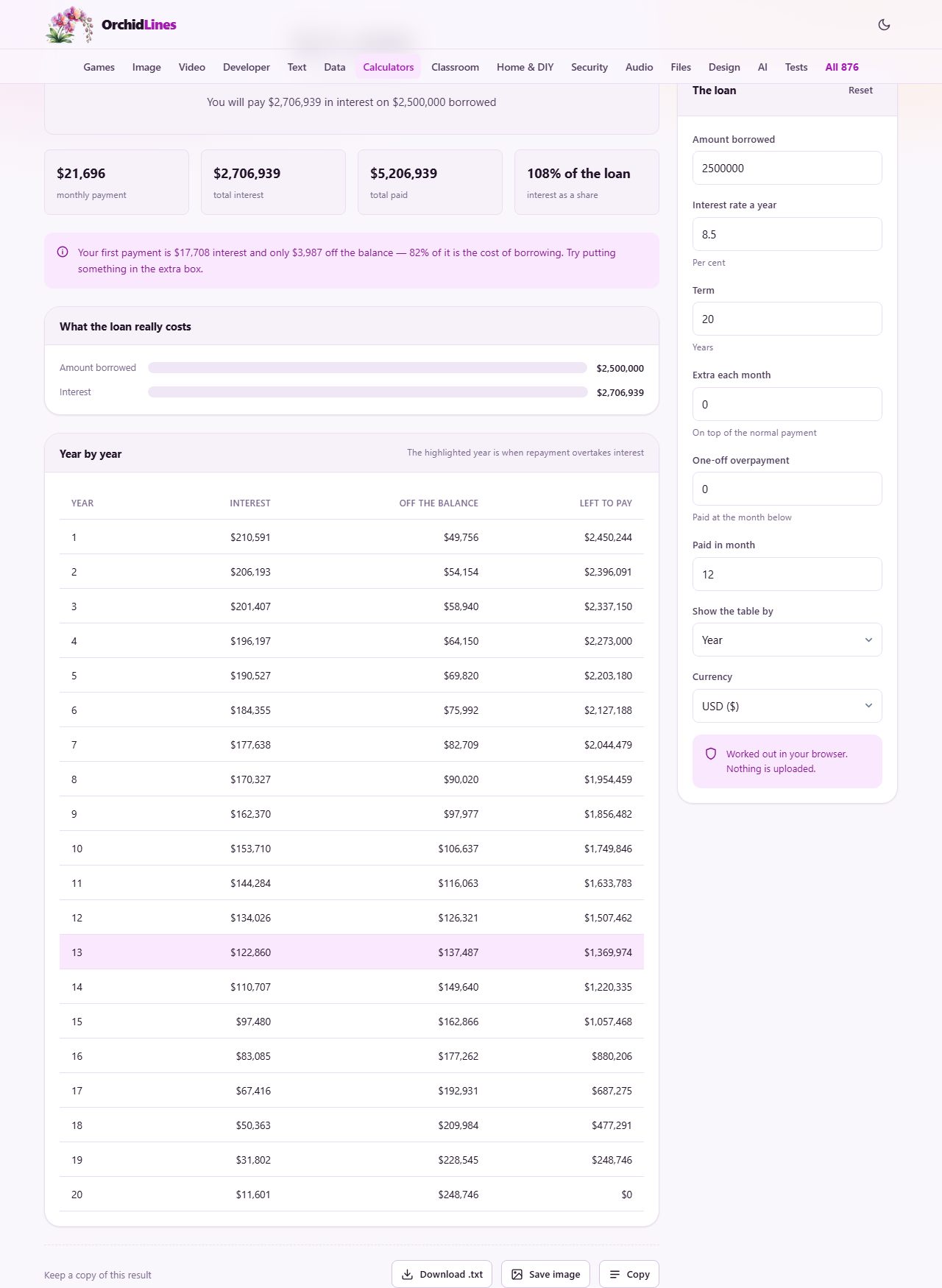
The panel headed The loan holds the fields that describe your borrowing. Amount borrowed is the total you received from the lender, entered as a number. Interest rate a year is the annual percentage rate, entered with decimals allowed. Term is the number of years the loan runs for.
These three fields are all you need for a basic schedule. The calculator works out the fixed monthly payment, the total interest over the full term, and builds the row-by-row table automatically. Every time you change a number the output updates at once.
Below the three main fields sits a Currency selector. It does not convert currencies or change the maths. It simply puts the right symbol in front of the figures so the output reads naturally in your own money.
The two overpayment fields
Extra each month is a fixed amount you pay on top of the normal payment every single month. Even a small figure here can cut years off the loan. The hint text reads On top of the normal payment, which is exactly what it means. If the calculated payment is twelve thousand and you enter five hundred, the total going out each month is twelve thousand five hundred.
One-off overpayment is a single lump sum paid once. The field beneath it, Paid in month, says when that lump sum lands. If you set the lump sum to two hundred thousand and the month to twelve, the schedule recalculates everything from month twelve onward with the lower balance.
You can use both at the same time. The schedule shows the combined effect, and the summary tells you how much interest you saved and how many months earlier the loan finishes.
Reading the output table
The Show the table by selector offers two views. Year groups twelve months together and shows annual totals for interest paid, principal paid and the balance at the end of each year. Month shows every individual payment.
The yearly view is the one most people want first. It makes the long arc of the loan visible at a glance. You can see the balance barely moving in the early years and then falling faster and faster as the interest share shrinks. The monthly view is there for the detail: checking a specific payment against a bank statement, or seeing exactly which month the loan would end if you overpay.
Above the table sit the headline figures. The monthly payment is the fixed amount. The total interest is the full cost of borrowing over the entire term, and it is usually the number that surprises people. When overpayments are entered, two more figures appear: the interest saved, and how much sooner the loan ends, given in years and months rather than as a date.
A worked example with real numbers
Take a loan of 2,500,000 at 8.5 percent for 20 years, which are the default values on the page. The calculator shows a monthly payment of roughly 21,700. Over the full 240 months the total interest comes to about 2,707,000, meaning you pay back more in interest than you originally borrowed.
Now add 1,000 per month in the Extra each month field. The schedule recalculates. The loan clears in 215 months instead of 240, so it ends two years and one month early, and the total interest drops by a large amount. That small monthly addition avoided years of compounding.
For a lump sum test, clear the extra monthly field, enter 200,000 in One-off overpayment and leave Paid in month at 12. The schedule shows the balance dropping sharply at month twelve and every payment from that point carrying less interest. The earlier the lump sum arrives, the bigger its effect, because every month it sits on the balance is a month of interest it prevents.
Why early payments are mostly interest
On the example loan at 8.5 percent, the first payment is about 82 percent interest and 18 percent principal, and the note above the table says so in those words. The half-and-half split does not arrive until around year twelve. This is not a trick or a penalty. It is just how the maths works.
Interest each month is calculated on the outstanding balance. At the start the balance is the full loan amount, so the interest charge is large and the leftover for principal is small. As the balance falls, the interest charge falls too, and a bigger share of the same fixed payment goes to reducing what you owe.
This is also why overpaying early is so much more powerful than overpaying later. An extra payment in year one reduces the balance that interest is charged on for the remaining nineteen years. The same extra payment in year eighteen only avoids two years of interest. If you can only overpay for a short stretch, doing it at the start gives you the best return.
Common mistakes when using the schedule
The most common mistake is assuming the lender applies overpayments the same way. Some lenders reduce the monthly payment instead of shortening the term. That saves less total interest because you are still paying for the full original term. This calculator assumes the term shortens, which is the more beneficial arrangement. Check your loan agreement to see which one applies.
Another frequent error is ignoring early repayment charges. A few loan products charge a penalty for paying off ahead of schedule, especially in the first few years. The calculator does not know about these charges, so the saving it shows could be partly offset by a penalty. Read the terms before acting on the numbers.
People also forget that the rate shown is divided by twelve for monthly compounding. That is how nearly all home and car loans work. Some credit products compound differently, in which case the schedule will not match exactly.
When the schedule is not the right tool
This calculator covers standard fixed-rate amortising loans. It does not handle variable-rate loans where the interest changes over time, interest-only periods where no principal is repaid for the first few years, or balloon payments where a large sum is due at the end.
If your loan has any of those features, the schedule will still show you what a plain fixed loan looks like at your rate, which is useful for comparison, but it will not match your actual statements. For a variable rate loan, you would need to recalculate every time the rate changes.
It is also not a financial advice tool. It shows the mathematics of your loan, not whether you should overpay or invest that money elsewhere. That depends on interest rates, tax rules and your own situation.
Privacy and where the maths runs
Every calculation runs inside your own browser. No loan amount, no interest rate, no personal detail is sent to a server at any point. The page works offline once it has loaded, and there is no account or login involved.
This matters because loan details are sensitive financial information. You can use the calculator freely without worrying about who might see your figures. One thing is worth knowing: the page does keep your entries. It writes them to this browser's own local storage so the schedule is still there on your next visit, and nothing outside this browser can read that. Press Reset to throw the saved copy away.