
Lay out a recipe you can really cook from
A good recipe card puts the times at the top, the ingredients in the order you use them, and the steps in a plain numbered list. This page builds one from what you type, and it can rewrite the amounts for a different number of people. Below is a tour of every box and choice, a full example scaled from four to eight, and the fixes for the usual slips.
What it makes and who wants it
The result is a tidy recipe laid out like a page from a cookbook. You can print it as a small card for a recipe box, as a full sheet, or as a book page with a wide edge for binding.
It suits anyone who cooks from written recipes. A parent can write down a family dish before it is forgotten. A home cook can tidy a scribbled note into something clear. Someone planning a dinner can size a recipe up for guests, then print a clean copy to follow at the stove.
The recipe details
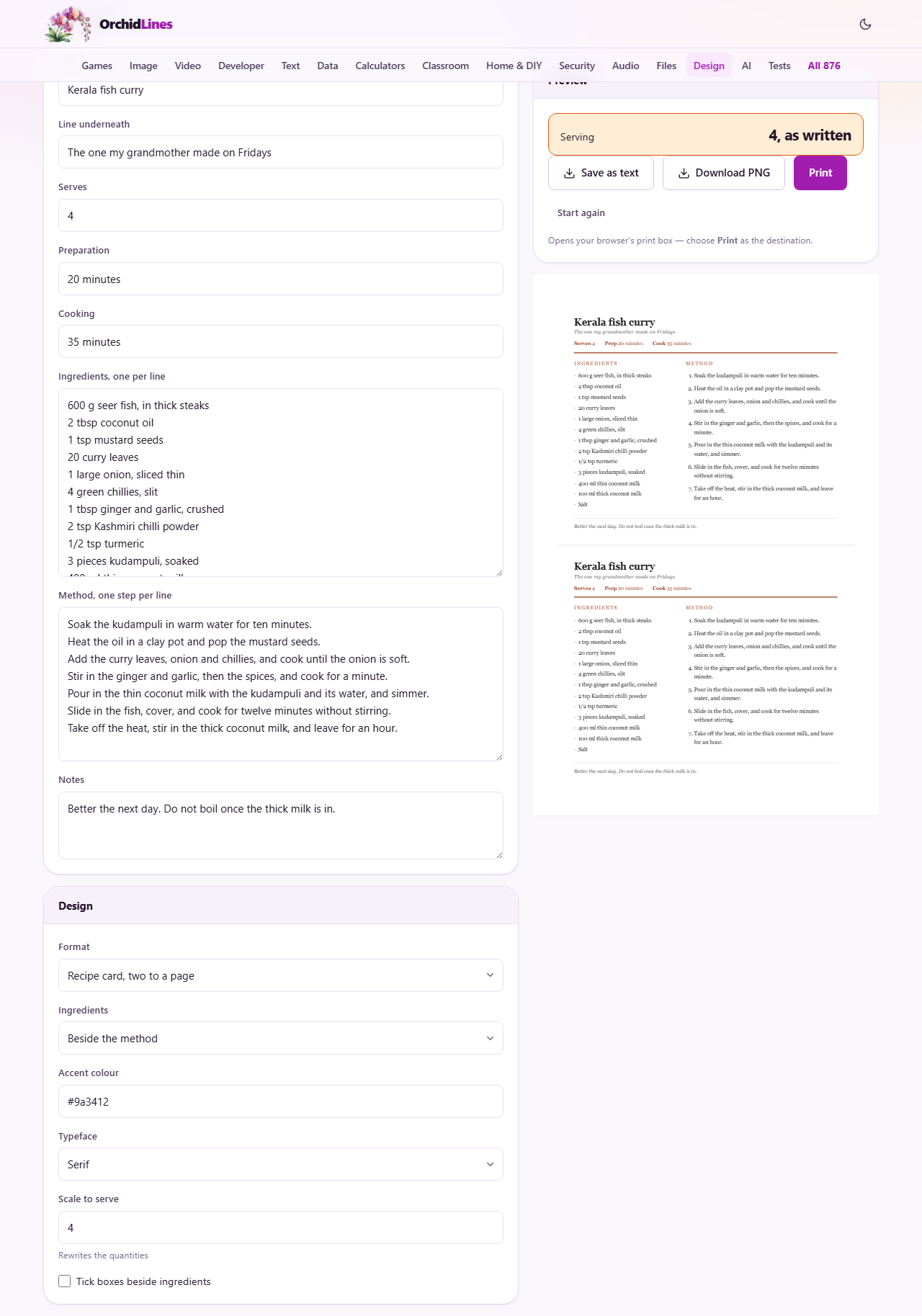
The first few boxes set the head of the card. Name is the title of the dish. The line underneath is a short note below it, such as where the recipe came from or when you make it. These are yours to fill in however you like.
Serves says how many the recipe feeds as written. Preparation and Cooking hold the two times. You can type these however you please, such as twenty minutes, since they are shown just as you enter them. Together they give a reader the shape of the job before starting.
The ingredients box
Type one ingredient on each line. The order matters more than people expect. List them in the order you reach for them while cooking, not by the alphabet, so a reader can move down the list as the dish comes together.
Start each line with the amount, then the item, like six hundred grams of fish or two spoons of oil. Beginning with the number is what lets the tool resize the recipe later. An ingredient with no amount, such as salt to taste, is fine and is left alone.
The method box
Put one step on each line of the method box. The steps are numbered for you, so you do not type the numbers. Keep each line to a single action where you can. A line that hides three jobs inside it is really three steps and reads better split up.
Short, clear steps are easier to follow with messy hands and a hot pan. When you are unsure whether to split a step, split it. The card will simply carry one more number, which costs nothing and helps the cook.
Notes at the foot
The Notes box adds a small italic line at the bottom of the card. It is the place for the things that do not fit a step, such as a warning not to let the sauce boil, a serving idea, or the fact that the dish tastes better the next day.
Notes are optional. Leave the box empty and no line appears. Fill it in and it sits quietly under the method, out of the way of the main recipe but there when a cook needs it.
Scaling to a different number
Scale to serve is the box that resizes the recipe. Set it to the number of people you actually need to feed, and the amounts in the ingredients are rewritten. A recipe for four turned up to eight has its quantities doubled, and turned down to two has them halved.
The tool works on the number at the front of each ingredient line, and it handles halves and quarters cleanly, showing them as neat fractions rather than long decimals. Above the preview, a small line tells you what is happening, such as serving eight, scaled up from four, so you always know whether you are looking at the original or a resized version.
What scaling gets right, and what it cannot
Scaling is plain arithmetic. It multiplies every amount that starts with a number by the same factor. For the main players, like the meat, the flour, or the liquid, that is exactly right, and doubling them gives a dish twice the size.
It cannot judge taste, though. Strong things rarely want the full multiple. A double batch seldom needs double the chilli, the salt, or the raising agent, and cooking times barely change at all, since a wider pan loses heat at much the same rate. So treat the scaled amounts as a starting point for those, and taste as you go, especially for anything that came off a small spoon.
Setting the look
A Design panel controls the appearance. Format offers three shapes: two cards on one page, a single full page, or a cookbook page with a wide margin for binding. The Ingredients choice puts the ingredient list either beside the method or above it. Reading both at once is why the side by side layout helps people miss fewer steps.
Accent colour takes a colour code and tints the title rule and the small headings. Typeface switches between a classic serif and a plain sans face. A final tick adds a small empty square before each ingredient, which turns the list into something you can check off as you shop or cook.
Choosing the right format
The three formats each suit a different end use. The two card layout prints a pair of matching cards on one sheet, with a dashed line down the middle to cut along. Each card is sized to drop into a recipe box or sit under a magnet on the fridge.
The full page layout gives the recipe a whole sheet to itself, which is best for a long recipe or one you will slip into a folder. The cookbook page leaves a wide blank strip down one side, so you can punch holes or bind a set of them into a book of your own without the text running into the spine.
Getting the card out
Three buttons sit above the preview. Save as text writes the recipe out as a plain text file, handy for pasting into a message or keeping a simple copy. Start again wipes the boxes back to a blank recipe when you want to begin a fresh one.
Print opens your browser's own print box. From there you choose where it goes. Pick your printer to put it on paper, or, if your browser offers it, choose Save as PDF as the destination to keep a neat digital copy. The card is laid out at true paper size, so what you see in the preview is what comes out.
A recipe worked through
Suppose you have a curry that serves four and six friends are coming. You type the name, a line underneath, and the two times. You list the ingredients in the order you use them, each starting with its amount, and you write the method one step to a line.
Now you set Scale to serve to eight. The ingredient amounts double before your eyes: six hundred grams of fish becomes one thousand two hundred, and half a spoon of turmeric becomes a whole one. The salt line, which had no number, stays as it was. The line above the preview reads serving eight, scaled up from four. You choose the two card format, press Print, and follow the copy at the stove.
Common mistakes and how to fix them
Most trouble comes from how the lines are typed. If an amount does not resize, check that the line begins with the number, since only the leading amount is scaled. If two ingredients share a line, split them so each has its own row and its own amount.
- The steps run together: you put more than one on a line. Press enter between them so each is numbered.
- The scaled spices taste too strong: that is the arithmetic being honest. Cut them back by hand and taste.
- The card runs off the page: shorten a wordy step, or move the ingredients above the method to gain width.
- You lost your draft: it is saved in this browser, so reopen the page rather than starting over.
When another tool fits better
This page is for a single recipe on a page you can print. It is not a place to store a whole cookbook, search your recipes, or plan a week of meals. For that, a dedicated recipe app or a notes app is the better home.
It also does not do the shopping maths across several recipes. If you want one combined list for a big cook, write each recipe here, save each as text, and gather the amounts together yourself. For one dish, printed clearly, this is the quick and simple choice.
Your recipe never leaves your kitchen
Everything you type is laid out on your own device. The recipe is not sent to us, and nobody sees the dish you are writing down. A treasured family method stays exactly where it belongs, with you.
As a small convenience, the page keeps your current recipe in this browser so it is still there when you come back. That saved copy sits on your computer alone. Since none of it needs a connection, you can write and print a card with the internet switched off entirely.