
Arithmetic practice you can hand out tomorrow
The help block above explains the idea. This guide digs into the machinery: what each operation box actually generates, what the number range controls for division as opposed to addition, why the seed box deserves more attention than its size suggests, and how to print a pupil copy without the answers on it. A full example follows, plus the traps that produce a poor sheet.
Ten quiet minutes, most days
Number facts stick through repetition, and repetition needs material. A parent who wants ten minutes at the kitchen table after homework has to find that material somewhere, every single evening.
A teacher has the same problem in a different shape. A five-minute starter while the register is taken. A back-up task when a lesson finishes early. Something for a child who has been off ill and needs the easier version of what everyone else did.
Buying a book locks you into whatever order the book chose. This page generates the sheet you need now, with its own answer key, and does it again with different questions whenever you ask. Nothing is stored and nothing is billed.
The four operation boxes
Addition, Subtraction, Multiplication and Division are separate tick boxes, and you can mix any of them. Questions are then drawn from whichever you switched on. Leave them all off and the page falls back to addition rather than giving you an empty sheet.
Addition and multiplication are the straightforward ones: two numbers are picked from your range and combined. Subtraction is picked the same way, then adjusted if you have asked for no negative answers.
Division is built differently, and this is the cleverest part of the page. Rather than pick two numbers and hope, it picks the divisor and the answer first, multiplies them together, and asks you to divide that product back down. The result is that every division question comes out exactly, with no remainder and no decimal, without you having to check a single one.
What the number range really sets
Smallest number and Largest number describe the pool the generator draws from. Keep a clear gap between the two figures, and think about what that pool means for each operation, because it is not the same thing in every case.
For addition and multiplication, both of the numbers in the question come from the pool. Set two to twelve and you get the familiar tables, with answers up to a hundred and forty-four.
For division it works one level back. The divisor and the answer both come from your pool, so the number being divided is their product and can be far larger than anything you typed. With a pool of two to twelve, a division question can start from a number as high as one hundred and forty-four.
One safeguard is worth knowing. Even if you set the smallest number to zero, division never uses zero as the divisor, so the sheet cannot ask a child to divide by nothing.
Quantity, width and the two layouts
How many questions runs from four to a hundred and twenty. Thirty is a sensible daily dose and fits one page. Sixty is a serious test. Above that you are into revision-day territory and should expect a second sheet.
Columns runs from one to six and decides how the questions are spread across the page. Three columns of ten reads comfortably. Six narrow columns suit short one-line sums and nothing else. One wide column suits a young child who loses their place easily.
Layout offers two shapes. On one line prints each question with an equals sign and a ruled space to write the answer, which is right for quick recall. Column sums stacks the two numbers one above the other with the sign beside the lower one, draws a line underneath, and leaves clear space below it. That is the shape written methods are taught in, and the space is where the working goes.
Keeping answers positive, or not
Never give a negative answer is ticked to start with. While it is ticked, any subtraction that would go below zero has its two numbers swapped, so the larger one is always on top.
That is what you want for a child who has not met negative numbers. Untick it once they have, and the same generator becomes negative number practice, since roughly half the subtractions will now cross zero.
Do expect the occasional question whose answer is zero. Both numbers came from the same pool, so sometimes the same value turns up twice. It is a fair question and worth a short conversation the first time it appears.
The seed box, and the habit it rewards
The seed is a small box with a large effect. Leave it empty and every change you make anywhere on the page produces a completely fresh set of questions. Nudge the column count and the questions change too, which surprises people who were only adjusting the layout.
Type a word into it and the questions become fixed. The same word always produces the same sheet, so you can come back next week and print an identical copy for a re-test, or give two children the same questions.
So the habit is this: settle the operations and the range, type a word into the seed, and only then fiddle with columns and layout. Under the sheet the page reports the seed number it used, and typing that number in brings the same questions back even if you never chose a word.
The answer key
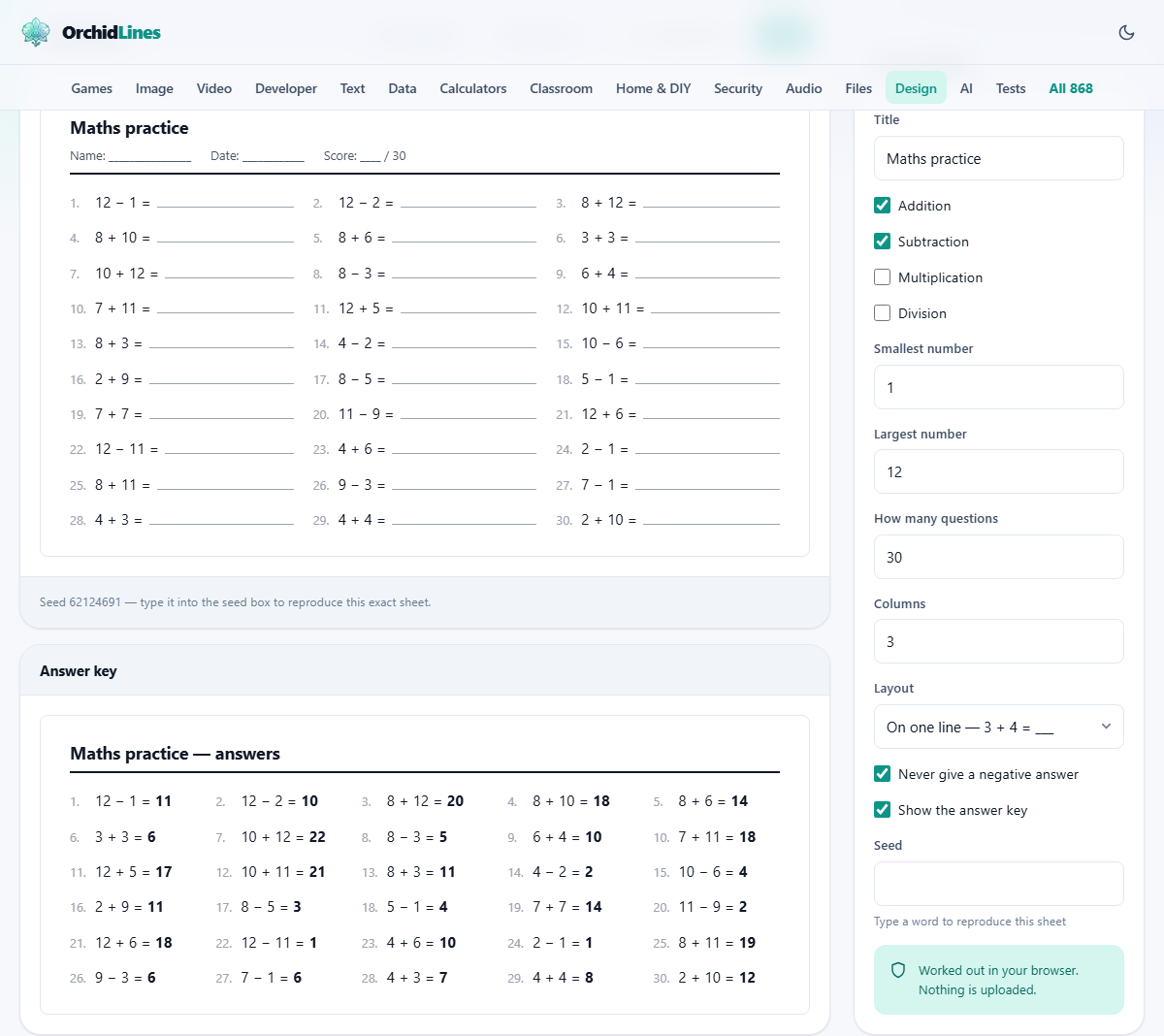
Show the answer key controls a second panel below the worksheet. It repeats every question in order with the answer in bold, numbered to match, and it packs the questions into more columns than the worksheet because there is no writing space to leave.
Untick the box and the whole key disappears from the page, which is exactly what you want before printing the copy a child will see. Tick it again afterwards to print your own copy. Marking thirty questions from a key takes about a minute; marking them by working each one out takes ten.
Worked example: Friday tables for a class of nine-year-olds
Start by typing Friday tables, Class 4 into the Title box, since that title prints at the top of both sheets and saves confusion in a pile of paper.
Untick Addition and Subtraction, and tick Multiplication only. Set the smallest number to two and the largest to twelve. Set how many questions to forty and columns to four, which gives ten rows across four columns. Leave the layout on one line, because this is about recall speed rather than method.
Now type friday into the seed box. The heading above the sheet reads forty questions, and the sheet itself shows the title with a name line, a date line and a score line reading out of forty. The answer key sits below with the same forty questions solved.
Untick Show the answer key and print. That is the class copy. Tick it again and print once more for yourself. Next term, type friday into the seed box again and the identical sheet comes back, which makes an honest before-and-after comparison possible.
Getting it onto paper and into files
Print opens your browser's own print box and sends the sheets alone. The settings rail, the panel headings, the buttons and the rest of the site are left off, so what reaches the paper is the worksheet as you see it.
Download .txt writes a plain text file containing every question with its answer beside it. That makes it a key rather than a blank sheet, and it is handy for pasting questions into a lesson plan or reading them aloud from a phone.
Download PNG saves the sheet as an image. When the answer key is showing, both sheets are saved, and they arrive together in a zip file with one image per sheet rather than as a single tall picture. Hide the key first if you only want the worksheet.
What separates a useful sheet from a filler sheet
- Short and frequent beats long and rare. Thirty questions daily teaches more than two hundred on a Sunday.
- Change one thing at a time. If you widen the number range, keep the operations the same, so you know what caused a wobble.
- Mixing two operations is harder than it looks, because the child must decide what to do before doing it. That is a separate skill, and worth practising on purpose.
- Use the score line. A number out of forty on the page, written by the child, turns a worksheet into a record.
- Keep the title specific. A drawer of sheets all titled Maths practice is a drawer you cannot search.
- Print a fresh set rather than photocopying an old one. It costs nothing here, and a child who half remembers the answers is not practising.
Where this page stops
It generates whole number arithmetic and nothing else. There are no word problems, no fractions, no decimals, no negative numbers in the questions themselves, and no algebra. It also cannot grade difficulty within a range, so every question in a run is equally likely.
One more limit is worth planning around. If the pool of numbers is very small, there are only so many different questions that can exist, and a long sheet will start to repeat itself. Widen the range or shorten the sheet.
For other kinds of practice, the site has neighbours. The Puzzle Worksheet Maker builds word searches and similar sheets, the Flashcard Maker prints cards for drilling facts away from a desk, and Printable Paper gives you squared and lined paper for the working out.
The questions are made on your own computer
Every question, every answer and every layout decision here is worked out by the page itself, inside your browser. Nothing is uploaded and no request goes anywhere while you generate a sheet. The random number generator, the duplicate check and the answer key all run on the machine in front of you.
That matters less for arithmetic than for a photograph, but it still buys you two things. There is no account to create and no child's name in anybody's database. And with no server involved, you can generate as many sheets as a term needs without anyone counting them.