
Printable bingo where no two cards match
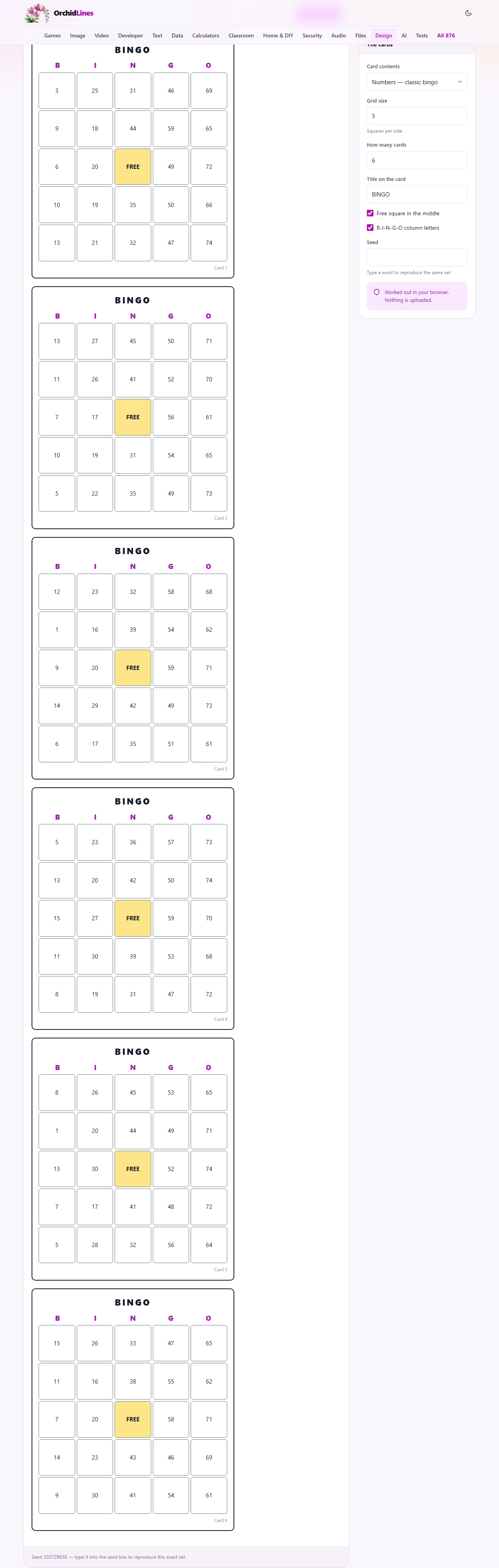
The panel above prints a stack of cards. This guide covers everything around it: how the numbers are laid out, how to run a game from your own words, what each option on the right changes, how the seed brings a set back, and how the cards reach paper. A word-bingo example is worked through, and the traps are gathered at the end.
Two games from one page
Bingo comes in two flavours here. One is the classic numbers game, the kind called out at a hall or a fundraiser. The other is word bingo, where you supply the squares yourself.
Word bingo has quietly spread into classrooms, baby showers, road trips, and the joke version colleagues play through a long meeting. Anything you can write as a list can become a set of cards.
You pick the flavour with Card contents at the top of the panel. Every other control adjusts around that first choice, showing or hiding whatever it needs to.
The numbers game
Choose Numbers, the classic bingo option, and the tool builds cards from the traditional layout. Each column takes its numbers from its own band: the first column from the low numbers, the next from the band above it, and so on across the card.
On a five-wide card that gives the familiar spread from 1 to 75, fifteen numbers to each column. No number is ever repeated on the same card.
You type nothing at all for this mode. Set how big the card is and how many you want, and the cards fill themselves with numbers straight away.
Word bingo, and how many words to bring
Choose My own words or phrases and a Words box appears. Type one item to a line: a term, a name, a short phrase, whatever the game is about.
You need at least as many words as a card has squares, which is twenty-five for a five-by-five card. Give fewer and the tool tells you how many you are short, instead of guessing or repeating one.
More words make a better game. With exactly twenty-five, every card holds the same set of items in a shuffled order, so players tend to complete lines at nearly the same moment. Bring forty or more and the cards start to differ in what they contain, not merely where things sit.
The Words box only shows in this mode. Switch back to numbers and it tucks itself away, since there is nothing for you to type.
The rest of the panel
Grid size is the number of squares along one side, from 3 up to 7, starting at 5. A bigger grid makes a longer game and, for word bingo, needs more words to fill it.
How many cards is how many to produce, from 1 up to 60, starting at 6. This is the number that print out, one per player.
Title on the card prints across the top of every card and starts as the word BINGO. Change it to name your own game.
Free square in the middle gives everyone a free centre square, the traditional head start. It only takes effect when the grid has an odd number of squares per side, because only an odd grid has a true middle square.
The B-I-N-G-O column letters option prints those five letters as headings above the columns. They appear on the five-wide card, which is the size they were made for.
Grids other than five
Five by five is the default because it is what most people picture, but the grid runs from three up to seven, and the size changes the feel of the game.
A three-by-three card needs only nine squares, so a round finishes fast. It suits small children, a quick warm-up, or a party where nobody wants a long game. For word bingo it also means you can get away with a shorter list.
A seven-by-seven card is a marathon. It wants forty-nine squares filled, so word bingo at that size asks for a long list, and even the numbers game stretches out. Reach for it when you want a game that lasts, and remember the free centre square only arrives on the odd sizes.
The seed, and the promise that cards differ
Every card is checked against the ones already made and thrown out if it is a duplicate. With a short word list, two identical cards are surprisingly easy to produce by accident, and two matching cards would let two players win off the same call. The check quietly prevents that.
If the list is too small to make as many different cards as you asked for, the tool says so rather than repeating one to pad the count. That message is your cue to add more words or ask for fewer cards.
Seed is a box for a word of your choosing. Type one and you get the exact same set of cards every time you use it. Leave it empty and each run is fresh and random.
A small line under the cards reports the seed that produced them. Note it down and you can print the very same set again later, which is what you want when one player loses a card and you need that one card back, not a whole new game.
Getting them onto paper
New cards rolls a fresh set with your current settings. Tap it to reshuffle until you like what you see on screen.
Print the cards hands the set to your browser's print dialog. The cards are laid out one to a page, so each player gets a full sheet that is easy to dab or cross off.
From that print dialog you can send the cards to a printer, or save them as a PDF instead if you would rather keep or email the file. The tool itself does not write a PDF; saving one is a choice inside the print box, not a separate button here.
To fit two cards on a single sheet and save some paper, use the pages-per-sheet setting in your printer's own options. That belongs to the printer, not to this page.
A worked example: a farewell party
A colleague is leaving and you want word bingo for the send-off. You set Card contents to My own words or phrases and paste about thirty short phrases tied to that person: their catchphrases, their desk habits, the meetings they always chaired.
Grid size stays at 5, so each card needs twenty-five of your thirty phrases and shuffles them into place. You set How many cards to 12 for the room, and change Title on the card to FAREWELL.
You leave Free square in the middle ticked for an easy centre, and untick the B-I-N-G-O column letters, since those letters mean nothing sitting over word columns. Into Seed you type farewell2026, so any lost card can be reprinted exactly.
You press New cards to see the set, then Print the cards. Twelve pages come out, one card each. To call the game, read your phrase list aloud in a shuffled order rather than straight down the page, and the first player to complete a line shouts out.
Traps worth dodging
- The too-few-words message: a five-by-five card needs twenty-five words and you have pasted fewer. Add more words, or drop the grid size a notch.
- Expecting a free square on an even grid: a four-by-four or six-by-six card has no single middle, so the free square is skipped there. Choose an odd size if you want one.
- Missing column letters: the B-I-N-G-O headings print on the five-wide card. Other grid sizes leave them off by design.
- Reading the word list from the top when calling: the very first card was filled in that order, so its owner would race ahead. Shuffle the list, or simply call at random.
- Cards printing tiny or oversized: that is the print box scaling the page, not the tool. Set the scale to a comfortable size in the print dialog before you send it.
When another page fits better
If all you need is to pull a random name or number out of a hat, a picker or a number generator is simpler than a grid of cards. Bingo is for a game with many players and many cards.
If you want flashcards, or a printed quiz sheet rather than a grid to mark off, those are different layouts served by different tools. This page makes cards to dab, not questions to answer.
But for the exact thing bingo asks for, a stack of cards that are guaranteed to differ and ready to print, this page is built to do just that and little else.
Made on your device
The cards are built inside this page, on your own computer. Your word list, your title and your seed all stay here; none of it is sent to a server on the way to a printed sheet.
There is no account to make and nothing saved online, which also means the page works with no internet at all once it has loaded. That is handy for a road-trip game made in the car with no signal.
Because nothing is stored for you, the seed is the one thing worth keeping when a set matters. That single word is all it takes to conjure the same cards again, so jot it down before you close the tab.