
Profiling a CSV file before you trust it with anything
Every data project starts with a file somebody sends you. Before you load it into a database, join it to another table, or build a chart on top of it, you need to know what is actually in it. This article walks through a column-by-column profiler that detects types, counts missing values, flags outliers, spots duplicate-free columns that could serve as keys, and warns you about mixed date formats before they cause trouble downstream.
Who needs this and why
Analysts receive CSV exports from systems they did not build. The column names might be clear, or they might be internal codes. The data might be clean, or it might have three different date styles in one column. You cannot tell any of that by scrolling through a spreadsheet, because row 4,500 looks exactly like row 12 until the import fails.
Data engineers who build pipelines need to know which columns can be null, which hold numbers, and which are pretending to hold numbers while actually containing the occasional text string. Anyone merging two files needs to know whether the key column is truly unique in both. A profiler answers all of these questions in one pass, so you do not discover the problems ten steps later.
Getting your data in
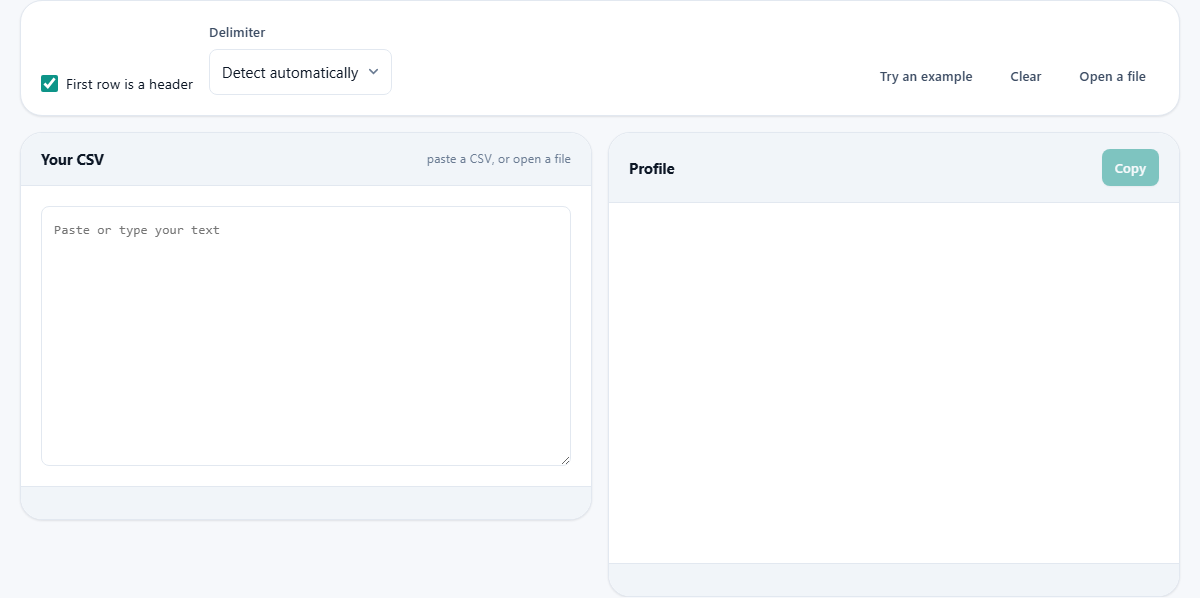
You can paste a CSV straight into the text area labeled Your CSV, or use the Open a file button to pick a file from your computer. There is also a Try an example button that loads a sample so you can see what the output looks like before committing your own data. A Clear button empties everything so you can start fresh.
At the top of the page sit two controls that affect how the file is read. The First row is a header checkbox, which is on by default, tells the profiler that the first line contains column names rather than data. The Delimiter dropdown lets you choose comma, semicolon, tab, or pipe. Leave it on Detect automatically and the tool works it out from the content, which is right nearly every time.
What the profiler reports for each column
The right-hand panel fills with a block for every column. Each block starts with the column name and the detected type. Type detection is majority-based, meaning a column of five thousand numbers with one text entry is reported as a number column with one problem, not a text column. That distinction matters because it tells you how many values need fixing rather than whether the column is usable at all.
Below the type you see how many values are present, how many are missing, and the percentage of each. Missing means empty cells plus the common stand-in strings people use to mean empty: NA, N/A, NULL, none, nil, NaN, a single dash, and the word blank in brackets. These are matched without caring about upper or lower case.
For number columns you get the minimum, maximum, mean, and a count of outliers. An outlier here is any value more than one and a half times the interquartile range beyond the first or third quartile. That is Tukey's fence, the same rule that box plots use. Outliers are counted and flagged but never removed.
Flags and what they mean
Coloured chips appear under each column. These are the findings that deserve your attention. A chip saying missing values with a count tells you how many gaps exist. A chip about mixed date formats warns that the column contains dates written in more than one style, which will confuse any tool that tries to read them.
A constant column chip appears when every value is identical. That usually means a leftover export setting or a filter that was already applied before the file was saved. It carries no information and can normally be dropped.
The chip unique -- could be a key flags a column where no value repeats. If you planned to use a column as a join key and it is not flagged, that column has duplicates and your join will produce extra rows. Stray spaces are also flagged, because a value with a trailing space looks the same on screen but will not match the version without it.
A worked example with a sales file
Suppose you paste a CSV with columns OrderID, Date, Customer, Region, Amount, and Status. The profiler might report OrderID as a text column that is unique and could be a key. Date might show as a date column, but with an ambiguous-dates flag because every date falls on or before the twelfth of the month, so day-first and month-first readings are both valid. Customer is text with four missing values. Region is text, constant, every row says EMEA, so it adds nothing. Amount is numeric, ranging from 12.50 to 9,430.00, with two outliers. Status is text with three distinct values: Shipped, Pending, and Cancelled.
From this single pass you already know: OrderID is safe as a key, the dates need a conversation with whoever exported the file, four customer names are missing, the Region column can be dropped, the two large orders deserve a look, and the Status values are clean.
The ambiguous-date problem
Dates deserve their own section because they cause more silent data corruption than anything else. A column full of 03/04/2024 values is flagged as ambiguous because both the third of April and the fourth of March are valid readings. No amount of looking at the data settles it. Only knowing where the file came from tells you which interpretation is correct.
If any single value in the column has a day above twelve, the order is determined, because 15/04/2024 can only be the fifteenth of April. But a column where every day number happens to stay at twelve or below is genuinely undecidable. The profiler flags this explicitly so you handle it before the import, rather than discovering three months later that half your dates are in the wrong month. ISO dates in year-month-day order avoid this problem entirely, which is exactly why they exist.
Blanks, zeros, and how statistics are computed
Every statistic the profiler shows is calculated over the values that are actually present. Blank cells are excluded, not treated as zero. This is a deliberate choice and an important one. If you have a column of incomes where thirty entries are missing, treating those as zero drags the mean down and makes the data look poorer than it is. That mistake has ruined more reports than any formula error.
The distinct count tells you how many different values appear. A column with ten thousand rows and ten distinct values is probably a category. A column with ten thousand rows and nine thousand distinct values is probably a free-text field. Neither is wrong, but they call for very different handling.
Common mistakes when profiling
The most common mistake is cleaning the file before profiling it. If you open it in a spreadsheet first, the spreadsheet silently converts date formats, strips leading zeros from codes, and trims whitespace. By the time you paste it, the problems the profiler would have caught are already baked in. Paste or open the raw file directly.
Another frequent error is ignoring the delimiter setting. A European export that uses semicolons as separators will appear as a single enormous column if the profiler assumes commas. If you see only one column and the data looks like it was glued together, change the delimiter.
People also forget that the profiler works with what you give it. If your CSV is a sample of ten rows, the profile tells you about those ten rows. A column may look unique in the sample and have duplicates in the full file. Profile the whole file when you need confidence.
When to use something else
This profiler reads one file and tells you about its columns. If you need to compare two files side by side, or run a query to find specific rows, or split the file into smaller pieces, those are separate tools. A profiler is the first step, not the only step.
For files larger than about fifty megabytes, the browser will slow down because the entire file is held in memory. At that size you are better off profiling a sample of a few thousand rows, which gives you the same column-level insight without the wait.
Privacy and where the work happens
The file is read by your browser using the FileReader API. Nothing is sent to a server. Nothing is uploaded. The data stays on your own device for the entire process, which is exactly the point when you are profiling a file you are not yet sure about. You can disconnect from the internet after the page loads and the profiler still works.