
Generating believable test data for demos, fixtures and seed scripts
Every developer needs fake rows sooner or later: a demo that looks real without being real, a test fixture that stays the same across runs, or a seed script for a fresh database. This guide covers every column type the generator supports, explains the seed mechanism, walks through a worked example that produces SQL inserts, and lists the traps that catch people building fixtures for the first time.
What the generator does and who it is for
The page takes a list of column definitions and produces rows of invented but plausible data. The output can be CSV for a spreadsheet, JSON for an API stub, SQL INSERT statements for a database seed, or a Markdown table for pasting into documentation.
Developers use it when they need a table that looks like production without containing real people. Designers use it to fill a mockup with data that has realistic lengths and variety, so a prototype looks convincing in a client presentation. Teachers use it to create exercise datasets for students without borrowing real records. Testers use it to generate edge cases like apostrophes in names or very long addresses. Technical writers use it to build example tables for documentation. Anyone who has ever typed John Doe into twenty rows of a spreadsheet and wished there was a faster way will find this useful.
Defining columns
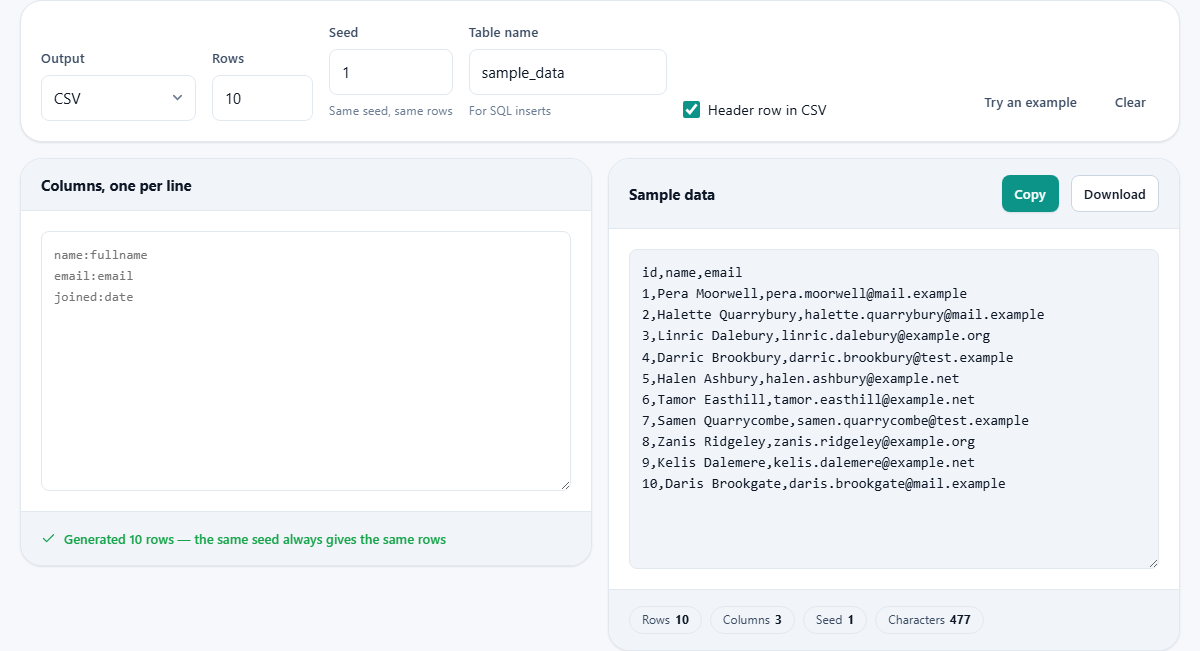
The left panel is labelled Columns, one per line. Each line names a column and gives it a type, separated by a colon. Writing name:fullname creates a column called name whose values are generated full names. Writing email:email creates a column of email addresses. If the name and the type are the same word, you can write just the word on its own, so email on a line by itself is the same as email:email.
The available types cover the most common fields in application data. Personal details include firstname, lastname, fullname, email and phone. Location types include town, address and postcode. Business types include company, product, price and quantity. General types include id, uuid, number, decimal, boolean, status, date, datetime, sentence, url and ip. If you type a name that does not match any known type, the generator falls back to producing a sentence.
The output format and its options
The dropdown labelled Output offers four choices. CSV produces comma-separated rows with a header line. JSON produces an array of objects where each key is a column name. SQL inserts produces one INSERT INTO statement per row, using the table name from the Table name field. Markdown table produces a pipe-and-dash table ready to paste into a document.
Header row in CSV is on by default. Turn it off when you need raw data rows without a header, which some import tools expect.
Table name sets the SQL table name used in INSERT statements. It defaults to sample_data and can be changed to whatever your schema uses.
The seed and why it matters
The Seed field takes a number. The generator uses this number to start its random sequence, which means the same seed with the same column definitions always produces exactly the same rows. Change the seed and you get a completely different set.
This matters for test fixtures. If a test relies on specific values, recording the seed alongside the fixture means anyone can regenerate the same data months later. Without a seed, a fixture that changes on every run makes a failing test impossible to reproduce.
The Rows field sets how many rows to generate. It accepts a number between one and two thousand. Beyond two thousand the browser textarea becomes sluggish, and at that scale a scripting approach is usually a better fit.
How names and emails relate
If you define a fullname column before an email column, the generated email address is built from that name. An email next to a name of Priya Sharma might read priya.sharma@example.com rather than a random string. This detail matters because test data where the email has nothing to do with the name beside it is an instant tell that the data is fabricated.
The names themselves are assembled from syllables rather than taken from a list of real people. The email domains are the reserved example domains that can never belong to anybody. This means the generated data cannot accidentally match a real person's name and email, which avoids the legal and ethical problems that come with test data landing in a bug report or a screenshot.
A worked example: seeding a customer table with SQL
Suppose you are building an order management system and need a customers table with five columns: id, name, email, city and joined. In the left panel, write five lines: id:id, name:fullname, email:email, city:town, joined:date.
Set Output to SQL inserts. Change Table name to customers. Set Rows to five and leave the seed at one. The right panel now shows five INSERT INTO customers statements. Each row has an auto-incrementing id, a plausible name, an email address built from that name, a town, and a date.
Copy the output and paste it into a migration script or run it directly against a development database. The next developer who clones the project can regenerate the same five rows by using seed one with the same column definitions.
Types and how they affect quoting
The type of a column controls more than the kind of value it produces. It also controls how the value is quoted in the output. In SQL, numeric columns like id, price, quantity, number and decimal are written without quotes. Boolean columns produce true or false without quotes. Everything else is wrapped in single quotes with any internal apostrophe doubled, which is how SQL escapes a literal quote.
In JSON the same distinction applies: numbers and booleans are written as bare values, and strings are wrapped in double quotes with internal characters escaped. In CSV everything is text, and fields that contain commas or quotes are wrapped in double quotes following the standard quoting rules.
Mistakes that produce unusable fixtures
A few errors come up often when generating test data for the first time.
- Forgetting to note the seed. Without it you cannot regenerate the same rows, and a test that depends on specific values will break the next time someone runs the generator.
- Using the wrong type for a column. A price column typed as number produces integers without decimal places. Use price or decimal for monetary values.
- Generating more rows than the use case needs. Five rows demonstrate a feature. Fifty stress-test a query. Two thousand are rarely necessary for a demo.
- Pasting SQL inserts into a production database. The table name defaults to sample_data, but if you changed it to your real table name and ran the output against the wrong connection string, real data would sit beside fake data.
When this generator is not enough
The generator covers the most common column types for application data. It does not produce geospatial coordinates, images, binary blobs, or data that follows a specific statistical distribution. For those, a scripting library like Faker in Python or a purpose-built data generation tool gives you full control.
It also does not generate related tables. If your schema has a customers table and an orders table with a foreign key between them, this page can make each table separately but cannot ensure the foreign keys line up. For relational fixtures, a seed script that generates the data programmatically is the safer choice.
Privacy and how the generation works
The rows are generated entirely inside the browser on your own device. Nothing is uploaded, there is no account, and the page works offline once it has loaded. The generation algorithm runs in the page's own code with no network calls.
Because no real names, addresses or emails are used, and the domains are reserved example ones, the output is safe to share in screenshots, documentation and issue trackers without a privacy review. That is the whole point of generated data: it looks real enough to be useful and is fake enough to be harmless. There is no limit on how many times you can generate, no registration required, and the ads on the page are what keep the site running.