
How check digits catch typing mistakes in IBANs, barcodes, ISBNs and more
Bank accounts, barcodes, book numbers and vehicle identification numbers all end in one extra character that is calculated from the rest. Get a single digit wrong and the whole number fails a simple test. This article explains what that test is, walks through a practical session with a list of mixed identifiers, and covers the edge cases that cause the most confusion.
What a check digit actually is
Imagine you are reading a thirteen-digit barcode off a crumpled label and you type a 3 where there should be a 5. The barcode number is now wrong, but without a check you would never know. A check digit solves this by adding one more character at the end, calculated from the others by a published formula. Change any digit in the middle and the formula gives a different answer, so the last character no longer matches.
Different kinds of numbers use different formulas. Credit cards and IMEI phone numbers use the Luhn algorithm, which catches any single wrong digit and most cases where two next-door digits are swapped. IBANs divide a much larger number by 97 and check the remainder. ISBNs and barcodes use weighted sums. The point is always the same: stop a typing mistake from travelling further.
The kinds of numbers the tool recognises
The Treat them as dropdown lists every supported type. IBAN covers bank accounts from any country. ISBN handles ten-digit and thirteen-digit book numbers. EAN, UPC or GTIN covers shop barcodes at eight, twelve, thirteen or fourteen digits. VIN checks seventeen-character vehicle identification numbers. IMEI validates fifteen-digit phone identifiers. Card number runs the Luhn test on payment card numbers. ISIN checks twelve-character securities codes. GSTIN validates fifteen-character Indian tax numbers. ISSN handles eight-digit periodical numbers. Verhoeff covers twelve-digit identity numbers that use the Verhoeff algorithm instead of Luhn.
The default setting, Work it out for each one, looks at the shape of each row and picks the right test. A number starting with two letters followed by digits is probably an IBAN. Thirteen digits starting with 978 is almost certainly an ISBN-13. This automatic matching works well when your list contains a mix of types.
Pasting a list or reading from a CSV column
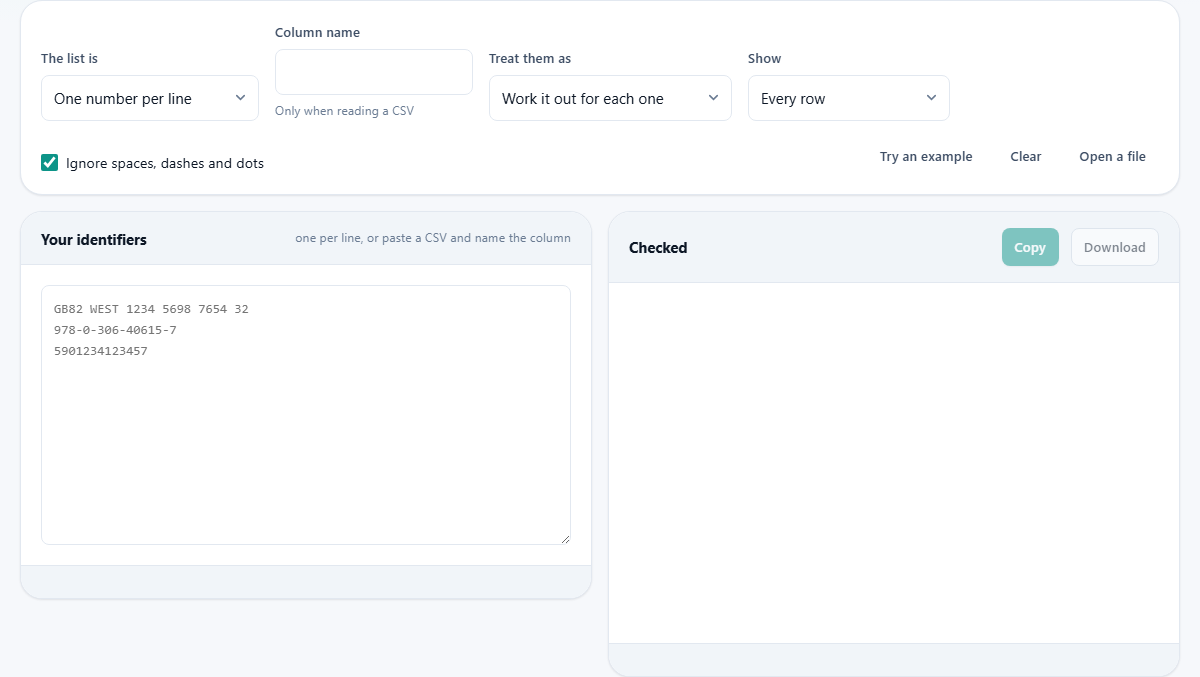
The simplest way is to paste one number per line into the left box. Spaces, dashes and dots inside the numbers are stripped by default, controlled by the Ignore spaces, dashes and dots checkbox. That means GB82 WEST 1234 5698 7654 32 and GB82WEST12345698765432 are both tested the same way.
If your data is a full CSV with many columns, change The list is from One number per line to A named column in a CSV. Then type the column name into the Column name field. The page reads your CSV, pulls out that one column, and tests each value. This saves you the step of copying a column out of a spreadsheet by hand.
You can also press Open a file to load a text file or CSV from your computer. The file is read locally and never sent anywhere.
Reading the results
The right side shows each number with a pass or fail verdict and a short reason. A passing row simply says the type it matched, such as IBAN or EAN-13. A failing row gives one of three reasons.
Wrong length means the number has too many or too few characters for the type it was tested against. An IBAN for Germany must be exactly 22 characters, for example. If yours has 21, it is not a matter of a mistyped digit - something was lost entirely.
Bad character means a letter appeared where only digits are allowed, or a digit appeared where the formula expects a letter. This usually comes from a copy-paste error that grabbed an extra character from the next cell.
Check digit mismatch is the most common failure and the most useful one. It means the length and characters are fine, but the last character does not match the one the formula produces. The result shows what the last character should have been, so you can compare. If it is one digit off, you almost certainly swapped or mistyped one character somewhere in the middle.
A worked example with mixed numbers
Suppose you paste these four lines:
GB82 WEST 1234 5698 7654 32 which is a valid IBAN example. Then 978-0-306-40615-7 which is a valid ISBN-13. Then 5901234123457 which is a valid EAN-13 barcode. Then 4111111111111112 which is a card number with the last digit changed.
The first three rows show green ticks. The fourth row fails with check digit mismatch. The result tells you the expected last digit is 1, not 2. You can see at a glance that one digit is wrong and where.
Now change the Show dropdown to Only the ones that fail. The three passing rows disappear and only the bad card number remains. This filter is useful when you have hundreds of rows and only need to fix the broken ones.
The twelve-digit problem
Some numbers look alike. Twelve digits could be a UPC barcode, a short card number, or an identity number using the Verhoeff algorithm. Each uses a different formula, and a number that passes one may fail another.
On the automatic setting, the tool tests each twelve-digit number against every kind it could be and reports whichever one passes. If none pass, it reports the failure for the most likely type.
The Verhoeff type is the one exception. It is never chosen automatically, because a twelve-digit Verhoeff number looks exactly like a UPC barcode and there is no reliable way to tell them apart. If you know your list contains Verhoeff numbers, pick that option from the Treat them as dropdown. The page then tests every row as Verhoeff and flags the ones with the wrong length as well.
Why passing does not mean the number is real
A check digit catches accidents. It does not prove existence. A valid IBAN format does not mean the bank account is open. A valid card number does not mean the card has money on it. A valid VIN does not mean the car is on the road.
Roughly one randomly invented number in ten passes a Luhn check by pure chance. The odds are better for an IBAN because the divisor is 97, but a pass still only means the digits are well formed. This tool is for catching data-entry errors in a list you already trust, not for verifying whether something is genuine.
The leading-zero trap in spreadsheets
This is the single most common cause of false failures. Open a column of barcodes in a spreadsheet, and a number like 0012345678905 becomes 12345678905 because the program treats it as a number and strips the leading zero. The barcode is now twelve digits instead of thirteen, the length is wrong, and every row fails.
The fix is to format the column as text before pasting the data, or to add a leading apostrophe in the cell. When pasting into this tool, the numbers come in as text already, so the zero survives. The problem only happens if the spreadsheet ate the zero before you copied from it.
Downloading and copying the results
Press Copy to put the results on your clipboard as tab-separated text, ready to paste beside your original data in a spreadsheet. Press Download to save them as a small file.
Both outputs include the original value, the verdict, the detected type, and the reason for any failure. That gives you everything you need to correct the bad rows without switching back and forth between windows.
When to use something else
This tool checks format, not meaning. If you need to confirm that an IBAN belongs to a particular bank, you need the bank's own lookup service. If you need to verify that an ISBN is listed in a catalogue, you need a book database. If you need to look up a VIN to find a vehicle's history, you need a registry search.
It also does not generate check digits for you. If you have a number without the last character and want to calculate what it should be, you would need a calculator for that specific type. This tool validates a complete number, it does not complete a partial one.
Privacy and local processing
Every calculation runs inside your browser. Card numbers, bank account numbers and phone identifiers never leave your device. You can disconnect from the internet after the page finishes loading and the tool still works. There is no server involved, no log of what you tested, and no account needed. This matters most when the list contains sensitive data like payment card numbers or personal identity codes, which should not travel over a network to reach someone else's computer.