
Billing a client without buying accounting software
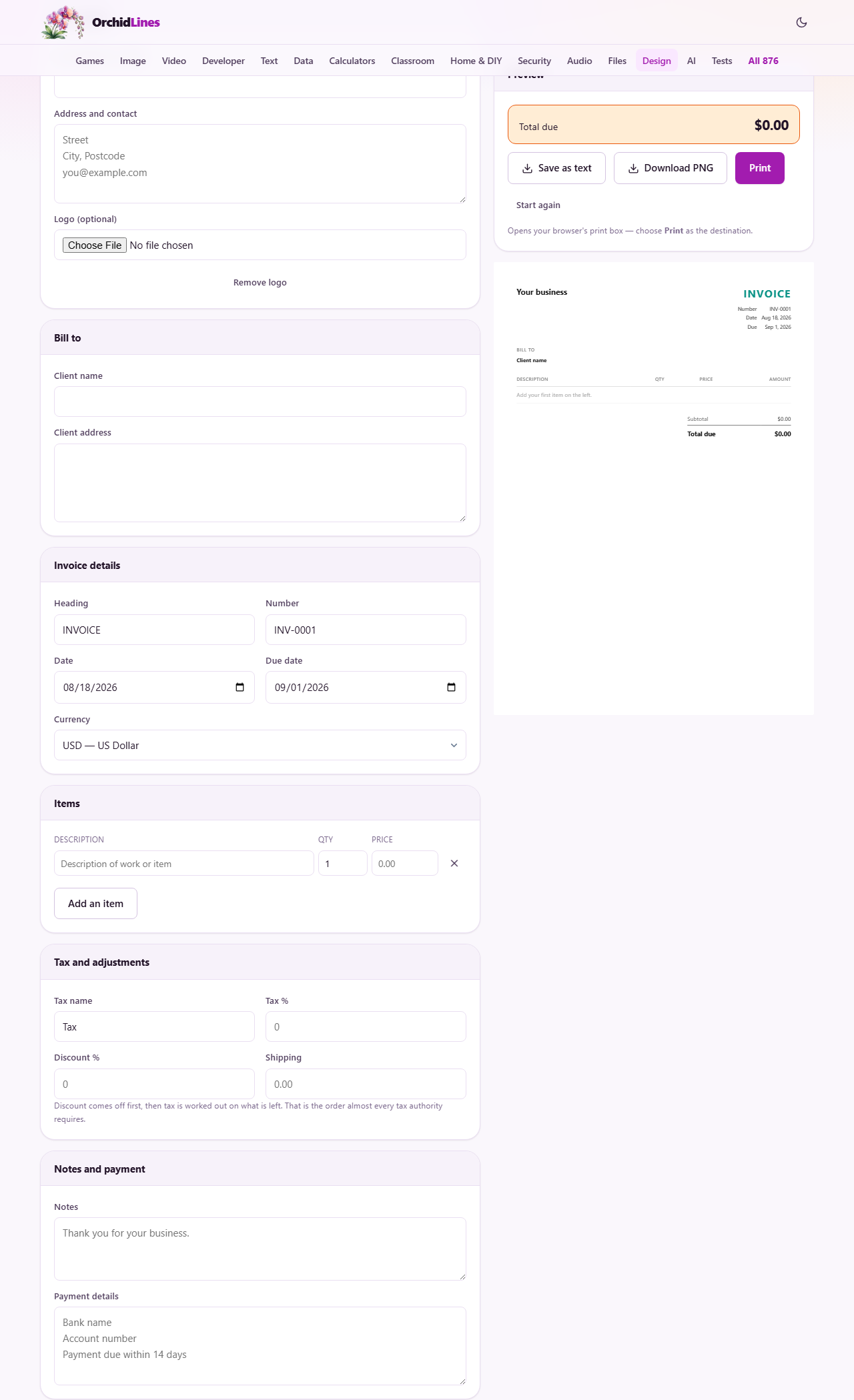
The help block above walks through the panels. This piece goes further down: how the arithmetic is done and in what order, what each money box really changes, what a bill must say before a client can pay it, and how to get a copy out of the page and into an email. There is a full example with rupee figures you can follow along with.
The moment you need one
Most people meet their first invoice unexpectedly. A friend of a friend pays you to build their website. A neighbour books you to photograph a wedding. A charity asks for a bill so the treasurer can release the money.
None of that needs software with a monthly fee. It needs one clean page saying who you are, what was agreed, how much is owed and where to send it. That is what this maker builds while you type, showing the finished sheet on the right of the screen.
It also suits the small trader who invoices twice a month and keeps the books in a spreadsheet. Because your details stay in this browser, the second invoice starts already filled in with your name, address, currency and payment terms.
The two name blocks
Your details comes first. Your business or name prints in large type at the top. Address and contact sits under it as a free block of text, and every line break you type is kept, so put the street, the town, the postcode and an email address on separate lines.
Logo takes an image file and places it above your name. A picture of about one megabyte or smaller is plenty; a bigger one makes the saved draft heavy, and the page will say so. Remove logo takes it away again if you change your mind.
Bill to holds the other side of the deal. Client name prints in bold under a Bill to heading, with Client address as a block beneath. Get this right rather than approximately. A company that is billed under the wrong trading name may bounce the invoice back, and that is a fortnight lost for the sake of one word.
Number, dates and currency
Heading is the big word at the top right. It starts as INVOICE, and you can replace it with QUOTATION or PROFORMA when the document is not yet a demand for money.
Number starts at INV-0001. Keep counting up and never reuse one. Gaps and repeats are what make a set of books hard to check later, and in several countries a run of numbers with holes in it is a problem in itself.
Date is set to today. Due date is set fourteen days after it and keeps following the date while you change it, right up until you set the due date by hand. After that it stays exactly where you put it.
Currency lists more than thirty options, and the page guesses one from your browser's region. Choosing a different one changes how every figure is written, including the symbol and the grouping of digits. It is a formatting choice only. No exchange rate is applied, so the numbers you type are the numbers that print.
The item rows, and the sums behind them
Each row has a Description, a Qty and a Price. Add an item makes another row and puts the cursor straight into it. The small cross at the end of a row deletes it. A row you have not touched at all is ignored, so a spare empty row will not print an empty line on the bill.
The quantity box accepts fractions, which matters more than it sounds. Two and a half hours at a fixed hourly rate is a normal thing to bill, and typing 2.5 in the quantity works exactly as you would hope.
Every figure is handled in whole units of the smallest coin rather than as a decimal, and each row is rounded once, on its own. That is why a column of odd prices adds up to the total a calculator gives you, instead of drifting a penny out over twenty rows.
Tax, discount and shipping in the right order
Four boxes sit under Tax and adjustments, and the order they are applied in is fixed.
Discount per cent comes off the subtotal first. Tax per cent is then worked out on what is left, not on the original figure. Tax name is just the word printed beside it, so write whatever applies where you trade. Shipping is a flat amount added at the very end, after the tax has been calculated, so no tax is worked out on it.
Any of these left at zero is left off the printed sheet entirely. An invoice with no discount does not show a discount line saying nothing, which is why a simple bill from this page looks simple.
A worked example in rupees
A photographer is billing a cafe for a menu shoot. Under Your details go the studio name, address and email, with the studio mark loaded as the logo. Under Bill to go the cafe name and its address.
The number is INV-0007 and the currency is set to Indian Rupee. The date is today and the due date is left at the fourteen-day default. Two rows are entered: Half-day menu shoot, quantity one, price twelve thousand; and Edited images, quantity twenty-four, price two hundred and fifty each.
The subtotal comes to eighteen thousand. A ten per cent discount was agreed for paying early, so ten goes in the discount box and one thousand eight hundred comes off. Tax is named GST and set to eighteen per cent, which is worked out on the sixteen thousand two hundred that remains, giving two thousand nine hundred and sixteen. Prints are being couriered over, so four hundred goes in the shipping box.
The Total due readout above the buttons now reads nineteen thousand five hundred and sixteen rupees, and the same figure sits at the foot of the sheet. Bank details go in the Payment details box, a thank-you line goes in Notes, and the invoice is finished.
What a bill has to say to get paid
Late payment is usually a failure of information rather than goodwill. Somebody in an accounts office could not work out what to pay, or how, so the invoice went to the bottom of a pile.
- Your full trading name and address, plus any registration number your country expects on a bill.
- The client's correct legal name, not the name of the person you spoke to.
- A unique number, so both sides can refer to this document without ambiguity.
- A description a stranger could match to a purchase order. Menu shoot, 14 August beats Photography.
- The date, the due date, and the total in one obvious place.
- How to pay: bank name, account details and anything they must quote. This belongs in the Payment details box.
- A short thanks in Notes. It costs nothing and it reads better than a bare demand.
Getting the finished bill out of the page
Print opens your browser's own print box. The controls, the page header and everything else on screen are left out, so only the sheet is sent. Inside that box you choose where it goes and at what scale, and the sheet is laid out for A4 with sensible margins already set.
Download PNG sits beside it and writes an image of the invoice straight to your downloads without any dialogue. That is the quickest way to attach something to a message from a phone. Save as text gives you the same content as plain text, which is useful for pasting the figures into an email or a bookkeeping sheet.
Whichever you use, keep the file. Your own copy is the record, and the page cannot hand you one later.
Slips worth avoiding
These are the ones that cause real trouble rather than mild embarrassment.
- Two invoices sharing a number. Check the last one you sent before you start the next.
- Tax applied to a discounted price by hand as well as by the page, so the client is charged twice for it. Type the plain percentage and let the sheet do the rest.
- A price typed with a currency symbol in front of it. The price box wants a bare number.
- Trusting the browser to keep your draft forever. Clearing browsing data wipes it, and it never appears on your phone.
- Pressing Start again by accident. It asks first, and it does delete the saved draft, so answer carefully.
- Sending a quotation with an invoice heading. Change the heading before the client treats an estimate as a bill.
When this page is the wrong tool
It builds one document at a time. If you raise forty invoices a month, chase unpaid ones and file tax returns from the totals, proper bookkeeping software will repay its cost quickly. This page has no client list, no record of what has been paid, and no reminders.
It also cannot know your local rules. Some countries want a tax registration number, specific wording or a serial number issued centrally. Check what yours expects and type it into the fields provided.
For related jobs, the site has other makers. A Resume Builder for job applications, a Letterhead Maker for the covering letter that goes with a quotation, and a Signature Maker if you want a signature image to drop in.
Your prices stay on your own machine
What you charge and who you charge is commercial information, and none of it leaves the device you are typing on. The whole invoice is drawn by the page itself. There is no account, no server copy, and no one at this end who could look at your client list even if asked.
The draft is written into this browser's own storage so you can close the tab and come back. That storage belongs to this browser on this computer only. Clear your browsing data and it goes.
So treat the downloaded file as the real invoice and the page as scrap paper. Save each one where you keep your records, named with its invoice number.