
Writing a content security policy that actually protects your site
What a content security policy does, how each directive tightens the fence, what the three presets give you, a worked example with real values, the audit findings that matter most, and the mistakes that quietly undo all of it.
What the header is for
A Content Security Policy is a single HTTP header that tells the browser which sources of content are allowed on a page. Scripts from your own domain, images from a CDN, fonts from Google, nothing else. Any source not named in the policy is blocked, and any injected script an attacker slips in hits the same wall.
The goal is XSS protection. Cross-site scripting works by getting a browser to run code the site owner did not write. A strict policy makes that far harder, because the browser refuses to run anything that was not explicitly listed. It does not replace escaping your output. It sits behind it as a second line of defence, and that second line has stopped real attacks on real sites.
Who writes these, and when
Front-end developers set them up when a site first ships. DevOps engineers adjust them when a new third-party script arrives. Security reviewers audit them when something goes wrong. Freelancers building WordPress themes add them to an .htaccess file and forget about them for a year.
The header is also a common interview topic for web security roles, and building one from scratch is a faster way to learn how it works than reading a specification that runs to dozens of pages.
The three presets and what they give you
Strict loads a policy where default-src is set to 'self', script-src and style-src are 'self', object-src is 'none', and base-uri is 'self'. It is tight enough to stop most injection attacks and loose enough to work with a site that serves everything from its own domain.
Nonce-based is what a modern application needs when inline scripts are unavoidable. Instead of allowing 'unsafe-inline', it expects every script tag to carry a nonce that matches a random value the server sets per response. The audit flags a hard-coded nonce as being exactly as dangerous as 'unsafe-inline', because it is.
Loose sets a wide-open policy. It exists so you can see what an unprotected header looks like and tighten it from there. Starting from Loose and removing things is useful when you have a running site and want to find out which directives it actually needs.
Every directive, by its label
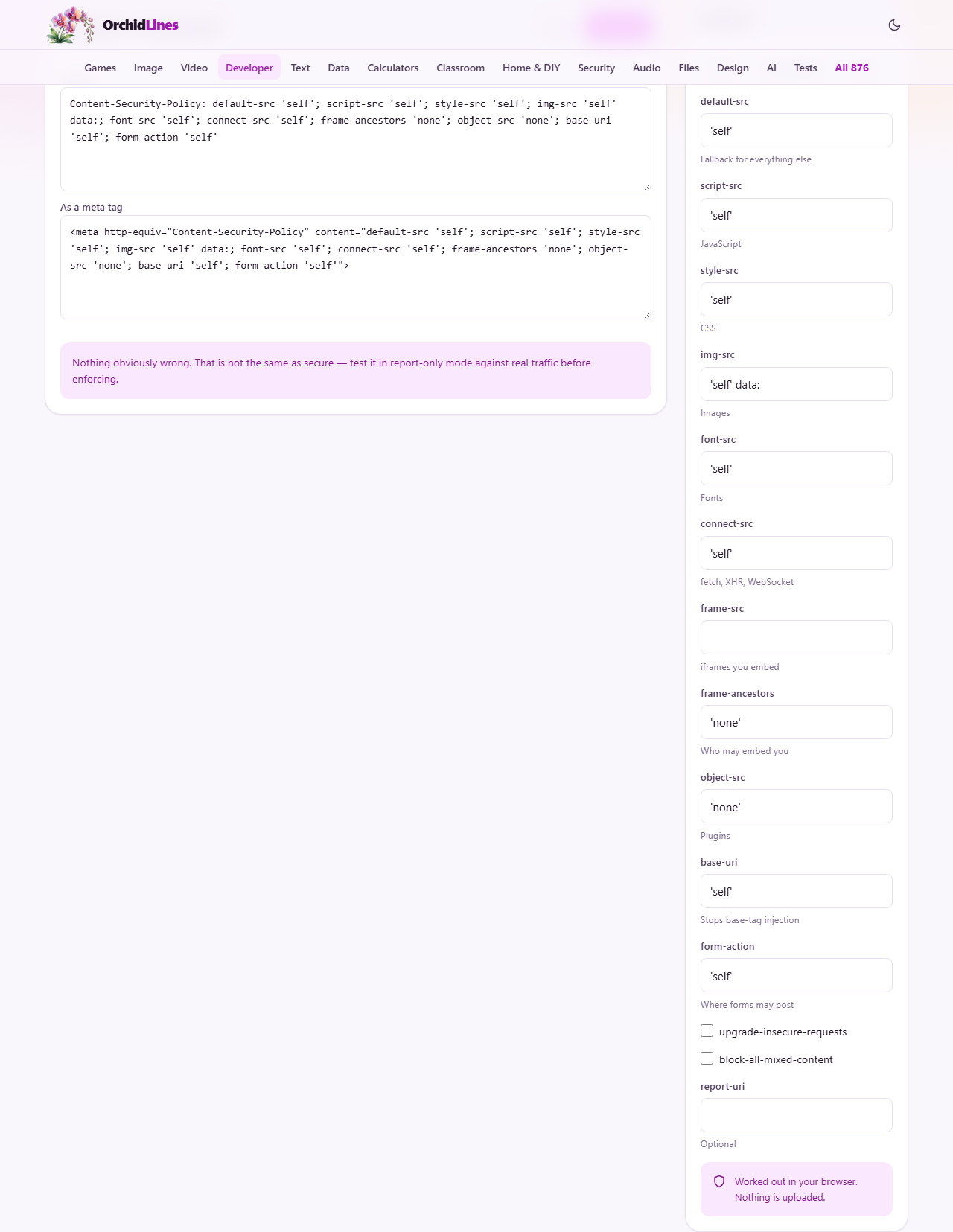
The sidebar lists each directive with its input field and a short hint. Here is what every one controls.
default-src is the fallback. Anything not covered by a more specific directive falls back to this list. script-src controls JavaScript. style-src controls CSS. img-src controls images, including data URIs if you add 'data:' to the list. font-src controls web fonts. connect-src controls fetch, XMLHttpRequest and WebSocket connections.
frame-src sets which domains you allow inside an iframe on your page. frame-ancestors does the reverse, controlling who may put your page inside their iframe. Setting frame-ancestors to 'none' is the modern replacement for X-Frame-Options DENY.
object-src covers plugin content like Flash. Set it to 'none'. Plugin content can run scripts, and leaving this open is one of the most common gaps the audit catches. base-uri stops attackers from injecting a base tag that redirects all relative URLs. form-action limits where your forms may post their data.
Two checkboxes sit below the directive fields. upgrade-insecure-requests tells the browser to load every HTTP resource over HTTPS instead. block-all-mixed-content refuses mixed content outright. Finally, report-uri takes a URL where the browser sends a JSON report every time it blocks something.
A worked example from start to finish
Suppose you run a company blog on your own domain. It loads images from a CDN at cdn.example.com, uses Google Fonts, and has no inline scripts. Press Strict to start. Then change img-src to 'self' cdn.example.com, and font-src to 'self' fonts.googleapis.com. Leave everything else as it is.
The Header box now reads: default-src 'self'; script-src 'self'; style-src 'self'; img-src 'self' cdn.example.com; font-src 'self' fonts.googleapis.com; connect-src 'self'; frame-ancestors 'none'; object-src 'none'; base-uri 'self'; form-action 'self'.
The audit panel shows no critical warnings. If you had typed 'unsafe-inline' into script-src, the audit would flag it in red and tell you the policy no longer provides meaningful XSS protection. That is the single most common way a CSP is turned into decoration.
Copy the header and paste it into your server configuration, or use the As a meta tag box if you cannot set HTTP headers. Note the warning beside it: a meta tag cannot carry frame-ancestors, sandbox or report-uri. The header is always the better choice when you have access to it.
Reading the audit results
The audit panel below the output separates findings into two groups. Some things defeat the policy entirely, and some are gaps worth closing. The distinction matters because a gap is a surface you might choose to accept, while a defeated policy is no policy at all.
The big ones are 'unsafe-inline' in script-src, a bare wildcard * in default-src, and a missing object-src (which falls back to default-src and may allow plugin content). The audit calls these out because each one, on its own, can remove most of the protection the header exists to give.
Less severe findings include missing upgrade-insecure-requests on an HTTPS site and allowing data: URIs in script-src. These are real attack surfaces, but they do not undo the policy the way 'unsafe-inline' does.
The nonce trap
A nonce is a random value generated fresh on every page load. Your server puts it in the header and in each script tag. The browser matches them and runs only the scripts that carry the right nonce. It is the recommended way to allow inline scripts without opening the door to injected ones.
The trap is a hard-coded nonce. If you set the same nonce in every response, an attacker who can inject markup can copy it. A nonce that never changes provides exactly the same protection as 'unsafe-inline', which is none. The page warns about this directly: a hard-coded nonce is exactly as good as 'unsafe-inline', which is to say no good at all.
Common mistakes that quietly break the protection
- Adding 'unsafe-inline' to script-src because a third-party widget says to. Find out if the widget supports nonces instead.
- Allowing * as a source. A wildcard matches every domain on the internet, and anything an attacker controls is included in that set.
- Forgetting object-src. Plugin content can execute scripts, and without object-src the browser falls back to default-src. Add 'none' and it costs you nothing.
- Setting a policy in report-only mode and never coming back to enforce it. Report-only is for the first week of testing, not forever.
- Shipping the meta tag version with frame-ancestors. The meta tag silently ignores it, so anyone can still frame your page.
- Copying a policy from a tutorial without changing the allowed domains. A policy that whitelists cdn.example.com protects your site exactly as far as that domain belongs to you.
When a different tool fits the job
- For testing whether your deployed header works, the browser developer tools console shows every CSP violation in real time.
- For checking colour contrast on the page that sits behind the policy, the Contrast Checker handles that.
- For generating the HTTPS certificate that upgrade-insecure-requests expects, your hosting provider or a free certificate authority is the place to start.
Nothing leaves your browser
The policy is built entirely on your own machine. The directive values you type are combined in JavaScript running in your browser, the audit runs against the result locally, and neither the policy nor the domains you list are sent anywhere. You can verify that by opening the page, turning off your network connection, and filling in every field. Everything still works exactly the same way.